
ULANZI Select VL49
ULANZI VL49 LED Video Light Instruction Manual
Model: VL49
Product Overview
The ULANZI VL49 is a compact and portable LED video light designed to provide supplementary illumination for various photography and videography needs. It features 49 high-brightness LED beads, a soft light board for diffused lighting, and a built-in 2000mAh battery with Type-C charging. Its versatile mounting options make it compatible with a wide range of cameras, smartphones, and accessories.
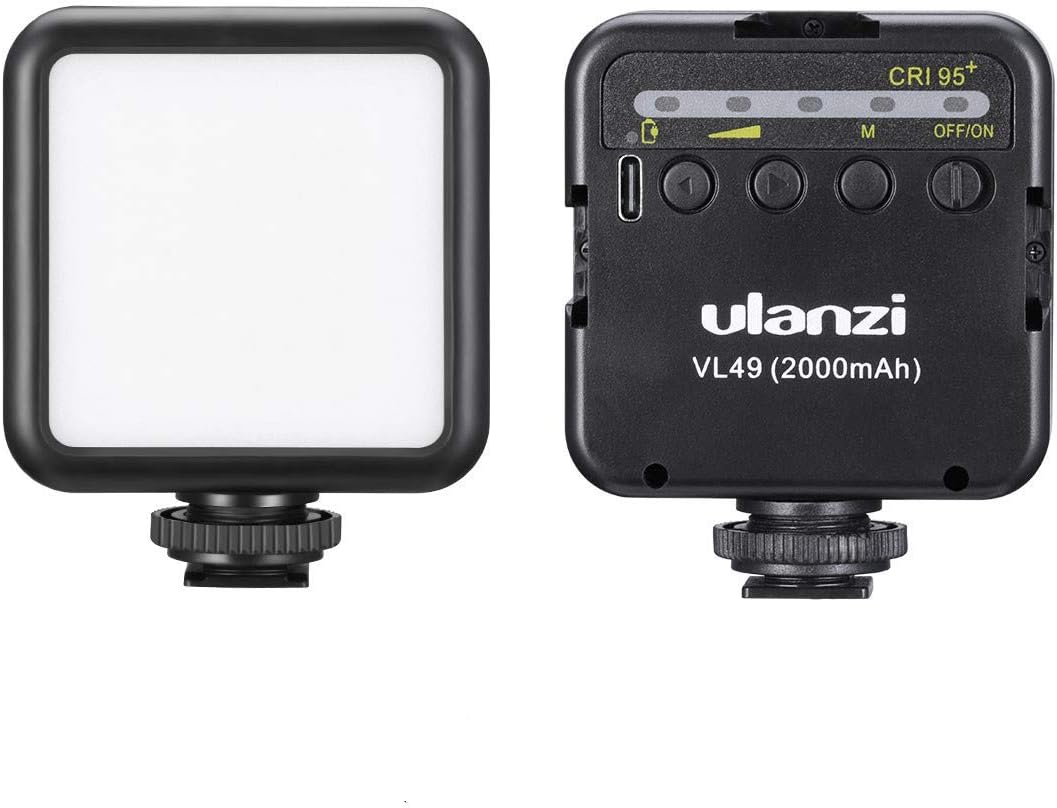
Image: Front and back view of the ULANZI VL49 LED Video Light, showcasing its compact design and control buttons.
Components

Image: Detailed diagram illustrating the components of the ULANZI VL49, including the soft light board, 49 LED beads, cold shoe mount, 1/4 inch screw, Type-C charging port, indicator light, switch, and function key.
- Built-in 49 high-brightness light beads: Provides consistent and powerful illumination.
- Soft light board: Diffuses light for a softer, more even output, reducing harsh shadows.
- Cold shoe fastening spin button: Secures the light to compatible accessories.
- Bottom 1/4 screw: Standard mounting thread for tripods and other gear.
- Cold shoe mount: Allows attachment to cameras or other cold shoe accessories.
- Indicator light: Displays battery status and charging progress.
- Type-C charging port: For convenient and fast charging.
- Switch (OFF/ON): Powers the device on or off.
- Function key: Used to adjust brightness levels and check power status.
Setup
1. Charging the Device
Before first use, fully charge the ULANZI VL49. Connect a USB Type-C cable to the charging port on the side of the device and to a compatible USB power source. The indicator light will show charging status.
- Battery Capacity: 2000mAh built-in lithium battery.
- Charging Time: Approximately 2 hours for a full charge.
- Battery Life: Up to 120 minutes at maximum brightness, up to 300 minutes at minimum brightness.
2. Mounting the Light
The VL49 offers multiple mounting options for versatility:
- Cold Shoe Mount: Attach the light directly to any camera or accessory with a standard cold shoe receiver. Secure it by tightening the cold shoe fastening spin button.
- 1/4 inch Screw Thread: Use the 1/4 inch screw hole at the bottom to mount the light onto tripods, light stands, or other accessories with a 1/4 inch screw.
- Multi-Light Setup: The VL49 features additional cold shoe mounts on its sides, allowing multiple units to be connected together for increased light output or creative lighting arrangements.

Image: Examples of the ULANZI VL49 mounted on a camera, configured in a multi-light setup, and attached to a smartphone rig, demonstrating its compatibility and versatility.

Image: The ULANZI VL49 mounted on a camera, alongside an external microphone, illustrating a typical setup for video recording.
Operating Instructions
1. Power On/Off
Locate the "OFF/ON" switch on the side of the device. Slide the switch to the "ON" position to power on the light. Slide it to "OFF" to power off.
2. Adjusting Brightness
The ULANZI VL49 features five levels of brightness adjustment. Press the function key (often labeled 'M' or a power symbol) to cycle through the brightness settings. The indicator lights will show the current brightness level.

Image: The ULANZI VL49 in operation, providing illumination for small objects, highlighting its effectiveness for close-up work and its high Color Rendering Index (CRI 95+).
3. Soft Light Board
The integrated soft light board ensures that the light output is diffused and gentle, preventing harsh glare and creating a more natural look for your subjects. This feature is an upgrade from older models, providing a smoother light supplement.

Image: A comparison showing an older version of a supplement light without a soft board (left) and the ULANZI VL49 with its new soft light board (right), demonstrating the improved light diffusion.
Maintenance
- Cleaning: Use a soft, dry cloth to clean the exterior of the light. Avoid using harsh chemicals or abrasive materials.
- Storage: Store the light in a cool, dry place away from direct sunlight and extreme temperatures.
- Battery Care: To prolong battery life, avoid fully discharging the battery frequently. Charge the device regularly, even if not in use for extended periods.
- Water Resistance: The device is rated as waterproof, offering protection against splashes. However, it is not designed for submersion in water.
Troubleshooting
- Light not turning on:
- Ensure the "OFF/ON" switch is in the "ON" position.
- Check the battery level. If low, charge the device using the Type-C port.
- Light not charging:
- Verify that the USB Type-C cable is securely connected to both the light and the power source.
- Try a different USB cable or power adapter to rule out faulty accessories.
- Ensure the power source is active.
- Brightness not adjusting:
- Press the function key firmly to cycle through brightness levels.
- If the issue persists, power off the device and then power it back on.
Specifications
| Brand | ULANZI Select |
| Model | VL49 |
| Color | Black |
| Connectivity Technology | USB (Type-C) |
| Battery Type | Lithium-ion |
| Battery Capacity | 2000 mAh |
| Battery Life (Min. Brightness) | Up to 300 minutes |
| Battery Life (Max. Brightness) | Up to 120 minutes |
| Color Temperature | 5500K |
| CRI (Color Rendering Index) | 95+ |
| Number of LED Beads | 49 |
| Dimensions (L x W x H) | 10.1 x 8.3 x 4.2 cm (Package) |
| Weight | 140 grams (Package) |
| Water Resistance Level | Waterproof (splash resistant) |
| Included Components | Mini LED Video Light |
| UPC | 708214681465 |
Warranty and Support
Specific warranty information for the ULANZI VL49 LED Video Light is not provided in the product details. For warranty claims or technical support, please refer to the retailer where the product was purchased or visit the official ULANZI website for their customer service contact information.
Online Resources:
- For additional product information and updates, please visit the ULANZI Select Store on Amazon.
Ask a question about this manual
Ask about setup, troubleshooting, compatibility, parts, safety, or missing instructions. Manuals+ will review the question and use this page’s manual context to help answer it.