
1. Introduction
This manual provides essential information for the safe and efficient operation, installation, and maintenance of the RITTAL SK3114.100 Temperature Indicator. Please read this manual thoroughly before installation and operation to ensure proper use and to prevent damage to the device or injury to personnel. Keep this manual for future reference.
2. Safety Instructions
Always observe the following safety precautions to prevent electric shock, fire, or damage to the device.
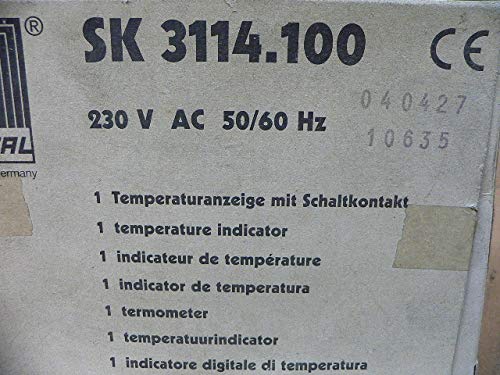
- Electrical Safety: Ensure the power supply matches the device's requirements (230 V AC, 50/60 Hz). Disconnect power before installation, wiring, or maintenance.
- Qualified Personnel: Installation and maintenance should only be performed by qualified and authorized personnel.
- Environment: Do not expose the device to excessive moisture, dust, or extreme temperatures outside its specified operating range.
- Damage: Do not operate the device if it appears damaged. Contact Rittal support for assistance.
- Intended Use: Use the device only for its intended purpose as a temperature indicator.
3. Product Overview
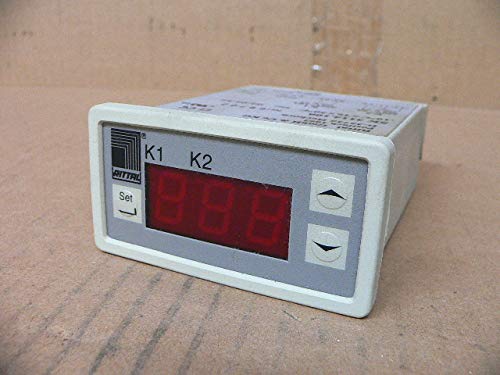
The RITTAL SK3114.100 is a digital temperature indicator designed for industrial applications. It provides a clear display of temperature readings and features control outputs.

4. Setup and Installation
Follow these steps for proper installation of the temperature indicator:
- Mounting: The device is designed for panel mounting. Ensure adequate space for ventilation and wiring. Refer to the product's technical drawings for precise cutout dimensions.
- Wiring:
- Connect the power supply (230 V AC, 50/60 Hz) to the designated terminals.
- Connect the temperature sensor (not included, compatible type required) to the sensor input terminals.
- If applicable, connect control outputs (e.g., relay contacts) to external devices according to your system's requirements.
Caution: Ensure all wiring is secure and correctly polarized to prevent damage or malfunction. Consult a qualified electrician if unsure.
- Initial Power-Up: After all connections are made, apply power to the device. The display should illuminate and show a temperature reading.
5. Operating Instructions
The RITTAL SK3114.100 is designed for straightforward operation.
- Temperature Display: The primary function is to display the current temperature measured by the connected sensor. The temperature will be shown on the red LED display.
- Setting Parameters:
- Press the "Set" button to enter the parameter setting mode.
- Use the up (▲) and down (▼) arrow buttons to navigate through parameters and adjust values.
- Parameters may include temperature units (e.g., °C/°F), alarm setpoints, hysteresis, and calibration offsets. Refer to the full technical documentation for a complete list of parameters and their functions.
- Press "Set" again to confirm changes and exit the setting mode.
- Alarm Functions: If configured, the device may trigger alarms (e.g., via relay outputs) when the temperature exceeds or falls below predefined setpoints.
6. Maintenance
The RITTAL SK3114.100 requires minimal maintenance to ensure long-term reliable operation.
- Cleaning: Periodically clean the display and housing with a soft, dry cloth. Do not use abrasive cleaners or solvents.
- Inspection: Regularly inspect wiring connections for looseness or signs of damage.
- Calibration: If accurate temperature readings are critical, periodic calibration by a qualified technician may be necessary.
- Firmware Updates: Check the Rittal website for any available firmware updates, though typically not user-installable for this type of device.
Warning: Always disconnect power before performing any maintenance.
7. Troubleshooting
This section provides solutions to common issues. For problems not listed here, contact Rittal technical support.
| Problem | Possible Cause | Solution |
|---|---|---|
| Device does not power on. | No power supply; incorrect wiring; blown fuse. | Check power connections; verify wiring against diagram; check and replace fuse if necessary. |
| Display shows "Err" or abnormal reading. | Sensor not connected; faulty sensor; incorrect sensor type; wiring issue. | Ensure sensor is properly connected; test sensor; verify sensor compatibility; check sensor wiring. |
| Temperature reading is inaccurate. | Sensor calibration needed; environmental interference; sensor placement. | Perform calibration (if supported) or contact service; ensure proper sensor placement away from heat sources/drafts. |
| Control outputs not activating. | Incorrect setpoint configuration; wiring issue; output fault. | Verify setpoint and hysteresis settings; check output wiring; consult technical support. |
8. Specifications
Key technical specifications for the RITTAL SK3114.100 Temperature Indicator:
- Model: SK3114.100
- Manufacturer: RITTAL
- Power Supply: 230 V AC, 50/60 Hz
- Product Dimensions: 18 x 16 x 21 cm (approximately 7.1 x 6.3 x 8.3 inches)
- Weight: 600 g (approximately 1.32 lbs)
- Display Type: Digital LED
- Function: Temperature Indicator with switching contact (as per product description)
- ASIN: B07YSRZ9R4
9. Warranty and Support
This RITTAL product is new and includes its original packaging. For specific warranty terms and conditions, please refer to the documentation provided with your purchase or visit the official Rittal website. For technical support, service, or spare parts, please contact Rittal customer service directly.
Rittal Contact Information: Please refer to the Rittal official website or your local distributor for up-to-date contact details.