
Introduction
This manual provides essential information for the safe and efficient use of your Ejoyous ZN-00 Adjustable Aluminum Laptop Table. This versatile and portable table is designed to enhance your comfort and productivity by providing a stable and adjustable surface for your laptop, books, or other items in various settings, including beds, sofas, and desks. Its integrated ventilation openings help prevent laptop overheating, ensuring optimal performance.
Setup Instructions
The Ejoyous ZN-00 laptop table is designed for quick and easy deployment. No complex assembly is required. Simply unfold the legs and adjust them to your desired height and angle.
- Unfolding the Table: Carefully unfold the table legs from their collapsed position. The multi-jointed legs allow for various configurations.
- Adjusting Height and Angle: Each leg segment features a locking mechanism that allows for 360-degree rotation. Press the adjustment buttons on the joints, set the desired angle for each segment, and release the buttons to lock the position. Repeat for all leg segments until the table reaches your preferred height and tilt. Ensure all joints are securely locked before placing items on the table.
- Attaching the Mouse Pad (Optional): If your model includes a separate mouse pad attachment, slide it into the designated slot on the side of the main table surface until it clicks into place.
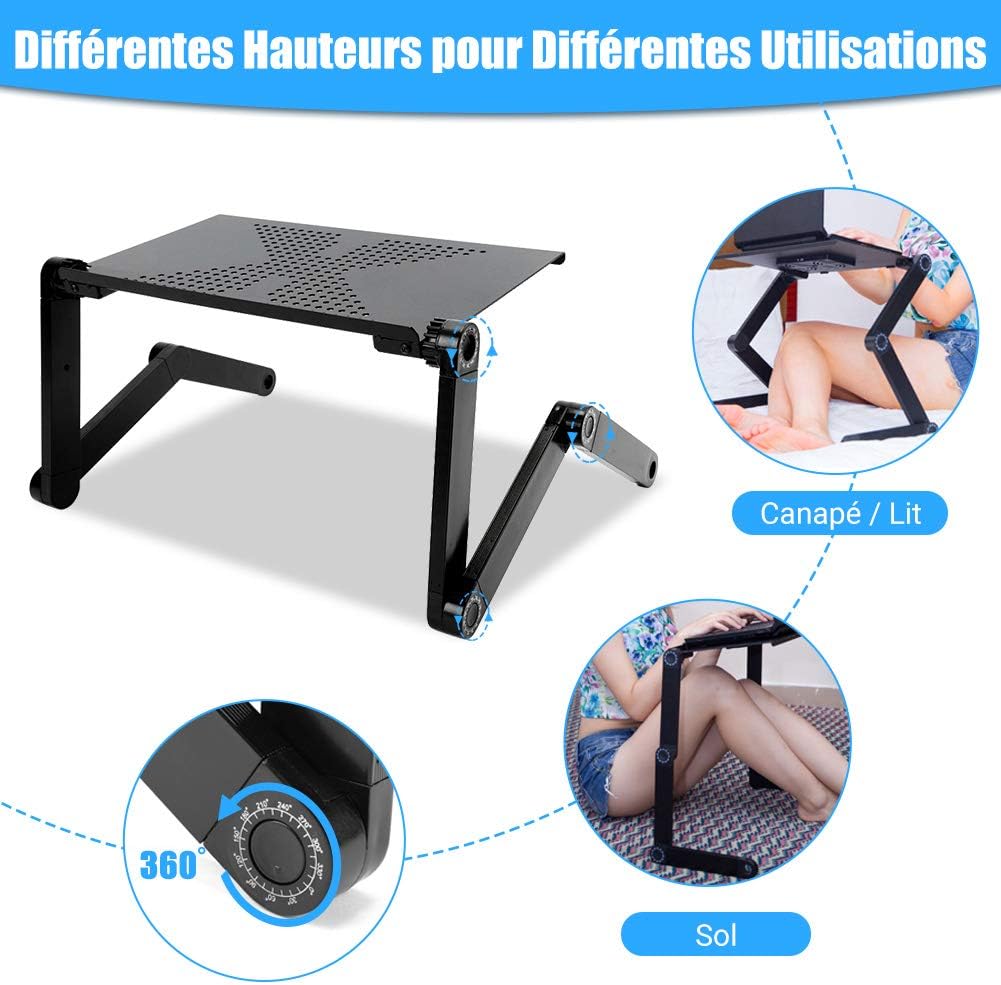
Figure 1: Adjusting the table for various uses and positions.
Operating Instructions
Once set up, the Ejoyous ZN-00 table provides a stable platform for your activities.
- Laptop Placement: Place your laptop centrally on the main table surface. The integrated ventilation holes are designed to facilitate airflow and prevent overheating.
- Using the Mouse Pad: If attached, the side tray provides a convenient surface for your computer mouse.
- Versatile Use: The table can be used for various purposes beyond laptops, such as reading, writing, or as a breakfast tray.

Figure 2: The dedicated mouse pad for enhanced usability.

Figure 3: Reliable cooling holes for optimal laptop performance.
Maintenance
To ensure the longevity and proper functioning of your Ejoyous ZN-00 laptop table, follow these simple maintenance guidelines:
- Cleaning: Wipe the table surfaces with a soft, damp cloth. For stubborn marks, a mild soap solution can be used. Avoid abrasive cleaners or harsh chemicals, as these can damage the finish.
- Joint Care: Periodically check the adjustment joints for any debris or dust accumulation. Keep them clean to ensure smooth and easy angle adjustments. Do not force the joints if they feel stiff; instead, clean them thoroughly.
- Storage: When not in use, fold the table flat for compact storage. Store it in a dry place away from extreme temperatures.
Troubleshooting
If you encounter any issues with your laptop table, refer to the following common solutions:
- Table Instability: Ensure all leg joints are fully locked into position after adjustment. Uneven surfaces can also cause instability; try moving the table to a flat surface.
- Difficulty Adjusting Joints: If the adjustment buttons are hard to press or the joints are stiff, check for any foreign objects or debris obstructing the mechanism. Clean the joints as described in the Maintenance section. Do not apply excessive force.
- Laptop Overheating: While the table has ventilation holes, ensure your laptop's own cooling vents are not blocked by the table surface or other objects. Ensure proper airflow around the table.
Specifications
| Feature | Detail |
|---|---|
| Model Number | ZN-00 |
| Brand | Ejoyous |
| Material | Aluminum plate, aluminum alloy brackets, ABS joints |
| Color | Black |
| Adjustable Angle | 0 to 360 degrees |
| Adjustable Height | Up to 48 cm |
| Load Capacity | At least 25 kg |
| Tray Dimensions (Current Model) | 48 x 26 cm |
| Folded Dimensions | 53 x 26 x 4 cm |
| Item Weight | 1.31 kg (1308 Grams) |

Figure 4: Product dimensions overview.
Warranty Information
Specific warranty details are not provided within this manual. For information regarding warranty coverage, terms, and conditions, please refer to the product packaging or contact the seller/manufacturer directly.
Customer Support
For further assistance, technical support, or inquiries not covered in this manual, please contact your retailer or the Ejoyous customer service department. Contact information can typically be found on the product packaging or the official Ejoyous website.