
PROHEAR PROHEAR 030
PROHEAR 030 Bluetooth Electronic Hearing Protection Earmuffs User Manual
Model: PROHEAR 030 | Brand: PROHEAR
1. Introduction
The PROHEAR 030 electronic hearing protection earmuffs are designed to safeguard your hearing in noisy environments while providing enhanced communication and entertainment options. Featuring advanced Bluetooth 5.4 technology, these earmuffs offer stable wireless connectivity, sound amplification for low-level sounds, and effective noise reduction for impulse noises like gunfire.

Figure 1: PROHEAR 030 Earmuffs in retail packaging.
2. Key Features
- Leading Bluetooth 5.4: Engineered with the latest Bluetooth 5.4 technology for a more stable connection (wireless range 33ft/10m). Seamlessly stream entertainment from Bluetooth-enabled devices.
- Designed for Shooting and Hunting: NRR 22dB/SNR 27dB. Durable recessed microphones amplify low-level environmental sounds (less than 82dB) while reducing wind noise. Slim low-profile cups with cut-outs provide clearance for firearms.
- Durable Comfort: Lightweight (0.63lb) for extended use. Wide ear cups with ultra-soft cushioned ear pads and a padded headband ensure a snug fit without pressure. High-quality rubber paint for improved touch and durability. Telescopic and ergonomic headband fits various head shapes and sizes.
- Wide Application: Compact folding design for easy portability. Recommended for gunfire ranges, hunting, woodworking, mowing, chainsawing, and other noisy environments.

Figure 2: Overview of PROHEAR 030's primary features.

Figure 3: Noise Reduction Rating (NRR) and rapid noise compression.
3. Setup
3.1 Battery Installation
The PROHEAR 030 earmuffs are powered by 2 AAA batteries (not included). The battery compartment is located on the outside of the right earcup. Gently open the cover, insert the batteries according to the polarity indicators, and close the cover securely.
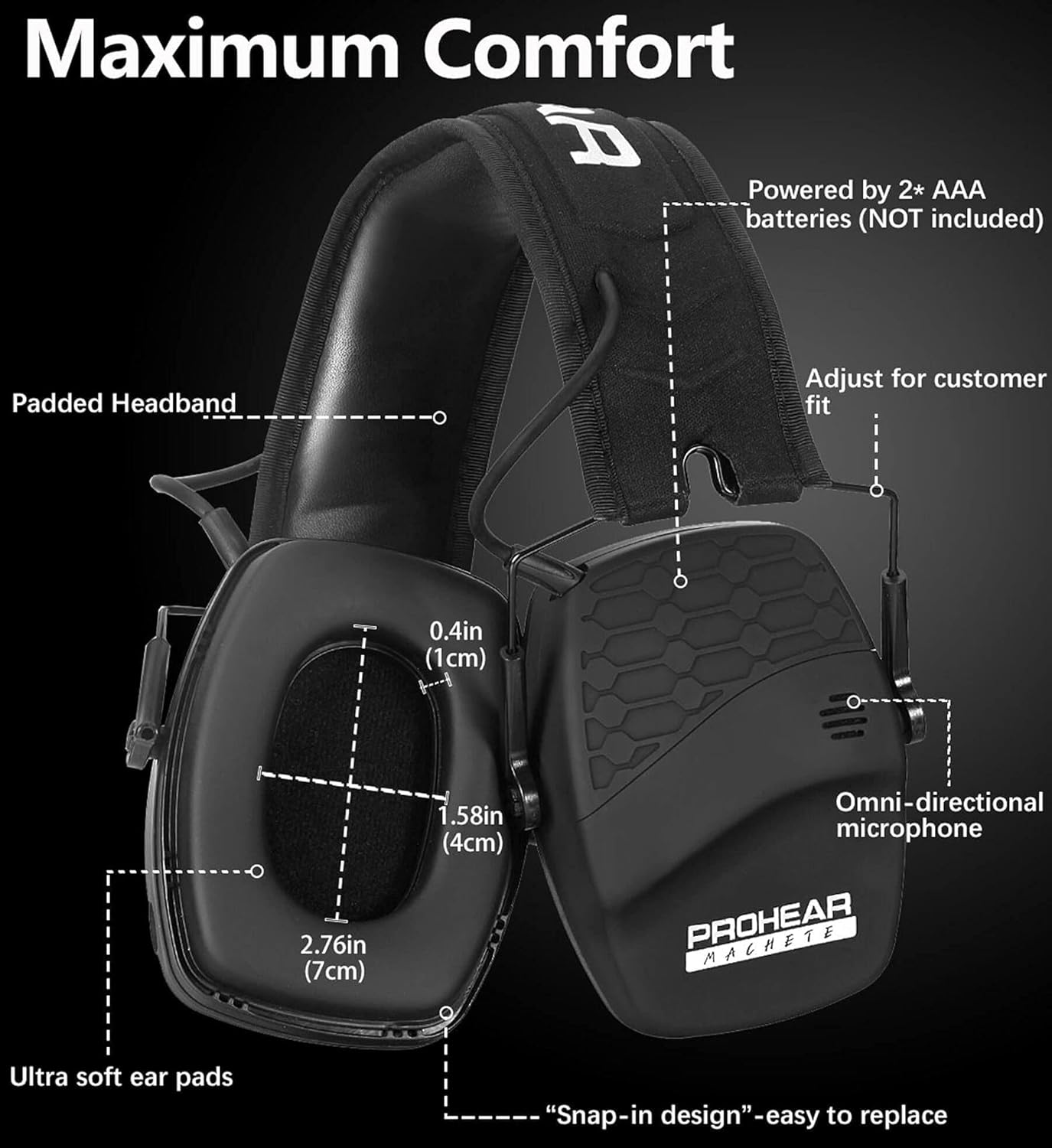
Figure 4: Location of the battery compartment and other components.
3.2 Adjusting Fit
Adjust the telescopic headband to ensure a comfortable and secure fit. The earmuffs should fit snugly around your ears without excessive pressure. The ultra-soft ear pads are designed for comfort during prolonged use.
4. Operating Instructions
4.1 Power On/Off and Ambient Sound Control
To power on the earmuffs and activate the sound amplification feature, rotate the right knob (Power on/off Volume Control Knob) clockwise. Continue rotating to adjust the ambient sound volume. To power off, rotate the knob counter-clockwise until it clicks off.

Figure 5: Separate volume control for ambient sound.
4.2 Bluetooth Pairing and Volume Control
To activate Bluetooth, press and hold the BT Sync Button located on the left earcup until the indicator light blinks. On your device, search for "PROHEAR 030" and select to pair. Once connected, you can stream audio. Adjust the Bluetooth volume using the Bluetooth/Audio Volume Knob on the left earcup. The earmuffs also support audio input via a 3.5mm connection cord (included).

Figure 6: Audio input and Bluetooth connectivity options.
4.3 Adjusting Bluetooth Volume (Video Guide)
Video 1: This video demonstrates how to adjust the Bluetooth volume on your PROHEAR 030 earmuffs to achieve your desired listening level.
5. Maintenance
5.1 Cleaning
Wipe the earmuffs with a soft, damp cloth. Do not use abrasive cleaners or solvents. Ensure the ear pads are clean and free of debris to maintain optimal seal and comfort.
5.2 Storage
The earmuffs feature a compact folding design for convenient storage. Fold them inward and store them in the included cloth bag to protect them from dust and damage when not in use.

Figure 7: Compact folding for easy storage.
6. Troubleshooting
6.1 No Sound/Low Sound
- Check if batteries are correctly installed and have sufficient charge.
- Ensure the power/volume knob is turned on and adjusted to an audible level.
- For Bluetooth audio, ensure your device's volume is also turned up and the earmuffs are properly paired.
6.2 Bluetooth Connectivity Issues
- Ensure the earmuffs are in pairing mode (blinking blue light).
- Make sure your device's Bluetooth is enabled and within the 33ft/10m range.
- Try unpairing and re-pairing the device.
- Restart both the earmuffs and your Bluetooth device.
7. Specifications
| Attribute | Value |
|---|---|
| Item Weight | 10.2 ounces |
| Product Dimensions | 4.52 x 3.54 x 4.92 inches |
| Item Model Number | PROHEAR 030 |
| Color | Black |
| Style | Bluetooth Black |
| Material | Durable & solid ABS plastic, Ultra-soft ear cushions and headband |
| Batteries Required | No (powered by 2 AAA batteries - NOT INCLUDED for initial purchase) |
| Noise Reduction Rating (NRR) | 22dB |
| Signal-to-Noise Ratio (SNR) | 27dB |
| Bluetooth Version | 5.4 |
| Wireless Range | 33ft/10m |
8. Warranty and Support
PROHEAR offers a 1-Year Warranty on this product. If you have any questions or suggestions, please feel free to contact us. We are here 24/7 to chat and help you.
For further assistance, you may refer to the official User Manual (PDF) available at: PROHEAR 030 User Manual PDF
You can also reach out via email: support@proheartac.com
Related documentsPROHEAR 030

Ask a question about this manual
Ask about setup, troubleshooting, compatibility, parts, safety, or missing instructions. Manuals+ will review the question and use this page’s manual context to help answer it.