
TCL 40a323
TCL 40a323 Smart TV Full HD 40-inch User Manual
Model: 40a323
1. Introduction
Thank you for purchasing the TCL 40a323 Smart TV. This manual provides essential information for the safe and efficient operation of your television. Please read it thoroughly before using the product and retain it for future reference.
Important Safety Instructions
- Do not block any ventilation openings. Install in accordance with the manufacturer's instructions.
- Do not install near any heat sources such as radiators, heat registers, stoves, or other apparatus (including amplifiers) that produce heat.
- Protect the power cord from being walked on or pinched, particularly at plugs, convenience receptacles, and the point where they exit from the apparatus.
- Only use attachments/accessories specified by the manufacturer.
- Unplug this apparatus during lightning storms or when unused for long periods of time.
- Refer all servicing to qualified service personnel. Servicing is required when the apparatus has been damaged in any way.
2. Package Contents
Please check to ensure all items are present and in good condition:
- TCL 40a323 Smart TV (40-inch Full HD LED Television)
- Remote Control
- Power Cable
- TV Stand (2 pieces)
- Screws for Stand Installation
- User Manual (this document)
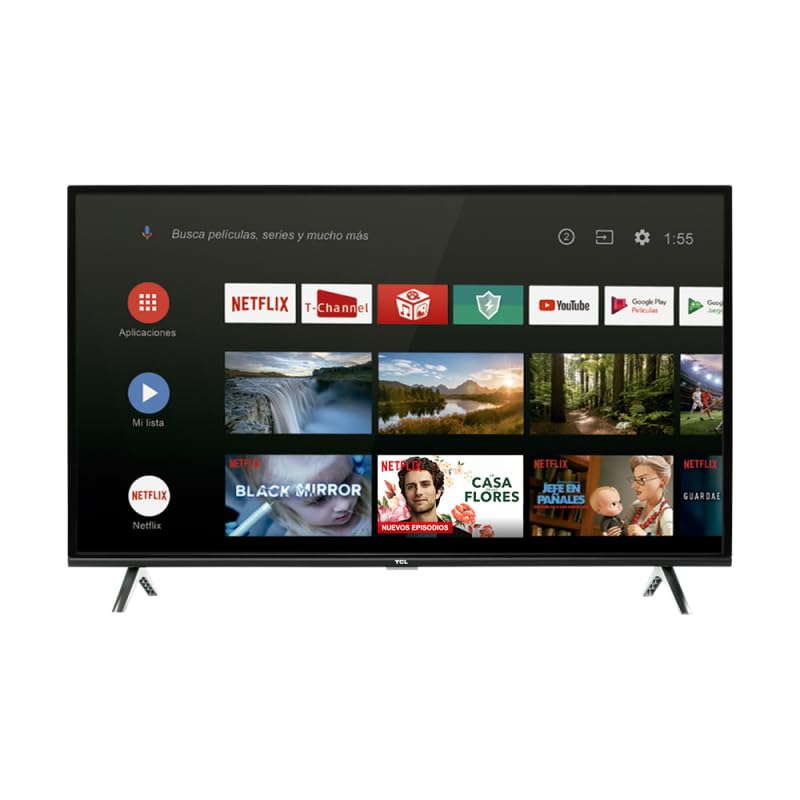
Image: The TCL 40a323 Smart TV, showing its display and smart interface.
3. Setup
3.1 Installing the TV Stand
- Carefully place the TV screen-down on a soft, flat surface (e.g., a blanket or foam) to prevent damage.
- Align each stand piece with the corresponding slots on the bottom of the TV.
- Secure each stand piece with the provided screws, ensuring they are tightened firmly.
- Carefully lift the TV to its upright position on a stable, level surface.
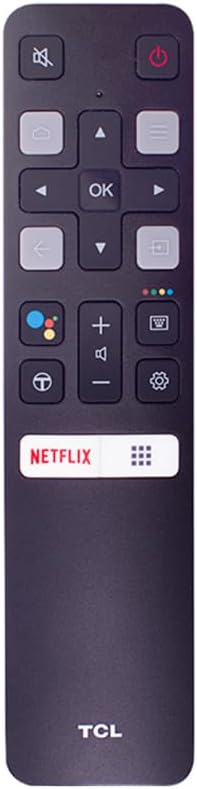
Image: Side view of the TCL 40a323 Smart TV, illustrating the attached stand.
3.2 Connecting Devices
Your TCL Smart TV offers various connection options:
- HDMI: Connect external devices like Blu-ray players, game consoles, or cable boxes to the HDMI port.
- LAN (Ethernet): For a stable wired internet connection, connect an Ethernet cable to the LAN port.
- Composite/AV Input: For older devices, use the Composite/AV input.

Image: Side view of the TCL 40a323 Smart TV, highlighting the available input ports.
3.3 Power Connection
Plug the power cable into the TV's power input, then plug the other end into a suitable wall outlet.
3.4 Initial Power On and Setup
- Press the power button on the remote control or on the TV itself.
- Follow the on-screen instructions to select your language, country, and connect to your Wi-Fi network (if not using a wired connection).
- Sign in with your Google account to access Android TV features, including Google Play Store and voice assistant.
- Complete the channel scan if you are connecting an antenna or cable.
4. Operating Your TV
4.1 Remote Control Overview
The remote control allows you to navigate your TV's features. Familiarize yourself with the buttons:

Image: The TCL Smart TV remote control, showing its layout and buttons.
- Power Button: Turns the TV on or off.
- Directional Pad (Up/Down/Left/Right) & OK: Navigate menus and confirm selections.
- Back Button: Returns to the previous screen.
- Home Button: Accesses the Android TV home screen.
- Volume Up/Down: Adjusts the volume level.
- Mute Button: Mutes or unmutes the sound.
- Input Button: Selects the input source (HDMI, AV, etc.).
- Netflix Button: Direct access to the Netflix application.
- Google Assistant Button: Activates voice commands.
4.2 Smart TV Features (Android TV)
Your TCL 40a323 runs on Android TV, providing access to a wide range of entertainment and applications:
- Google Play Store: Download and install apps, games, and streaming services.
- Built-in Chromecast: Cast content from your smartphone or tablet directly to the TV.
- Google Assistant: Use voice commands to search for content, control smart home devices, and get information.
- Pre-installed Apps: Access popular services like Netflix and YouTube directly from the home screen.
4.3 Network Connectivity
- Wi-Fi: Connect to your home wireless network via the Settings menu.
- Bluetooth: Pair Bluetooth devices such as headphones, game controllers, or soundbars.
5. Maintenance
5.1 Cleaning the Screen
- Always unplug the TV before cleaning.
- Use a soft, lint-free cloth (e.g., microfiber) to gently wipe the screen.
- For stubborn marks, lightly dampen the cloth with water or a specialized screen cleaner. Never spray liquid directly onto the screen.
- Avoid using harsh chemicals, abrasive cleaners, or alcohol-based solutions.
5.2 Cleaning the TV Body
- Wipe the TV's frame and back panel with a soft, dry cloth.
- Do not allow water or other liquids to enter the TV's casing.
6. Troubleshooting
If you encounter issues with your TV, refer to the following common problems and solutions:
| Problem | Possible Solution |
|---|---|
| No power |
|
| No picture, but sound is present |
|
| No sound, but picture is present |
|
| Remote control not working |
|
| Cannot connect to Wi-Fi |
|
7. Specifications
| Model Name | 40A323 |
| Brand | TCL |
| Screen Size | 40 inches |
| Display Technology | LED |
| Resolution | Full HD (1920 x 1080) |
| Refresh Rate | 60 Hz |
| Operating System | Android TV |
| Connectivity Technology | Bluetooth 4.0, Wi-Fi 2.4G 802.11 b/g/n 2T2 |
| Internet Services Supported | Android, Google Play, Netflix, YouTube, etc. |
| Ports | 1 x HDMI, 1 x LAN (Ethernet), 1 x Composite/AV Input |
| Audio Output | Dolby Audio 2 x 8W |
| Control Method | Remote Control |
| Color | Black |
| Weight | 10000 Grams (approx. 22 lbs) |
| UPC | 846042011051 |
8. Warranty and Support
8.1 Limited Warranty
This product comes with a limited warranty. Please refer to the warranty card included in your product packaging or visit the official TCL website for detailed terms, conditions, and duration of the warranty applicable to your region. Keep your purchase receipt as proof of purchase for any warranty claims.
8.2 Customer Support
For technical assistance, troubleshooting beyond this manual, or service inquiries, please contact TCL customer support. You can usually find contact information (phone numbers, email, or support portals) on the official TCL website for your country.
Before contacting support, please have your TV's model number (40a323) and serial number ready.
Related documents40a323


Ask a question about this manual
Ask about setup, troubleshooting, compatibility, parts, safety, or missing instructions. Manuals+ will review the question and use this page’s manual context to help answer it.