
1. Important Safety Instructions
Please read all safety and operating instructions carefully before using this television. Keep these instructions for future reference.
- Do not expose the TV to rain or moisture.
- Do not block ventilation openings.
- Ensure proper grounding for electrical safety.
- Unplug the TV during lightning storms or when unused for long periods.
- Refer all servicing to qualified service personnel.
2. Package Contents
Verify that all items are present in the package:
- ONIDA 32HAF 32-inch LED Smart TV
- TV Stand (2 pieces)
- Remote Control
- User Manual (this document)
- Power Cord
- Screws for Stand Assembly

Image 1: Front view of the ONIDA 32HAF 32-inch LED Smart TV. The screen displays a city skyline at night. The TV has a slim black bezel and two stand feet at the bottom corners.

Image 2: The black remote control for the ONIDA Smart TV. It features various buttons including power, source, HDMI, volume, channel, navigation keys, and number pad.
3. Setup
3.1 Attaching the TV Stand
- Carefully place the TV face down on a soft, clean surface to prevent screen damage.
- Align each stand piece with the corresponding slots on the bottom of the TV.
- Secure the stands using the provided screws. Ensure they are tightened firmly.
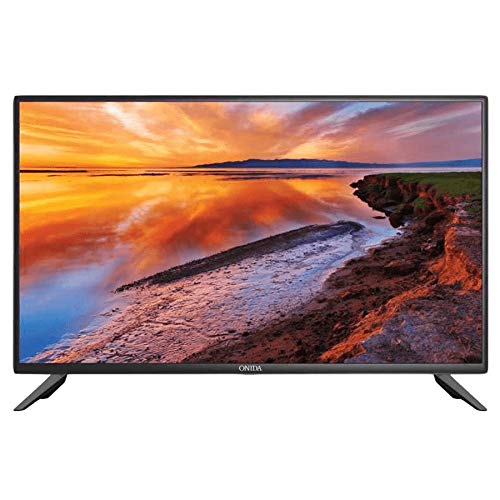
Image 3: The ONIDA 32HAF TV displayed with its stand attached, showing a scenic landscape on the screen. This illustrates the TV ready for placement on a flat surface.
3.2 Wall Mounting (Optional)
If you choose to wall mount your TV, please consult a professional installer. The TV supports standard VESA wall mounts. Refer to the wall mount kit instructions for proper installation.
3.3 Connecting Peripherals
- Power: Connect the power cord to the TV's power input and then to a wall outlet.
- HDMI: Use HDMI cables to connect external devices like set-top boxes, gaming consoles, or Blu-ray players.
- USB: Insert USB drives for media playback or software updates.
- Antenna/Cable: Connect your antenna or cable TV feed to the RF input.
3.4 Initial Power On and Setup Wizard
- Plug in the TV and press the power button on the remote control.
- Follow the on-screen instructions to select your language, country, and network settings (Wi-Fi or Ethernet).
- Complete the channel scan for DVB-T/DVB-T2 signals if using an antenna.
4. Operating Your Smart TV
4.1 Remote Control Functions
Familiarize yourself with the remote control buttons for easy navigation and control.
- Power: Turns the TV on or off.
- Source: Selects input sources (HDMI, USB, TV).
- Volume +/-: Adjusts the volume level.
- Channel +/-: Changes TV channels.
- Navigation (Arrow) Keys & OK: Navigates menus and confirms selections.
- Menu: Accesses the main settings menu.
- Back/Exit: Returns to the previous screen or exits a menu.
4.2 Smart TV Features (Android OS)
Your ONIDA 32HAF TV runs on Android OS, providing access to various smart features:
- App Store: Download and install applications for streaming, news, and more.
- Browser: Access the internet directly from your TV.
- Media Playback: Play videos, music, and view photos from connected USB devices.
- Wireless Connectivity: Connect to your home Wi-Fi network for internet access.
4.3 Picture and Sound Settings
Access the TV's menu to customize picture and sound settings:
- Picture Mode: Standard, Dynamic, Movie, User.
- Brightness, Contrast, Color: Fine-tune display characteristics.
- Sound Mode: Standard, Music, Movie, User.
- Equalizer: Adjust audio frequencies for personalized sound.
- Surround Sound: Enable or disable 5.1 surround sound output.

Image 4: A visual representation demonstrating the 178-degree wide viewing angle of the ONIDA TV. Multiple panels show the same image of camels in a desert, maintaining consistent color and clarity from various side angles.

Image 5: A side-by-side comparison illustrating the superior performance of an ADS Panel versus a conventional panel. The ADS Panel on the right shows better color reproduction and clarity when touched, indicating improved display technology.
5. Maintenance
- Cleaning the Screen: Gently wipe the screen with a soft, lint-free cloth. For stubborn marks, use a screen cleaner specifically designed for LED TVs. Do not spray cleaner directly onto the screen.
- Cleaning the Cabinet: Use a soft, dry cloth to wipe the TV cabinet. Avoid using abrasive cleaners or solvents.
- Ventilation: Ensure the ventilation openings on the back of the TV are not blocked to prevent overheating.
- Software Updates: Periodically check for software updates through the TV's settings menu to ensure optimal performance and access to new features.
6. Troubleshooting
| Problem | Possible Cause | Solution |
|---|---|---|
| No power | Power cord disconnected; no power from outlet. | Check power cord connection; test outlet with another device. |
| No picture, but sound is present | Incorrect input source selected; backlight issue. | Press the "Source" button on the remote to select the correct input. |
| No sound, but picture is present | Volume muted or too low; incorrect audio output settings. | Unmute or increase volume; check audio settings in the menu. |
| Remote control not working | Batteries depleted; obstruction between remote and TV. | Replace batteries; ensure clear line of sight to the TV's IR sensor. |
| Cannot connect to Wi-Fi | Incorrect password; router issues; TV too far from router. | Verify Wi-Fi password; restart router; move TV closer to router or use Ethernet. |
7. Specifications
| Feature | Detail |
|---|---|
| Brand | Onida |
| Model Name | 32HAF |
| Model Year | 2019 |
| Operating System | Android |
| Display Type | LED |
| Resolution | HD Ready (1366 x 768 pixels) |
| Screen Size | 81 cm (32 Inches) |
| Viewing Angle | 178 Degrees |
| Audio Output Mode | Surround |
| Speaker Configuration | 5.1 Channel Surround Sound |
| Connectivity | Wired, Wireless (Wi-Fi), USB, HDMI |
| Tuner Technology | DVB-T, DVB-T2 |
| Mounting Type | Wall Mount, Table Top (with included stand) |
| Item Weight | 9 kg |
| Package Dimensions | 54 x 30 x 21 cm |

