
1. Introduction
The SUNPOW Pinpointer Metal Detector is a high-precision, fully waterproof device designed for efficient metal detection. Its 360-degree probe and multiple detection modes make it suitable for various environments, from quiet gardens to noisy outdoor settings and even underwater. This manual provides detailed instructions for setting up, operating, and maintaining your pinpointer to ensure optimal performance and a rewarding treasure hunting experience.

Image 1.1: SUNPOW Pinpointer Metal Detector with all included accessories.
2. Package Contents
Please verify that all items listed below are included in your package:
- 1 x SUNPOW Pinpointer Metal Detector
- 1 x 9V Battery
- 1 x Belt Holster
- 1 x English User Manual
- 1 x Retractable Hanging Wire
- 1 x Storage Bag
3. Key Features
- 360-Degree Probe & Three Optional Modes: The pinpointer features a 360-degree detection area, extending the detection range and minimizing target loss. It offers three distinct modes: Vibration (silent), Audio, and a combined Vibration & Audio mode, adaptable for quiet, noisy, or underwater environments.
- Fully Waterproof Design (IP68): Engineered for all weather conditions, this metal detector can be fully submerged in water, including lakes, rivers, ponds, and oceans, allowing for underwater treasure hunting.
- Deep & Precise Metal Detection: Capable of quickly and accurately targeting objects up to 11 cm (4.3 inches) deep. It can detect various metals such as iron, aluminum, gold, bronze, and silver, providing precise small-scale positioning that larger metal detectors cannot achieve.
- One-Touch Operation, Lightweight & Portable: Simple one-button control for powering on (long press) and switching modes (single click). With a length of 27 cm (10.6 inches) and a weight of 340g (0.75 lbs), it is highly portable and easy to carry.
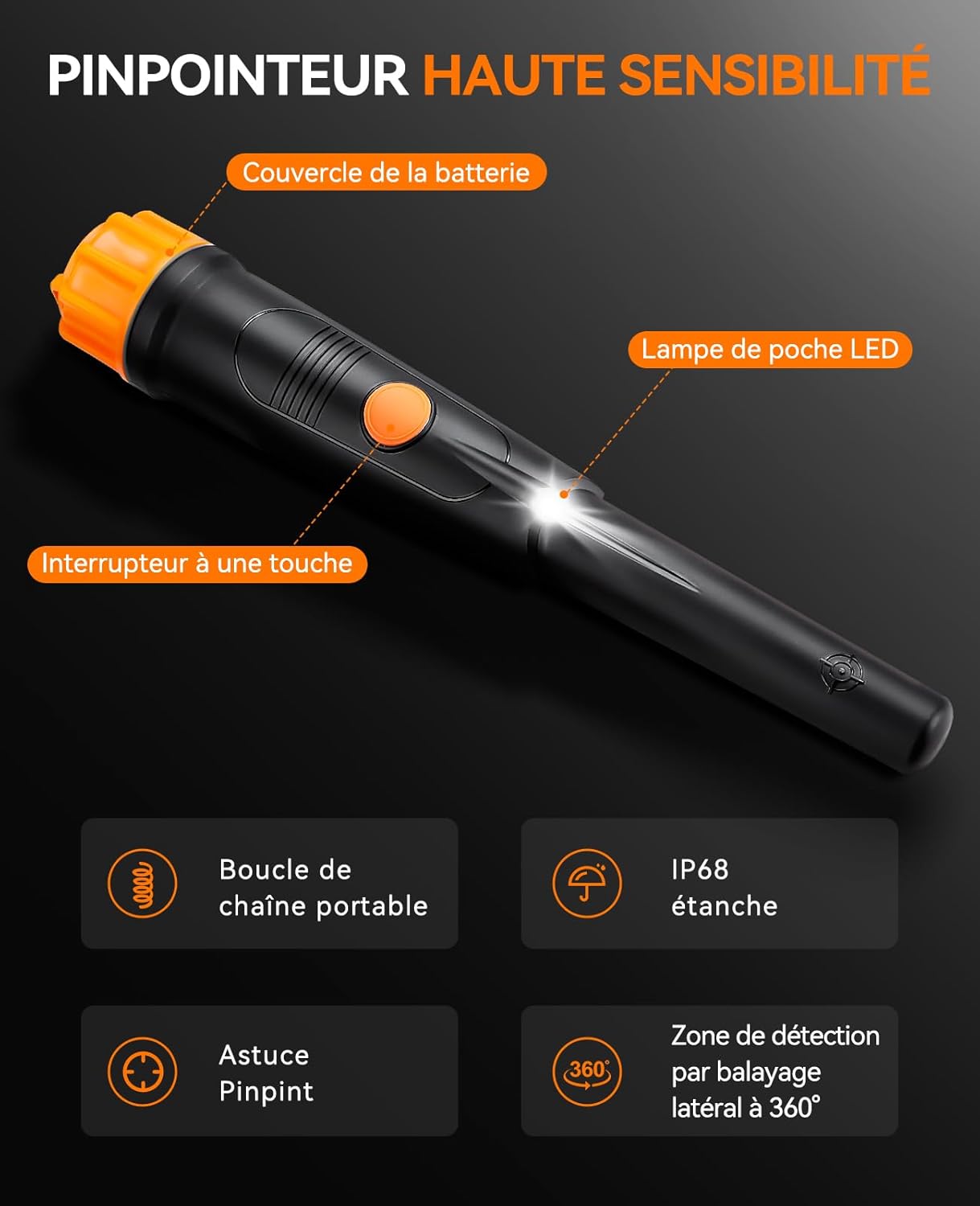
Image 3.1: Key features and components of the SUNPOW Pinpointer.

Image 3.2: The pinpointer's IP68 waterproof capability.

Image 3.3: Portability of the SUNPOW Pinpointer.
4. Setup
4.1 Battery Installation
- Unscrew the battery cover located at the end of the pinpointer.
- Insert the included 9V battery into the battery compartment, ensuring the correct polarity (+/-) alignment.
- Securely screw the battery cover back on. Ensure it is tightly sealed to maintain the device's waterproof integrity.
5. Operating Instructions
5.1 Power On/Off
- To power on the device, press and hold the orange button for approximately 2 seconds until you feel a vibration or hear a sound (depending on the current mode).
- To power off the device, press and hold the orange button again for approximately 2 seconds.
5.2 Changing Detection Modes
The SUNPOW Pinpointer offers three detection modes:
- Vibration Mode: Ideal for silent operation or when working in noisy environments where audio alerts might be missed.
- Audio Mode: Provides clear sound alerts, suitable for general use in quiet to moderately noisy areas.
- Vibration & Audio Mode: Combines both alerts for maximum feedback, recommended for most treasure hunting scenarios.
To cycle through the modes, simply press the orange button once (single click) while the device is powered on.

Image 5.1: The three detection modes: Sound & Vibration, Sound, and Vibration.
5.3 Metal Detection
Once powered on and in your desired mode, slowly sweep the pinpointer over the area you wish to scan. The 360-degree detection area allows for efficient scanning. As the pinpointer approaches a metal object, the vibration and/or audio alert frequency will increase, indicating proximity to the target. The closer you get, the faster the alerts will become, helping you pinpoint the exact location of the buried item.
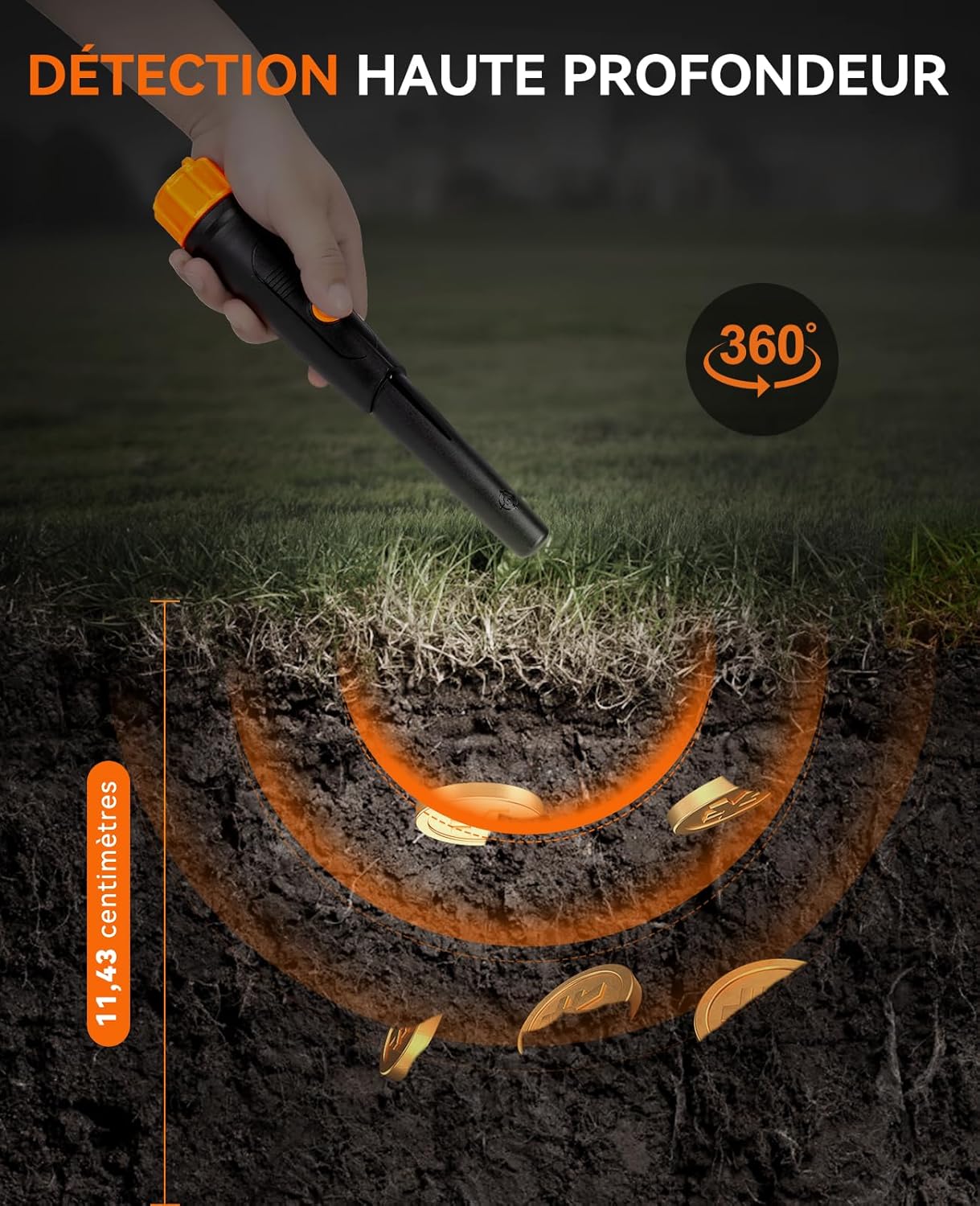
Image 5.2: Demonstrating deep detection up to 11.43 cm.
6. Maintenance
- Cleaning: After each use, especially if used in wet or muddy conditions, wipe down the pinpointer with a damp cloth to remove dirt and debris. Do not use abrasive cleaners or solvents.
- Battery Care: If the device will not be used for an extended period, remove the 9V battery to prevent leakage and potential damage to the electronics.
- Storage: Store the pinpointer in a cool, dry place, away from direct sunlight and extreme temperatures. Use the provided storage bag for protection.
7. Troubleshooting
- Device does not power on:
- Ensure the 9V battery is correctly installed with the correct polarity.
- Check if the battery has sufficient charge. Replace with a new battery if necessary.
- Ensure the battery cover is securely tightened.
- Weak or inconsistent detection:
- The battery might be low. Replace the 9V battery.
- Ensure you are sweeping the pinpointer slowly and steadily over the target area.
- False signals:
- Environmental interference can sometimes cause false signals. Try moving to a different location.
- Ensure there are no other electronic devices or strong magnetic fields nearby.
If you encounter issues not covered here, please refer to the Warranty and Support section for assistance.
8. Specifications
| Attribute | Value |
|---|---|
| Product Dimensions (L x W x H) | 27.5 x 6 x 6 cm (10.8 x 2.4 x 2.4 inches) |
| Item Weight | 300 Grams (0.66 lbs) |
| Item Model Number | OTMD01 |
| Battery(ies) | 1 x 9V (included) |
| Material | Metal |
| Power Source | Battery Powered |
| Color | Black |
| International Protection Rating | IP68 or higher |
| Adjustable Length | Yes |
| Country of Origin | China |
9. Warranty and Support
Your SUNPOW Metal Detector Pinpointer is designed for durability and performance. While specific warranty details are not provided in this manual, SUNPOW is committed to customer satisfaction.
If you encounter any problems or have questions regarding your product, please do not hesitate to contact us via Amazon's messaging service. Our customer service team will do their best to provide you with prompt and effective assistance.
For the latest support information and contact methods, please visit the official SUNPOW store on Amazon or refer to your purchase documentation.


