
Ace Instruments HTC-1
Ace Instruments HTC-1 Digital Temperature and Humidity Monitor User Manual
Model: HTC-1
Brand: Ace Instruments
1. Introduction
The Ace Instruments HTC-1 is a digital thermo-hygrometer designed to simultaneously display current temperature, relative humidity, and time. It also features a calendar function, alarm clock, and memory for maximum and minimum readings. This device is suitable for monitoring indoor environments in homes, offices, greenhouses, industrial spaces, and more.
2. Safety Information
- Do not expose the device to extreme temperatures or direct sunlight for prolonged periods.
- Avoid dropping the device or subjecting it to strong impacts.
- Do not immerse the device in water or other liquids.
- Use only the specified battery type (AAA 1.5V).
- Keep out of reach of children.
3. Product Features
- Simultaneous display of temperature, humidity, and time.
- Large LCD display for clear readability.
- Memory function for MAX/MIN temperature and humidity readings.
- Selectable temperature units: Celsius (°C) or Fahrenheit (°F).
- Selectable time formats: 12-hour or 24-hour.
- Alarm clock function.
- Calendar function (month and date display).
- Integrated back stand for desktop use and hanging hole for wall mounting.
- Low power consumption, powered by one AAA 1.5V battery.

4. Device Components
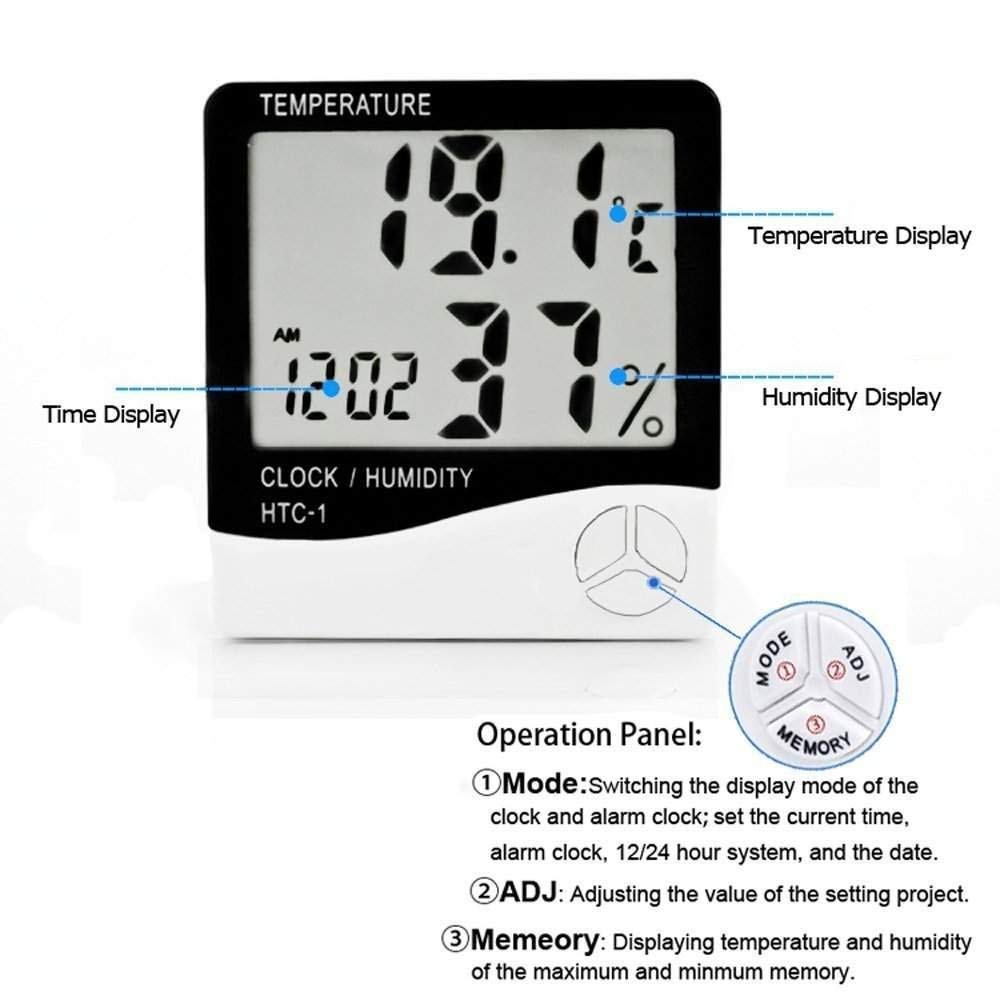
The HTC-1 unit features a large LCD display and three control buttons on the front panel:
- MODE Button: Used for switching display modes (clock, alarm clock), setting current time, alarm, and date.
- ADJ Button: Used for adjusting the value of settings.
- MEMORY Button: Used for displaying maximum and minimum temperature and humidity values.

The side of the device includes induction holes for accurate environmental sensing. The back features a foldable support stand for desktop placement and a hanging hole for wall mounting.
5. Setup
5.1 Battery Installation
- Locate the battery compartment on the back of the unit.
- Open the battery compartment cover.
- Insert one AAA 1.5V battery, ensuring correct polarity (+/-).
- Close the battery compartment cover securely.
- The device will power on automatically and display current readings.
5.2 Placement

The HTC-1 offers two placement options:
- Desktop Placement: Extend the integrated back stand to place the unit on a flat surface.
- Wall Mounting: Use the hanging hole on the back of the unit to mount it on a wall using a screw or hook (not included).
For accurate readings, place the device away from direct heat sources, direct sunlight, and areas with high airflow or drafts.
6. Operating Instructions
6.1 Initial Display
Upon battery installation, the LCD will display the current temperature, humidity, and time. The default temperature unit is Celsius (°C) and the time format is 24-hour.
6.2 Setting Time and Date
- Press the MODE button once to enter time setting mode. The hour digits will flash.
- Use the ADJ button to adjust the hour.
- Press MODE again to move to minute setting. Use ADJ to adjust minutes.
- Continue pressing MODE to cycle through year, month, and day settings, adjusting each with the ADJ button.
- After setting the day, press MODE one more time to exit setting mode and return to normal display.
- To view the current date during normal operation, briefly press the ADJ button.
6.3 Setting Alarm
- From normal display, press the MODE button twice to enter alarm setting mode. The alarm hour digits will flash.
- Use the ADJ button to set the alarm hour.
- Press MODE again to move to alarm minute setting. Use ADJ to set alarm minutes.
- Press MODE one more time to exit alarm setting mode.
- To activate or deactivate the alarm, press the ADJ button while in alarm display mode (after pressing MODE twice). An alarm icon will appear or disappear on the display.
6.4 Switching Temperature Units (°C/°F)
On the back of the unit, locate the small switch labeled "°C/°F". Slide the switch to select your desired temperature unit.
6.5 Switching Time Format (12/24 Hour)
While in normal time display mode, press the ADJ button to toggle between 12-hour (with AM/PM indicator) and 24-hour time formats.
6.6 MAX/MIN Temperature and Humidity Readings
The device automatically records the maximum and minimum temperature and humidity values since the last reset.
- Press the MEMORY button once to display the maximum recorded temperature and humidity. "MAX" will appear on the screen.
- Press the MEMORY button again to display the minimum recorded temperature and humidity. "MIN" will appear on the screen.
- Press the MEMORY button a third time to return to current readings.
- To clear the MAX/MIN memory, press and hold the MEMORY button for approximately 2 seconds while MAX or MIN values are displayed. The memory will reset to current values.
7. Maintenance
- Cleaning: Wipe the device with a soft, dry cloth. Do not use abrasive cleaners or solvents.
- Battery Replacement: When the display becomes dim or erratic, replace the AAA 1.5V battery. Follow the battery installation steps in Section 5.1.
- Storage: If storing the device for an extended period, remove the battery to prevent leakage. Store in a cool, dry place.
8. Troubleshooting
| Problem | Possible Cause | Solution |
|---|---|---|
| No display or dim display | Battery is dead or incorrectly installed. | Replace the AAA battery, ensuring correct polarity. |
| Incorrect time/date | Time/date not set correctly. | Refer to Section 6.2 to set the time and date. |
| Inaccurate readings | Device placed in an unsuitable location (e.g., near heat source, direct sunlight, strong airflow). | Relocate the device to a stable indoor environment away from extreme conditions. |
| MAX/MIN values not resetting | Button not held long enough. | Press and hold the MEMORY button for approximately 2 seconds while MAX or MIN values are displayed. |
9. Specifications

- Temperature Range: 14°F to 122°F (-10°C to +50°C)
- Temperature Resolution: 0.1°C (0.1°F)
- Temperature Accuracy: ±1°C
- Humidity Range: 10% to 99% RH
- Humidity Resolution: 1% RH
- Humidity Accuracy: ±5% RH
- Power Supply: 1 x AAA 1.5V Battery
- Dimensions: 100 x 110 x 21.5 mm (Width x Height x Depth)
- Product Dimensions (W x H): 3.94" x 4.33"
- Weight: Approximately 1.2 Pounds (including packaging)
- Storage Conditions: -20°C to +60°C
- Mounting Type: Wall Mount or Desktop

10. Warranty and Support
This product comes with a calibration certificate at no additional cost, ensuring its accuracy upon purchase. For specific warranty details or technical support, please refer to the documentation provided with your purchase or contact Ace Instruments customer service.
Manufacturer: HTC instruments
Ask a question about this manual
Ask about setup, troubleshooting, compatibility, parts, safety, or missing instructions. Manuals+ will review the question and use this page’s manual context to help answer it.