
1. Introduction
Thank you for purchasing the Vordon AC-5201 Kent Car Radio. This manual provides essential information for the safe installation, operation, and maintenance of your new car multimedia system. Please read this manual thoroughly before using the product and keep it for future reference.
2. Safety Information
Observe the following safety guidelines to prevent accidents and damage to the unit:
- Do not operate the unit in a way that distracts you from driving. Always prioritize road safety.
- Ensure proper installation by a qualified professional to avoid electrical shorts or damage to your vehicle.
- Do not disassemble or modify the unit. This may cause electric shock, damage, or fire.
- Keep the volume at a level that allows you to hear outside traffic sounds.
- Avoid exposing the unit to extreme temperatures, direct sunlight, or moisture.
- Use only accessories and parts approved by Vordon.
3. Package Contents
Please check that all items are present in the package:
- Vordon AC-5201 Car Radio Unit
- Power and Speaker Wiring Harness
- Mounting Brackets and Screws
- Remote Control
- User Manual (this document)
- External Microphone (if included with your model)
4. Product Overview
4.1 Front Panel and Display
The Vordon AC-5201 features a retractable 7-inch touchscreen display and a standard 1 DIN chassis. The front panel includes essential controls and input ports.
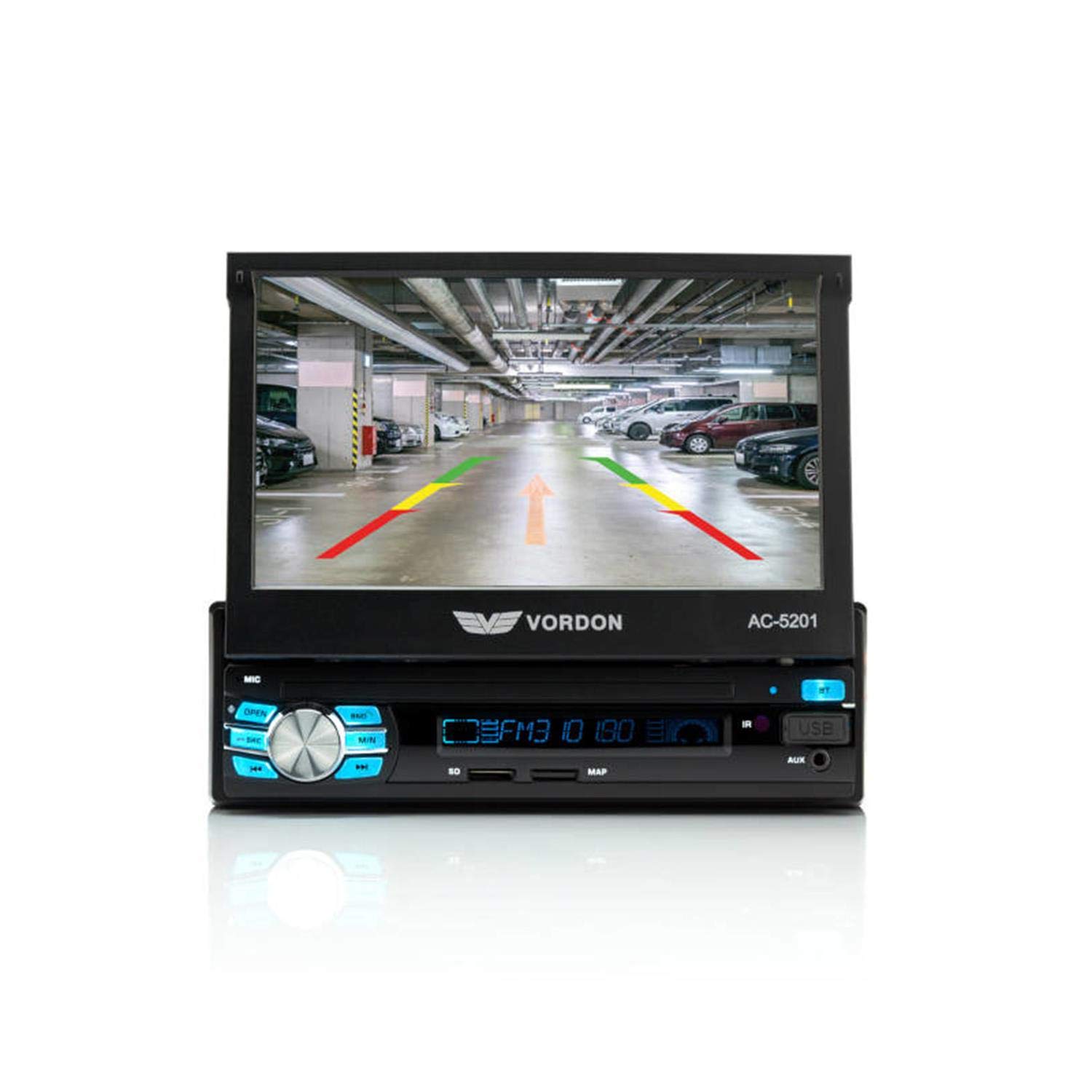
Image: Front view of the Vordon AC-5201 car radio with the 7-inch LCD touchscreen extended, displaying a simulated reversing camera view with parking guidelines. The main unit below the screen shows control buttons, a rotary knob, USB port, and AUX input.
- 7-inch TFT LCD Touchscreen: Retractable display for multimedia playback and system control.
- Power/Volume Knob: Press to turn on/off, rotate to adjust volume.
- Mode Button: Switches between radio, USB, SD, AUX, and Bluetooth modes.
- USB Port: Connect USB storage devices for media playback.
- SD Card Slot: Insert SD cards for media playback.
- AUX-IN (3.5mm Jack): Connect external audio devices.
- Microphone (MIC): Built-in for hands-free calling.
- Reset Button: Small button to reset the unit (requires a pointed object).
4.2 Remote Control
The included remote control allows for convenient operation of the car radio from a distance.

Image: The Vordon AC-5201 car radio unit with its 7-inch screen extended, shown alongside its black remote control. The remote has various buttons for media control, volume, and mode selection.
4.3 Rear Connections
The rear panel of the unit contains various connectors for power, speakers, and external devices:
- ISO Connector: For power supply and speaker connections.
- Antenna Input: Connect your car's radio antenna.
- RCA Audio Outputs: For connecting external amplifiers.
- Video Output (V-OUT): For connecting external monitors.
- Video Input (V-IN): For connecting a reversing camera or other video sources.
- AUX Audio Input (RCA): Additional audio input.
- Steering Wheel Control Input: For connecting to compatible steering wheel controls.
5. Setup and Installation
Installation of this unit requires technical knowledge. It is highly recommended to have it installed by a professional car audio technician.
5.1 Wiring Diagram (General Guidelines)
Refer to the wiring diagram provided with your unit for specific connections. General connections include:
- Yellow Wire (Constant 12V): Connect to a constant 12V power source (battery).
- Red Wire (Accessory 12V): Connect to a switched 12V power source (ignition).
- Black Wire (Ground): Connect to a good chassis ground point.
- Blue Wire (Antenna/Amp Remote): Connect to power antenna or amplifier remote turn-on.
- Speaker Wires: Connect to your vehicle's speakers (e.g., White/White-Black for Front Left, Grey/Grey-Black for Front Right, Green/Green-Black for Rear Left, Purple/Purple-Black for Rear Right). Ensure correct polarity.
- Reverse Gear Wire: Connect to the vehicle's reverse light circuit for automatic camera display.
5.2 Mounting the Unit
The AC-5201 is designed for a standard 1 DIN opening. Use the supplied mounting sleeve and brackets to secure the unit in your vehicle's dashboard. Ensure the unit is firmly in place to prevent vibration and damage.
6. Operation
6.1 Basic Controls
- Power On/Off: Press the volume knob.
- Volume Adjustment: Rotate the volume knob.
- Mode Selection: Press the MODE button to cycle through available sources (Radio, USB, SD, AUX, Bluetooth).
- Screen Retraction: Use the OPEN/CLOSE button to retract or extend the screen.
6.2 Radio Tuner (AM/FM)
In Radio mode, use the touchscreen or physical buttons to:
- Scan: Automatically search for and store strong stations.
- Tune: Manually adjust the frequency.
- Preset Stations: Store and recall up to 18 FM stations.
6.3 Bluetooth Connectivity
Pair your mobile phone for hands-free calling and audio streaming.
- Turn on the unit and select Bluetooth mode.
- Enable Bluetooth on your mobile phone and search for devices.
- Select "Vordon AC-5201" from the list of available devices.
- Confirm pairing on both devices if prompted.
6.4 USB/SD Playback
Insert a USB drive or SD card into the respective slot. The unit will automatically switch to USB/SD mode and begin playing compatible media files (AVI, MP3, MP4, MP5, FLV, RMVB).
6.5 AUX Input
Connect an external audio device (e.g., MP3 player, smartphone) to the front 3.5mm AUX-IN jack or the rear RCA AUX inputs. Select AUX mode to play audio from the connected device.
6.6 Hands-Free Calling
Once paired via Bluetooth, you can make and receive calls directly through the car radio. Use the touchscreen to dial numbers, answer, or end calls. The built-in microphone captures your voice, and audio plays through your car speakers.
6.7 MirrorLink (Android, iOS)
The unit supports MirrorLink functionality, allowing you to mirror your smartphone's screen (Android or iOS) onto the car radio display. Refer to your phone's specific MirrorLink instructions for connection details.
6.8 Reversing Camera (V-IN)
If a reversing camera is connected to the V-IN port and the reverse gear wire is properly installed, the display will automatically switch to the camera view when the vehicle is put into reverse.
7. Maintenance
Proper care ensures the longevity of your Vordon AC-5201:
- Cleaning the Screen: Use a soft, lint-free cloth to wipe the touchscreen. Do not use abrasive cleaners or solvents.
- General Cleaning: Wipe the unit's exterior with a soft, dry cloth.
- Avoid Liquids: Do not allow liquids to enter the unit.
- Temperature: Avoid leaving the unit in extreme hot or cold conditions for extended periods.
8. Troubleshooting
If you encounter issues, refer to the table below for common problems and solutions:
| Problem | Possible Cause | Solution |
|---|---|---|
| No power | Incorrect wiring; Blown fuse | Check power connections (Yellow, Red, Black wires). Inspect and replace fuse if necessary. |
| No sound | Speaker wires disconnected; Volume too low; Mute activated | Check speaker connections. Increase volume. Deactivate mute function. |
| Bluetooth not connecting | Bluetooth not enabled; Device not in pairing mode; Incorrect pairing code | Ensure Bluetooth is on for both devices. Put unit in pairing mode. Re-enter pairing code if required. |
| USB/SD not playing | Incompatible file format; Corrupted media; Incorrect mode selected | Ensure files are compatible (AVI, MP3, MP4, MP5, FLV, RMVB). Try a different USB/SD card. Select USB/SD mode. |
| Screen not retracting/extending | Obstruction; Mechanical issue | Check for any physical obstructions. If issue persists, contact support. |
9. Technical Specifications
Key technical details for the Vordon AC-5201 car radio:
| Feature | Detail |
|---|---|
| Model Number | AC-5201 |
| Display | 7-inch TFT LCD Touchscreen (800 x 480 pixels, 16:9) |
| Output Power | 4 x 60 Watts |
| Connectivity | Bluetooth, USB, SD Card, AUX (3.5mm Jack, RCA), RCA Video Input (V-IN), RCA Video Output (V-OUT) |
| Supported Audio Formats | MP3, MP4, MP5 |
| Supported Video Formats | AVI, FLV, MP4, MP5, RMVB |
| Radio Tuner | AM/FM (18 preset stations) |
| Special Features | Hands-free calling, MirrorLink (Android, iOS), Reversing Camera Support, RDS |
| Compatible Devices | Smartphone |
| Audio Output Mode | Stereo |
| Number of Channels | 5 |
10. Warranty and Support
Vordon products are manufactured to high-quality standards. For information regarding warranty coverage, please refer to the warranty card included with your product or visit the official Vordon website. If you require technical assistance or have questions not covered in this manual, please contact Vordon customer support.


