
1. Introduction
This manual provides essential information for the safe and effective use of your DeWalt DXGNR4000 portable gas generator. This generator is designed to deliver 5,000 starting watts and 4,000 running watts, suitable for professional jobsites, home emergency backup, and outdoor events. It features a durable 223cc DeWalt engine, Idle Control Technology for fuel efficiency, and CO Protect Carbon Monoxide Detection for enhanced safety.
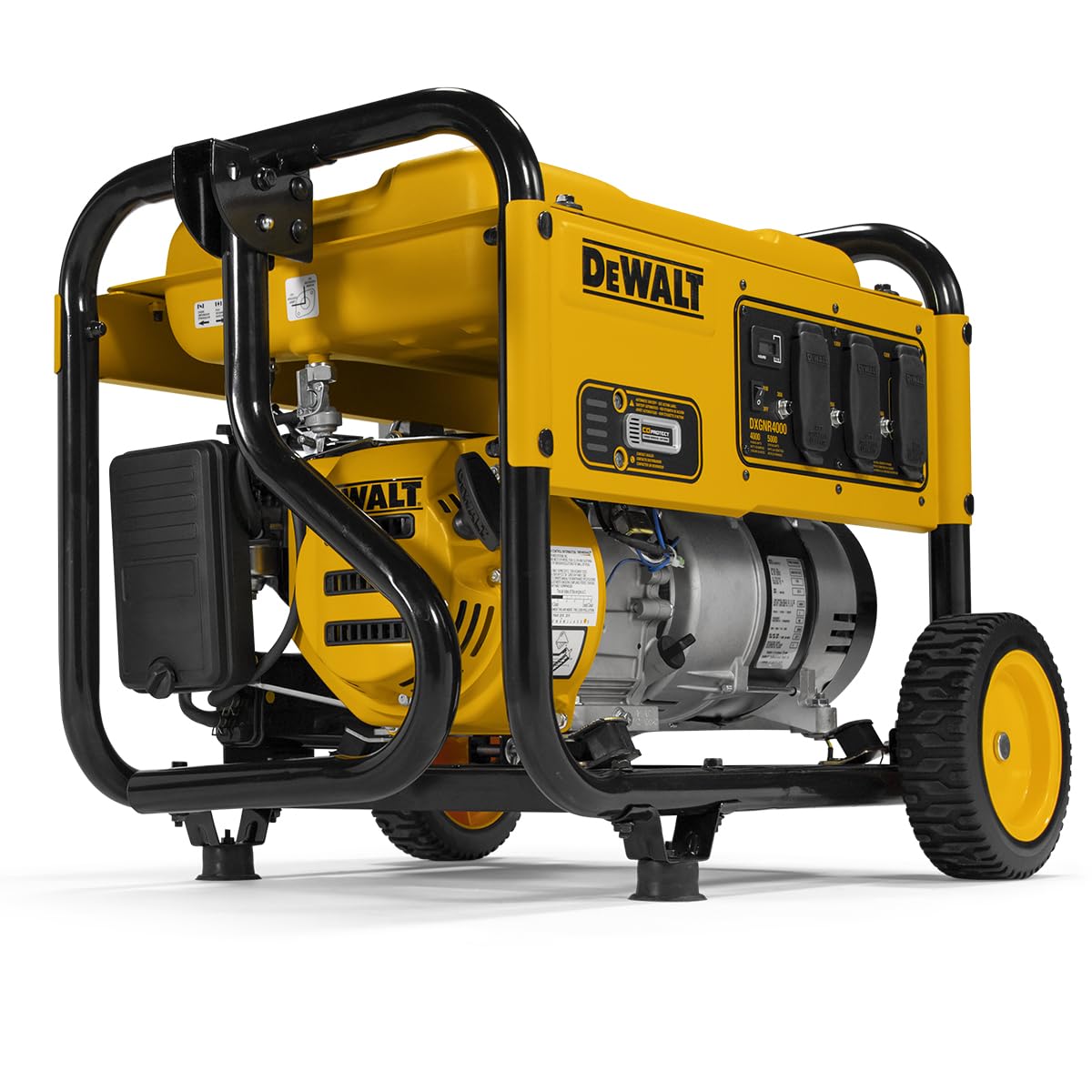
Figure 1.1: Front-side view of the DeWalt DXGNR4000 Portable Gas Generator. This image shows the generator's overall yellow and black design, including the control panel, fuel tank, and wheels.
2. Safety Information
WARNING: Failure to follow these safety instructions can result in serious injury or death. Always read and understand the entire manual before operating the generator.
- Carbon Monoxide Hazard: Generator exhaust contains carbon monoxide, a colorless, odorless, poisonous gas. Never operate the generator inside any building, garage, basement, crawlspace, or other enclosed or partially enclosed area. Only use outdoors and far away from windows, doors, and vents. The CO Protect system will automatically shut down the unit if unsafe carbon monoxide levels are detected.
- Fire Hazard: Gasoline is highly flammable. Refuel in a well-ventilated area with the engine off and cool. Do not smoke or allow open flames near the generator.
- Electrical Shock Hazard: Do not operate the generator in wet conditions. Ensure all electrical connections are secure and protected. The weather-resistant covered outlet panel protects connections from dust, debris, and moisture.
- Hot Surfaces: The generator's engine and muffler become very hot during operation and remain hot for a period after shutdown. Avoid contact with hot surfaces.
- Low Oil Shutdown: The generator is equipped with a low oil shutdown feature that automatically protects the engine from damage by stopping operation when oil levels drop critically low.

Figure 2.1: Icon indicating the Low-oil Level Shutdown feature. This feature automatically stops the engine if oil levels are too low, preventing damage.

Figure 2.2: Icon representing Circuit Breakers. These protect the generator and connected devices from electrical overloads.
3. Setup and Assembly
Before operating your generator, some assembly and initial setup are required. Ensure the generator is on a flat, stable surface during assembly.
3.1 Unpacking
Carefully remove the generator and all components from the packaging. Verify all parts listed in the owner's manual are present.
3.2 Wheel and Handle Assembly
Attach the never-flat wheels and the fold-down, locking handle to the generator frame. These components facilitate easy transportation of the unit.

Figure 3.1: Side view of the generator, highlighting the robust never-flat wheels and the sturdy frame. The handle is designed for easy maneuverability.
3.3 Adding Engine Oil
The engine is shipped without oil. Add the recommended type and amount of engine oil as specified in the owner's manual. Do not overfill.
3.4 Adding Fuel
Fill the 3.4-gallon steel fuel tank with fresh, unleaded gasoline. Ensure the fuel cap is securely tightened after refueling. Refer to the owner's manual for specific fuel requirements.

Figure 3.2: Rear view of the generator, showing the fuel tank cap and various engine components. The fuel cap is black and located on top of the yellow fuel tank.
4. Operating Instructions
Follow these steps to safely start and operate your DeWalt generator.
4.1 Starting the Generator
- Ensure the generator is placed outdoors in a well-ventilated area, away from any openings to buildings.
- Check the oil level and fuel level.
- Turn the fuel valve to the "ON" position.
- Move the choke lever to the "CHOKE" position (if the engine is cold).
- Press the electric start button or pull the recoil starter handle firmly until the engine starts.
- Once the engine starts, gradually move the choke lever to the "RUN" position.

Figure 4.1: Close-up of the generator's control panel, showing the power outlets, circuit breakers, and the main ON/OFF switch. The panel also includes an hour meter.
4.2 Connecting Electrical Loads
After the engine has warmed up, you can connect your electrical devices. Do not overload the generator. The Idle Control Technology automatically adjusts engine speed based on load, conserving fuel and reducing noise.
- Plug appliances directly into the generator's outlets or use heavy-duty outdoor-rated extension cords.
- Ensure the total wattage of connected devices does not exceed the generator's running wattage (4,000 watts).
- The generator features multiple 120V outlets and circuit breakers for protection.

Figure 4.2: An illustrative diagram demonstrating typical wattage requirements for common appliances like power tools, refrigerators, lights, sump pumps, furnaces, and window AC units. This helps users estimate their power needs.
4.3 Stopping the Generator
- Disconnect all electrical loads from the generator.
- Allow the engine to run for a few minutes without load to cool down.
- Turn the engine switch to the "OFF" position.
- Turn the fuel valve to the "OFF" position.
5. Maintenance
Regular maintenance ensures the longevity and reliable performance of your generator. Always perform maintenance with the engine off and cool.
- Check Oil Level: Check the engine oil level before each use. Add oil if necessary.
- Change Oil: Change the engine oil after the first 20 hours of operation, and then every 100 hours or annually, whichever comes first.
- Air Filter: Inspect the air filter regularly and clean or replace it as needed, especially in dusty conditions.
- Spark Plug: Inspect and clean the spark plug annually or every 100 hours. Replace if worn.
- Fuel System: Drain the fuel tank and carburetor if storing the generator for an extended period (over 30 days) to prevent fuel degradation.
- General Cleaning: Keep the generator clean and free of debris.

Figure 5.1: The hour meter display, which tracks the total operating hours of the generator. This is useful for scheduling maintenance intervals.
6. Troubleshooting
This section addresses common issues you might encounter with your generator. For problems not listed here, consult a qualified service technician.
| Problem | Possible Cause | Solution |
|---|---|---|
| Engine will not start | No fuel; Low oil level; Choke not set correctly; Spark plug issue; Engine switch OFF | Add fuel; Add oil; Adjust choke; Inspect/replace spark plug; Turn engine switch ON |
| No power output | Circuit breaker tripped; Overload; Loose connections | Reset circuit breaker; Reduce load; Check connections |
| Engine runs rough | Stale fuel; Dirty air filter; Spark plug issue | Drain and replace fuel; Clean/replace air filter; Inspect/replace spark plug |
| CO Protect shutdown | High carbon monoxide levels detected | Move generator to a more open outdoor area; Ensure proper ventilation |
7. Specifications
| Feature | Detail |
|---|---|
| Brand | DEWALT |
| Model Number | DXGNR4000 (PMC164000) |
| Starting Wattage | 5,000 Watts |
| Running Wattage | 4,000 Watts |
| Engine | 223cc DeWalt Engine, 4-Stroke |
| Fuel Type | Gasoline |
| Fuel Tank Capacity | 3.4 Gallons |
| Runtime (at 50% load) | Up to 10 hours |
| Voltage | 120 Volts |
| Frequency | 50 Hz |
| Special Features | Automatic Idle Control, CO Protect Sensor, Low Oil Shutdown, Never-Flat Wheels, Weather-Resistant Covered Outlets |
| Item Weight | 119 Pounds |
| Dimensions (L x W x H) | 23.7"L x 23"W x 21.4"H |

Figure 7.1: Diagram illustrating the physical dimensions of the DeWalt DXGNR4000 generator: 23.7 inches long, 23 inches wide, and 21.4 inches high.
8. Warranty and Support
Your DeWalt DXGNR4000 portable gas generator comes with a 3-Year Limited Warranty. This warranty covers defects in materials and workmanship under normal use. For detailed warranty terms and conditions, please refer to the warranty card included with your product or visit the official DeWalt website.
For technical assistance, parts, or service, please contact DeWalt Customer Support. Keep your model number (DXGNR4000 or PMC164000) and serial number ready when contacting support.
Manufacturer: GENERAC POWER SYSTEMS


