
1. Introduction
Thank you for choosing the Skyshop BYINTEK U50 Pro Mini Projector. This device is designed to provide a high-quality home theater experience with its native 1080p resolution, 4K support, 3D capabilities, and integrated Android operating system. This manual will guide you through the setup, operation, and maintenance of your projector to ensure optimal performance and longevity.

Figure 1.1: The Skyshop BYINTEK U50 Pro Mini Projector, showcasing its compact and sleek design.
2. Package Contents
Before proceeding with the setup, please ensure all items are present in the package:
- BYINTEK U50 Pro Projector
- Power Adapter
- Power Cable
- IR Remote Control
- HD Cable (1m/3.28ft)
- User Manual

Figure 2.1: Illustration of the projector and its included accessories, such as the remote control, power adapter, and cables.
3. Setup Guide
3.1 Physical Connections
Connect the power adapter to the projector's DC19V-in port and then plug it into a power outlet. Identify the various input/output ports on the projector:
- DC19V-in: Power input.
- HD-in: HDMI input for external devices (e.g., Blu-ray player, game console).
- Audio-out: 3.5mm jack for external speakers or headphones.
- USB 3.0 / USB 2.0: For connecting USB storage devices, mouse, or keyboard.

Figure 3.1: Detailed view of the projector's input and output ports, including DC-in, HD-in, Audio-out, and USB ports.
3.2 Placement and Mounting
The projector can be placed on a tabletop or mounted to the ceiling. Ensure a stable surface or secure mounting for optimal projection. The projector features a universal bracket hole (d-1/4inch, 6mm) for mounting.

Figure 3.2: Examples of projector placement, including tabletop and ceiling mount configurations, along with projection distance guidelines.
3.3 Initial Power On and Focus
- Press the power button on the projector or remote control to turn on the device.
- Adjust the focus using the manual focus ring or electronic focus feature until the projected image is clear.
- Utilize the Auto Vertical Keystone correction for automatic image shape adjustment. Manual corner keystone correction is also available for fine-tuning.
4. Operating Instructions
4.1 Android OS Navigation
The projector runs on an Android operating system, providing access to various applications and media. Navigate the interface using the included remote control, or connect a wireless mouse and keyboard via the USB ports for easier interaction.

Figure 4.1: Screenshot of the projector's Android operating system interface, showing various applications and navigation options.
4.2 Wireless Projection (WiFi Display)
The U50 Pro supports wireless projection from smartphones, tablets, and computers via E-Share, Airplay, Miracast, and DLNA protocols. Ensure your device and the projector are connected to the same Wi-Fi network (2.4G or 5G dual-band WiFi for faster and smoother connection).
- Select the 'WiFi-display' or 'E-Share' application from the projector's home screen.
- Follow the on-screen instructions to connect your mobile device or computer.

Figure 4.2: Illustration of the WiFi display feature, demonstrating screen mirroring from various devices to the projector.
4.3 3D Playback
The projector supports DLP-Link 3D and Blu-ray 3D active shutter technology. To experience 3D content, you will need compatible active shutter 3D glasses (not included).
4.4 Picture and Sound Adjustments
- Electronic Zoom: Adjust the screen size without moving the projector using the remote control.
- Keystone Correction: Correct distorted images (trapezoid effect) automatically or manually.
- Audio: The projector features built-in 8Ω 3W*2 stereo speakers. For enhanced audio, connect external speakers via the Audio-out port.

Figure 4.3: Visual representation of the electronic zoom function and the projector's integrated Hi-Fi audio capabilities.
5. Maintenance
5.1 Cleaning the Projector
- Lens: Gently clean the projector lens with a soft, lint-free cloth specifically designed for optical surfaces. Do not use abrasive cleaners.
- Casing: Wipe the projector's exterior with a soft, dry cloth. Avoid using liquid cleaners directly on the device.
5.2 Dust Protection
The BYINTEK U50 Pro features a fully enclosed, dust-proof optical engine design to minimize dust accumulation and maintain image quality over time. Despite this, regular cleaning of external surfaces is recommended.
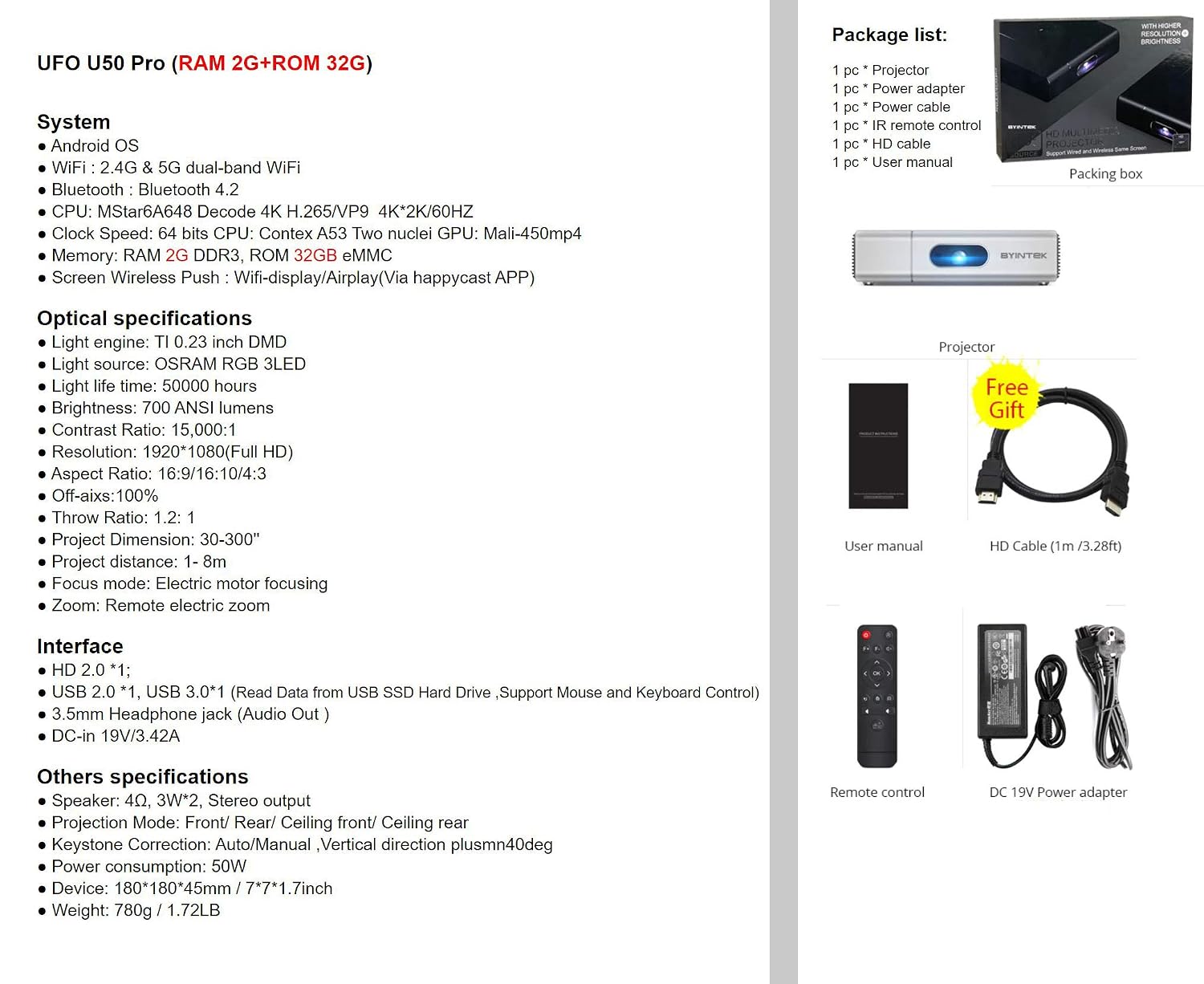
Figure 5.1: Close-up view highlighting the dust-proof design of the projector's lens area.
6. Troubleshooting
If you encounter issues with your projector, please refer to the following common problems and solutions:
| Problem | Possible Cause | Solution |
|---|---|---|
| No power | Power cable not connected; Power outlet faulty | Ensure power cable is securely connected; Try a different power outlet. |
| No image projected | Input source not selected; Lens cap on; External device not connected | Select correct input source (HDMI, USB); Remove lens cap; Check external device connections. |
| Image is blurry | Focus not adjusted; Keystone not corrected | Adjust manual focus ring; Use auto or manual keystone correction. |
| No sound | Volume too low; External speakers not connected/selected | Increase volume; Check external speaker connections and ensure they are selected as output. |
| System freezes during 4K video playback (especially via mobile hotspot) | Network instability; Software optimization | Ensure a stable and strong Wi-Fi connection; Check for available firmware updates to improve performance. |
7. Specifications
Detailed technical specifications for the Skyshop BYINTEK U50 Pro Mini Projector:
- Model: U50 PRO
- Operating System: Android OS
- Connectivity: 2.4G & 5G dual-band WiFi, Bluetooth 4.2
- CPU: Mstar6A648 Decode 4K H.265/VP9 4K*2K/60Hz
- Memory: RAM 2GB DDR3, ROM 32GB eMMC
- Display Technology: DLP
- Light Engine: TI 0.23 inch DMD
- Light Source: OSRAM RGB 3LED
- Light Life Time: 50,000 hours
- Brightness: 700 ANSI lumens
- Contrast Ratio: 15,000:1
- Native Resolution: 1920x1080 (Full HD), Max support 4K
- Aspect Ratio: 16:9/16:10/4:3
- Off-axis: 100%
- Throw Ratio: 1.2:1
- Projection Dimension: 30-300 inches
- Projection Distance: 1-8m
- Focus Mode: Electric motor focusing
- Zoom: Remote electronic zoom
- Interface: HD 2.0 *1, USB 3.0 *1, USB 2.0 *1, 3.5mm Headphone jack (Audio Out), DC-in 19V/3.42A
- Speaker: 4Ω, 3W*2, Stereo output
- Projection Mode: Front/Rear/Ceiling front/Ceiling rear
- Keystone Correction: Auto/Manual, Vertical direction plusmn40deg
- Power Consumption: 50W
- Dimensions (LxWxH): 18 x 18 x 4.5 cm (7.08 x 7.08 x 1.77 inches)
- Weight: 780g (1.72LB)
8. Warranty and Support
8.1 Warranty Information
The Skyshop BYINTEK U50 Pro Mini Projector comes with a 12-month warranty from the date of purchase. This warranty covers manufacturing defects and malfunctions under normal use. Please retain your proof of purchase for warranty claims.
8.2 Customer Support
For technical assistance, troubleshooting beyond this manual, or warranty inquiries, please contact Skyshop customer support through your retailer or the official Skyshop website. Provide your product model number (U50 PRO) and purchase details when contacting support.