
Introduction
This manual provides detailed instructions for the installation, operation, and maintenance of the Neufday 702 MS-HC Generator Controller. The 702 MS-HC is a microcomputer-controlled manual start generator controller designed to monitor and protect your generator engine.
Features
- Microcomputer control for precise operation.
- Manual start and stop functionality.
- LED indicators for fault information.
- LCD display for accumulative running time.
- Lubricating oil low pressure protection.
- Battery charging monitoring via WL terminal on the alternator.
- Automatic engine shutdown upon fault detection.
- Cool water temperature protection.
- Engine overspeed protection.
- Hours counter provides accurate information for monitoring maintenance and warranty periods.
- Multiple engine parameters are monitored simultaneously.
Product Overview
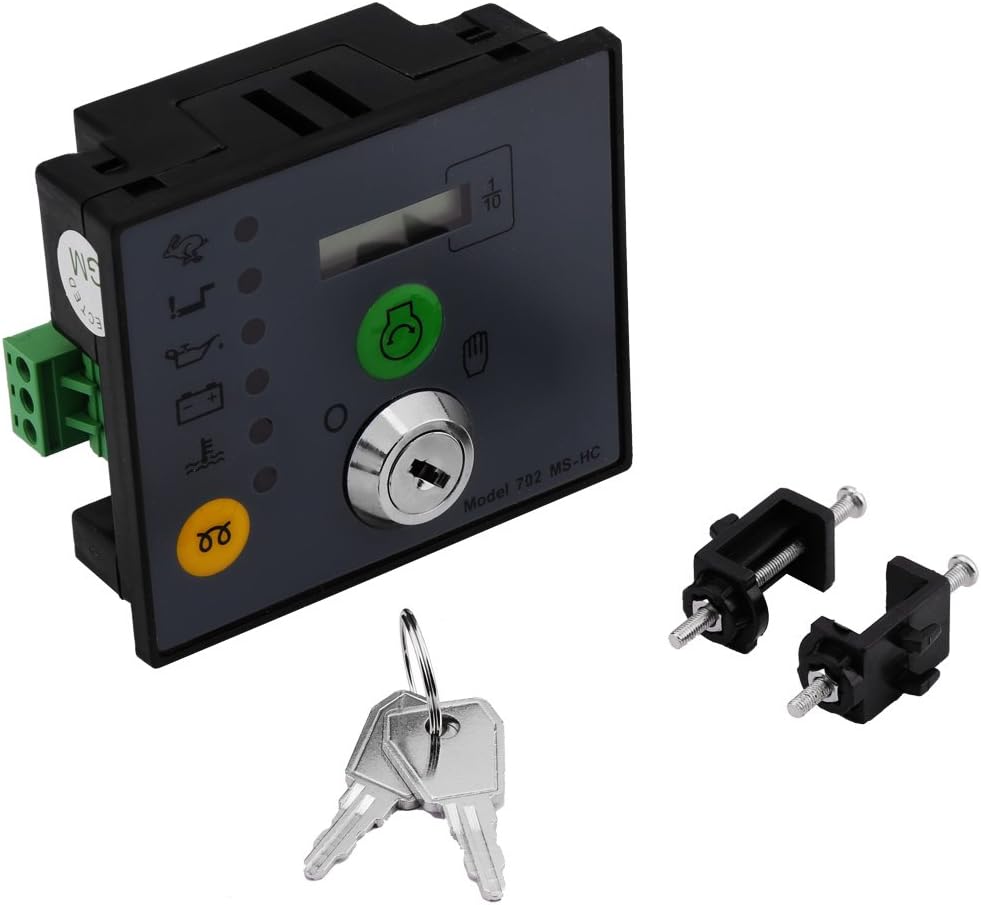
Figure 1: Front view of the 702 MS-HC Generator Controller, showing the control panel, key switch, and included keys and mounting screws.

Figure 2: Rear view of the 702 MS-HC Generator Controller, highlighting the wiring terminals for connection.

Figure 3: Dimensions of the 702 MS-HC Generator Controller, showing its length, width, and height.
Specifications
| Specification | Value |
|---|---|
| Model | 702 MS-HC |
| Size | 8.5 x 7 x 3.8 cm (3.45 x 2.76 x 1.50 inch) |
| Weight | 157g (5.3 ounces) |
| Display Type | LCD or LED |
| Voltage | 12 Volts (DC) |
| Material | Metal or Heavy-Duty Plastic |
| Manufacturer | Neufday |
| Country of Origin | China |
Setup and Installation
The 702 MS-HC controller is designed for panel mounting. Ensure proper electrical connections are made according to the generator's wiring diagram and local electrical codes. It is recommended that installation be performed by a qualified technician.
Mounting
The controller comes with screws for mounting. Secure the controller firmly into the designated panel cutout.

Figure 4: Close-up view of the mounting screws provided with the controller.
Wiring Connections
Connect the generator's wiring to the appropriate terminals on the rear of the 702 MS-HC controller. Pay close attention to the labeling for battery, engine start, oil pressure, water temperature, and alternator (WL) connections. Ensure all connections are secure to prevent loose contacts and potential malfunctions.

Figure 5: Detailed view of the green wiring terminals on the back of the controller, indicating connection points.
Operating Instructions
Manual Mode Operation
To operate the generator using the 702 MS-HC controller in manual mode, follow these steps:
- Insert Key: Insert the provided key into the key switch on the controller panel.
- Turn Key to Palm Position: Turn the key to the 'palm' position (usually indicated by an icon or label) to power on the module.
- Engine Pre-heat (if applicable): Press and hold the engine pre-heat button for the required duration, as specified by your generator's engine manufacturer.
- Start Engine: Press the start button to crank and start the engine.
- Stop Engine: To stop the engine, turn the key to the 'off' position.

Figure 6: Front panel of the controller, illustrating the key switch and operational buttons.
Maintenance
Regular maintenance ensures the longevity and reliable operation of your 702 MS-HC Generator Controller. While the controller itself requires minimal maintenance, it is crucial to ensure the generator it controls is properly maintained.
- Cleanliness: Keep the controller panel clean and free from dust and debris. Use a soft, dry cloth for cleaning. Avoid abrasive cleaners or solvents.
- Connections: Periodically check all wiring connections to ensure they are tight and free from corrosion. Loose connections can lead to intermittent operation or faults.
- Environmental Conditions: Ensure the controller is operated within its specified environmental conditions (temperature, humidity) to prevent damage.
- Hours Counter: Utilize the built-in hours counter to track generator run time, which is essential for scheduling routine engine maintenance (e.g., oil changes, filter replacements) as recommended by the generator manufacturer.
Troubleshooting and Protection Features
The 702 MS-HC controller is equipped with several protection features to safeguard your generator engine. When a fault condition is detected, the module automatically shuts down the engine and indicates the fault via LED.
Common Protection Features:
- Low Oil Pressure Protection: The module monitors engine oil pressure. If pressure drops below a safe level, the engine will shut down to prevent damage.
- Cool Water Temperature Protection: Monitors engine coolant temperature. An engine shutdown will occur if the temperature exceeds safe operating limits.
- Engine Overspeed Protection:
The engine overspeed trip setting can be calibrated at the rear of the module for 50Hz or 60Hz nominal (57Hz or 68Hz trip respectively). During engine cranking and for the first 10 seconds after the engine starts running, all alarm conditions are suspended (overspeed is enabled) to allow the engine to reach its optimum running speed.
- Battery Charging Monitoring: The controller monitors the battery charging status via the WL terminal on the alternator. Issues with charging may be indicated.
Fault Indication:
Refer to the LED indicators on the front panel for specific fault information. Consult your generator's service manual or a qualified technician for detailed troubleshooting of engine-specific issues.
Package Contents
Upon opening the package, you should find the following items:
- 1 x 702 MS-HC Generator Controller
- 2 x Keys
- 2 x Screws (for mounting)
Warranty and Support
For warranty information and technical support, please contact Neufday customer service. Keep your purchase receipt as proof of purchase.
For further assistance or inquiries, please refer to the contact information provided by the manufacturer or your point of purchase.