
Introduction
Thank you for choosing the Maxcio PM01 Energy Cost Meter. This device is designed to help you monitor the real-time energy consumption, current, and electricity costs of your electrical appliances. By understanding your energy usage, you can make informed decisions to save energy and reduce your electricity bills. Please read this manual carefully before using the product to ensure proper operation and safety.
Safety Information
- Do not exceed the maximum load of 3680W / 16A. Overloading can damage the device and connected appliances, and poses a fire hazard.
- Ensure the device is used in a dry environment. Avoid exposure to water or high humidity.
- Do not disassemble or attempt to repair the device. Refer all servicing to qualified personnel.
- Keep out of reach of children.
- Ensure the plug and socket connections are secure and free from debris.
Product Features
- Real-time Energy Monitoring: Tracks power consumption, current, voltage, frequency, and power factor.
- Cost Calculation: Allows setting electricity price per unit (COST/KWh) to calculate total electricity cost.
- Overload Warning: LCD screen flashes "OVERLOAD" when the connected load exceeds 3680W.
- LCD Backlight: Easy to read display, even in low-light conditions.
- Data Hold Function: Built-in battery preserves memory settings and stored electricity data during power outages.
- Multiple Display Modes: Seven different display modes for various measurement parameters.
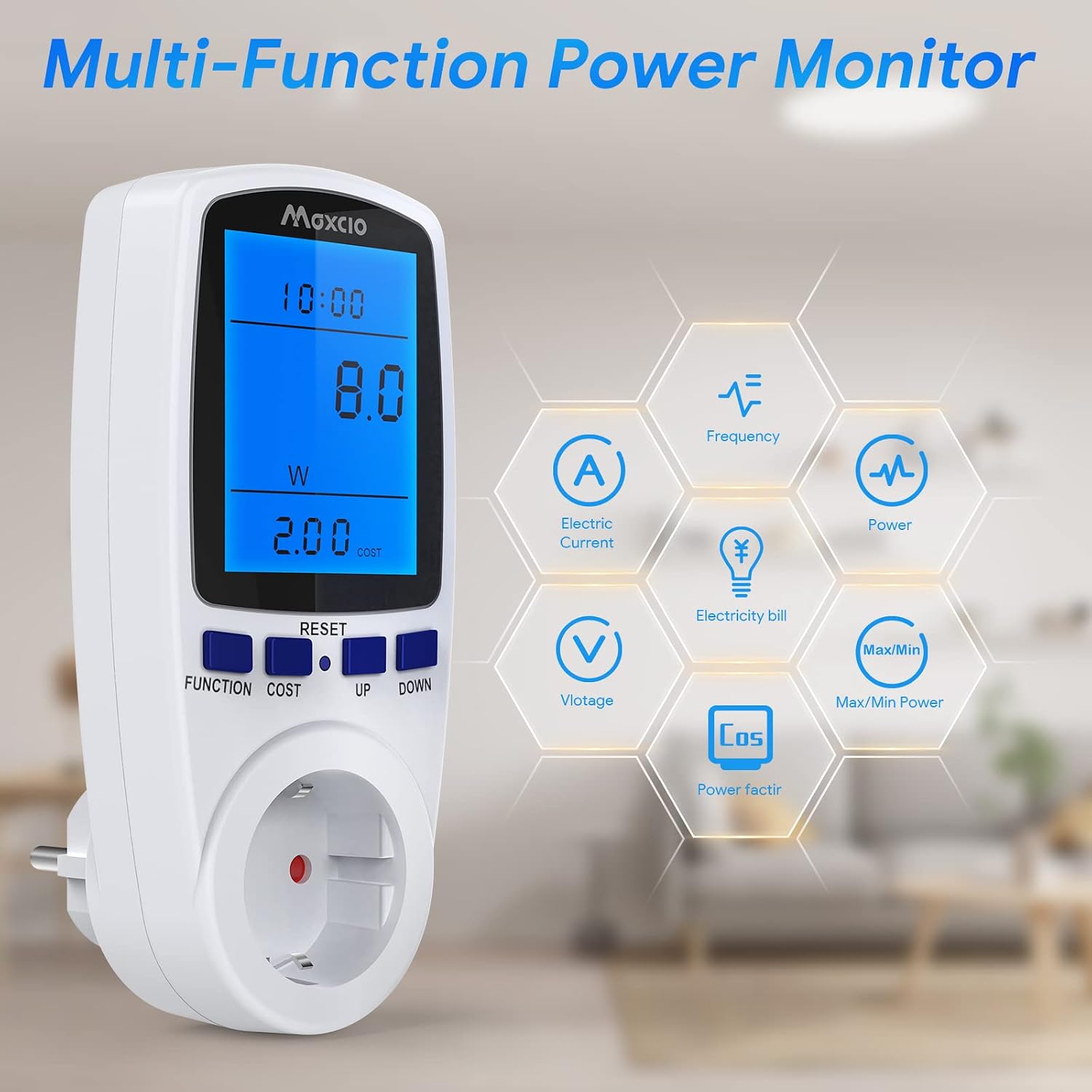
Image: Multi-Function Power Monitor. This image illustrates the various functions the Maxcio PM01 can monitor, including electric current, frequency, power, voltage, electricity bill, and maximum/minimum power.
Setup
- Unpacking: Carefully remove the Maxcio PM01 Energy Cost Meter from its packaging.
- Initial Charge: The device has a built-in backup battery. For optimal performance, plug the meter into a power outlet for approximately 5-10 hours before first use to fully charge the internal battery. This ensures data retention during power interruptions.
- Setting Electricity Price:
- Press the "COST" button. The display will show "COST/KWh".
- Press the "UP" or "DOWN" buttons to adjust the electricity price per kilowatt-hour (KWh). The range is 00.00 to 99.99.
- Press "COST" again to confirm and save the setting.
- Connecting Appliance: Plug the appliance you wish to monitor into the socket of the Maxcio PM01 Energy Cost Meter. Then, plug the meter into a wall outlet.

Image: Maxcio PM01 in use. This image demonstrates the versatility of the Maxcio PM01, showing it can be used to monitor the energy consumption of various household appliances.
Operating Instructions
The Maxcio PM01 features a large LCD display and several buttons for easy operation.
Buttons Overview:
- FUNCTION: Cycles through the seven different monitoring modes.
- COST: Used to set the electricity price per KWh.
- UP / DOWN: Adjusts values when setting the electricity price.
- RESET: Clears all accumulated data and settings. Press and hold for 3 seconds to reset.
Monitoring Modes:
Press the "FUNCTION" button repeatedly to cycle through the following display modes:
- Mode 1: Time, Wattage (W), Cost: Displays current time, real-time power consumption in Watts, and accumulated cost.
- Mode 2: Time, Accumulated Energy (KWh), Days: Shows current time, total energy consumed in Kilowatt-hours, and the number of days the monitoring has been active.
- Mode 3: Time, Voltage (V), Frequency (Hz): Displays current time, current voltage, and frequency of the power supply.
- Mode 4: Time, Current (A), Power Factor: Shows current time, current drawn by the appliance in Amperes, and the power factor.
- Mode 5: Time, Minimum Power (Lo): Displays current time and the lowest recorded power consumption.
- Mode 6: Time, Maximum Power (Hi): Displays current time and the highest recorded power consumption.
- Mode 7: Time, Electricity Price (COST/KWh): Shows current time and the set electricity price per KWh.

Image: Seven Mode Power Meter. This image illustrates the seven distinct display modes available on the Maxcio PM01, allowing users to view various electrical parameters.

Image: LCD Display with Backlight. This image highlights the backlight feature of the Maxcio PM01's LCD screen, which enhances readability in dimly lit environments.
Maintenance
- Cleaning: Wipe the device with a soft, dry cloth. Do not use abrasive cleaners or solvents.
- Storage: When not in use for extended periods, store the meter in a cool, dry place.
- Battery: The internal backup battery is not user-replaceable. If the battery no longer holds a charge, contact customer support.
Troubleshooting
| Problem | Possible Cause | Solution |
|---|---|---|
| Display is blank or not turning on. | No power from the outlet; internal battery depleted. | Ensure the meter is securely plugged into a live power outlet. Allow several hours for the internal battery to charge. |
| "OVERLOAD" flashes on the screen. | Connected appliance exceeds the maximum load (3680W). | Immediately unplug the appliance. Do not connect appliances with power consumption exceeding 3680W. |
| Incorrect cost calculation. | Electricity price (COST/KWh) is set incorrectly. | Refer to the "Setting Electricity Price" section in Setup and adjust the value according to your local electricity rates. |
| Data lost after power outage. | Internal backup battery is not sufficiently charged or has reached end of life. | Ensure the meter is plugged in for at least 5-10 hours initially to fully charge the backup battery. If the issue persists, contact customer support. |

Image: Overload Protection. This image shows the "OVERLOAD" warning displayed on the Maxcio PM01's screen, which activates when the connected load surpasses 3680W to prevent damage.
Specifications
| Model Number | PM01 |
| Brand | Maxcio |
| Maximum Load | 3680W / 16A |
| Operating Voltage | 230V AC |
| Frequency Display | 47Hz - 63Hz |
| Wattage Display Range | 0W - 9999W |
| Voltage Display Range | 0V - 9999V |
| Current Display Range | 0.000A - 16.000A |
| Price Display Range | 0.00 COST/KWh - 99.99 COST/KWh |
| Total KWh Display Range | 0.000 KWh - 9999 KWh |
| Dimensions (L x W x H) | 7 x 7 x 15 cm (approximately 2.8" x 2.8" x 6") |
| Weight | 197 Grams |
| Certifications | CE Marked |
| Power Source | Mains powered with internal backup battery |

Image: Product Dimensions and Back Panel. This image provides the physical dimensions of the Maxcio PM01 and shows the information printed on the back of the device, including model number and electrical ratings.
Warranty and Support
Maxcio products are designed for reliability and performance. For warranty information, please refer to the documentation provided with your purchase or contact your retailer.
For detailed PDF user manuals, technical support, or any assistance regarding your Maxcio PM01 Energy Cost Meter, please contact us directly:
- Email: eu-support@maxcio.com
- Please include your product model (PM01) and a detailed description of your inquiry for faster service.

