
1. Introduction
Thank you for choosing the TP-Link Tapo C200 Indoor Full HD Wi-Fi Security Camera. This manual provides essential information for setting up, operating, and maintaining your camera, ensuring optimal performance and security for your home or pets. Please read this manual thoroughly before use.
2. Package Contents
The following items are included in your Tapo C200 package:
- Tapo C200 Camera Unit
- Power Adapter
- Quick Setup Guide
- Mounting Screws
- Mounting Base
3. Setup Guide
Follow these steps to set up your Tapo C200 camera:
- Download the Tapo App: Search for 'Tapo Camera' on the App Store or Google Play and download the official Tapo app.
- Power on the Camera: Connect the camera to a power outlet using the provided power adapter. The LED indicator will blink red and green when ready for setup.
- Follow In-App Instructions: Open the Tapo app, create a TP-Link ID if you don't have one, and follow the on-screen instructions to add your camera to your network.

Image: Visual representation of the three setup steps: Download the app, power on the camera, and follow the in-app instructions.
4. Operating Instructions
4.1 Pan and Tilt Functionality
The Tapo C200 offers extensive coverage with 360° horizontal and 114° vertical rotation. You can control the camera's viewing angle remotely via the Tapo app.

Image: The Tapo C200 camera illustrating its 360-degree horizontal and 114-degree vertical pan and tilt capabilities.
4.2 Night Vision
Equipped with advanced night vision, the Tapo C200 provides clear images even in low-light conditions or complete darkness, ensuring continuous monitoring around the clock.

Image: The Tapo C200 camera positioned to monitor a baby sleeping, highlighting its effective night vision mode.
4.3 Two-Way Audio
The built-in microphone and speaker allow for two-way audio communication. You can listen to what's happening around the camera and speak through the camera from your smartphone, ideal for interacting with pets or family members.

Image: The Tapo C200 camera with a dog in the background, depicting the two-way audio feature for remote interaction.
4.4 Motion Detection and Notifications
The camera detects motion and sends instant notifications to your smartphone app, keeping you informed of any activity. You can customize detection zones and sensitivity settings within the app.
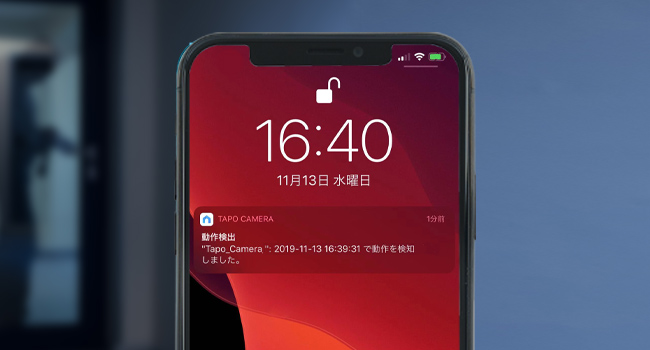
Image: A smartphone displaying a notification indicating motion detected by the Tapo camera.
4.5 Multi-Camera View
The Tapo app allows you to register up to 32 Tapo cameras and view up to 4 camera feeds simultaneously on a single screen, providing comprehensive monitoring.

Image: A smartphone screen displaying a four-way split view, showing live feeds from multiple Tapo cameras simultaneously.
4.6 Local Storage (MicroSD)
The camera supports microSD cards up to 512GB for local storage of recorded footage (microSD card sold separately). This allows for continuous 24-hour recording.

Image: Icons illustrating key features: encrypted cloud storage, continuous 24-hour recording, and playback functionality accessible via the app.
4.7 Voice Control Integration
The Tapo C200 is compatible with Amazon Alexa and Google Assistant, allowing you to control your camera and view live feeds using voice commands.

Image: A woman interacting with an Amazon Echo Show, demonstrating voice control to view the camera feed of a nursery.
5. Maintenance
- Cleaning: Use a soft, dry cloth to clean the camera lens and body. Avoid using harsh chemicals or abrasive cleaners.
- Firmware Updates: Regularly check for and install firmware updates via the Tapo app to ensure optimal performance, security, and access to new features.
- MicroSD Card Management: If using a microSD card, periodically check its status in the app. Note that certain microSD cards (e.g., SAMSUNG Evo Plus, TOPESEL) are not recommended due to potential compatibility issues and risk of damage.
6. Troubleshooting
| Issue | Possible Solution |
|---|---|
| Camera offline/disconnected | Check Wi-Fi connection, ensure camera is powered on, restart camera and router. |
| Poor video quality | Check network speed, ensure lens is clean, adjust video resolution in app. |
| Motion detection not working | Verify motion detection settings in app, check detection zone and sensitivity. |
| MicroSD card not recognized | Ensure card is inserted correctly, format card in app, try a different compatible card. |
7. Specifications
| Feature | Detail |
|---|---|
| Model Name | Tapo C200 |
| Video Capture Resolution | 1080p Full HD |
| Effective Pixels | 2.07 million pixels |
| Pan/Tilt Range | 360° Horizontal, 114° Vertical |
| Frame Rate | 15 fps |
| Connectivity Technology | Wi-Fi (Wireless) |
| Power Source | Corded Electric (9V, 5.4W) |
| Storage | MicroSD card slot (up to 512GB, sold separately) |
| Compatible Devices | Smartphones (iOS 10+, Android 4.4x+) |
| Controller Type | Android, Google Assistant, Amazon Alexa |
| Product Dimensions (LxWxH) | 8.7 x 8.5 x 11.8 cm |
| Item Weight | 118 g |
| Indoor/Outdoor Usage | Indoor |
| Waterproof Rating | IP65 (Note: This rating is typically for outdoor use, but the product is specified as indoor. Please refer to product packaging for definitive outdoor use.) |
8. Warranty and Support
The TP-Link Tapo C200 comes with a 3-year manufacturer's warranty. For technical support, warranty claims, or further assistance, please visit the official TP-Link support website or contact their customer service. You can find detailed support information and FAQs on the TP-Link website.
Official TP-Link Support: www.tp-link.com/support/


