
1. Introduction
Thank you for choosing the DAEWOO DCOOL12D 60W White Fan. This manual provides important information regarding the safe operation, installation, maintenance, and troubleshooting of your new fan. Please read this manual thoroughly before using the appliance and keep it for future reference.
2. Important Safety Instructions
Always follow basic safety precautions when using electrical appliances to reduce the risk of fire, electric shock, and injury to persons.
- Read all instructions before using this fan.
- Ensure the power supply matches the voltage specified on the fan's rating label (220V AC).
- Do not operate any fan with a damaged cord or plug. Discard fan or return to an authorized service facility for examination and/or repair.
- Do not run cord under carpeting. Do not cover cord with throw rugs, runners, or similar coverings. Arrange cord away from traffic area and where it will not be tripped over.
- Do not insert or allow fingers or foreign objects to enter any ventilation or exhaust opening as this may cause an electric shock or fire, or damage the fan.
- Do not use outdoors. This fan is designed for indoor use only.
- Always unplug the fan before moving, cleaning, or when not in use.
- Do not use the fan in wet or damp locations such as bathrooms or laundry areas.
- Keep the fan away from heat sources, open flames, and flammable materials.
- Supervise children when the fan is in use.
3. Product Overview
The DAEWOO DCOOL12D is a 60W floor fan designed to provide efficient air circulation. It features multiple speed settings, a timer function, and an oscillating grille for wide coverage.
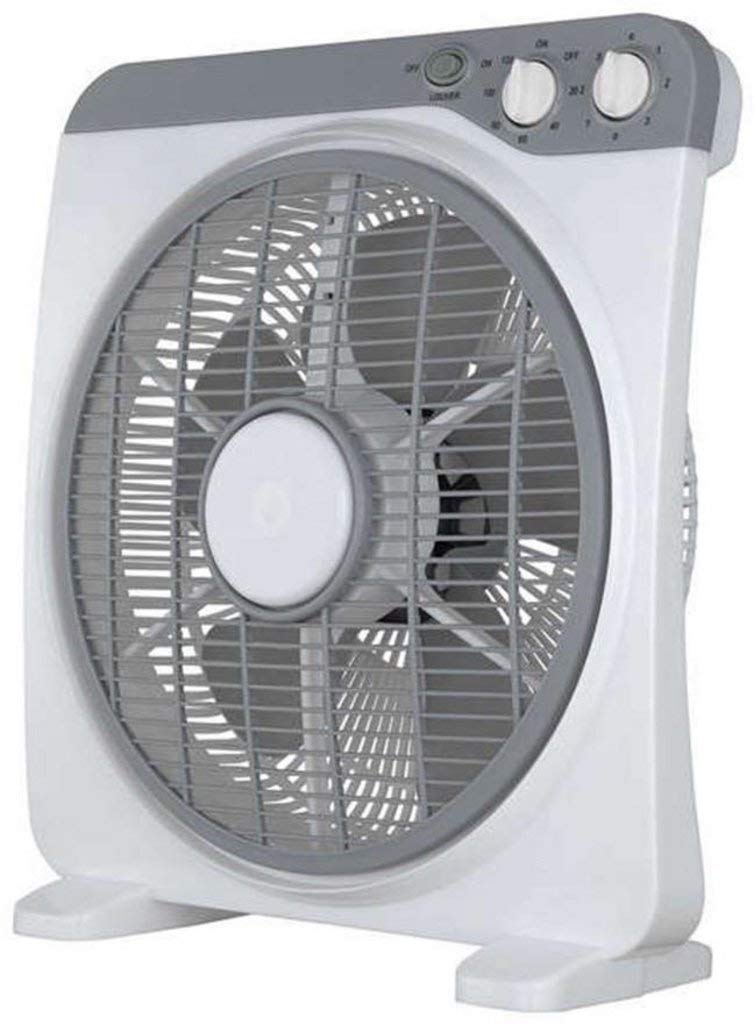
Figure 1: DAEWOO DCOOL12D 60W White Fan. This image shows the complete fan unit, including the base, stand, motor housing, and fan blades protected by the grille.
Components:
- Fan Head: Contains blades, motor, and protective grille.
- Control Panel: Buttons/knobs for speed, timer, and oscillation.
- Stand/Pole: Connects the fan head to the base.
- Base: Provides stability for the fan.
- Power Cord: For connecting to an electrical outlet.
4. Setup
4.1 Unpacking and Assembly
- Carefully remove all components from the packaging.
- Place the base on a flat, stable surface.
- Attach the stand to the base, ensuring it is securely fastened.
- Mount the fan head onto the top of the stand, securing it with the provided fasteners.
- Ensure all parts are correctly assembled and tightened before plugging in the fan.
4.2 Placement
Position the fan on a firm, level surface where it cannot be easily knocked over. Ensure there is adequate space around the fan for proper air circulation and to prevent obstruction of the air intake/outlet. Keep it away from curtains or other objects that could be drawn into the fan blades.
5. Operating Instructions
Before operating, ensure the fan is properly assembled and plugged into a 220V AC power outlet.
5.1 Power On/Off
- To turn on the fan, rotate the speed control knob or press the power button (depending on model variation) to your desired speed setting.
- To turn off the fan, rotate the speed control knob to the "OFF" position or press the power button again.
5.2 Speed Settings
The DCOOL12D fan offers 3 speed settings:
- Speed 1: Low speed for gentle air circulation.
- Speed 2: Medium speed for moderate cooling.
- Speed 3: High speed for maximum airflow.
Adjust the speed by rotating the control knob or pressing the corresponding button on the control panel.
5.3 Timer Function
The fan is equipped with a 120-minute timer. To set the timer:
- Rotate the timer knob to the desired operating duration (up to 120 minutes).
- The fan will automatically turn off once the set time has elapsed.
- To override the timer, turn the timer knob to the "ON" position (if available) or manually turn off the fan.
5.4 Oscillation
The fan features a 360° oscillating grille to distribute air across a wider area.
- To activate oscillation, press the oscillation button or pull up the oscillation knob located on the motor housing.
- To stop oscillation, press the oscillation button again or push down the oscillation knob.
6. Maintenance
Regular cleaning and proper storage will ensure the longevity and efficient operation of your fan.
6.1 Cleaning
- Always unplug the fan from the power outlet before cleaning.
- Use a soft, damp cloth to wipe the exterior surfaces of the fan. Do not use abrasive cleaners or solvents.
- To clean the fan blades, carefully remove the front grille (refer to assembly instructions for reverse steps if necessary). Wipe the blades with a soft cloth. Ensure the blades are completely dry before reattaching the grille.
- Do not immerse the fan in water or allow water to drip into the motor housing.
6.2 Storage
When not in use for extended periods, store the fan in its original packaging or cover it to protect it from dust. Store in a cool, dry place.
7. Troubleshooting
| Problem | Possible Cause | Solution |
|---|---|---|
| Fan does not turn on. | No power supply. Fan not plugged in correctly. Power switch is off. |
Check if the power outlet is working. Ensure the plug is fully inserted. Turn the power switch to an "ON" position. |
| Weak airflow. | Fan speed set too low. Grille or blades are dirty. Obstruction near the fan. |
Increase the fan speed setting. Clean the fan grille and blades (refer to Maintenance section). Remove any objects blocking the airflow. |
| Fan makes unusual noise. | Loose parts. Fan not on a level surface. Foreign object inside. |
Check for loose screws or components and tighten them. Place the fan on a stable, level surface. Unplug the fan and carefully inspect for any foreign objects. |
| Oscillation not working. | Oscillation function not activated. | Activate the oscillation function (refer to Operating Instructions section). |
If you encounter problems not listed above, or if the issue persists after attempting the solutions, please contact customer support.
8. Specifications
| Feature | Specification |
|---|---|
| Brand | Daewoo |
| Model | DCOOL12D |
| Power | 60 Watts |
| Voltage | 220 Volts (AC) |
| Product Weight | 4.5 kg |
| Fan Type | Floor Fan |
| Power Source | Corded Electric |
| Special Features | Timer (120 minutes) |
| Mounting Type | Floor Mount |
| Material | Plastic |
| Number of Speeds | 3 |
| Number of Blades | 3 |
| Oscillation | 360° Oscillating Grille |
9. Warranty and Support
9.1 Warranty Information
This product is covered by a manufacturer's warranty in accordance with local regulations. Please retain your proof of purchase for any warranty claims. The warranty typically covers defects in materials and workmanship under normal use. It does not cover damage resulting from misuse, accident, alteration, or unauthorized repair.
9.2 Customer Support
For technical assistance, service, or warranty inquiries, please contact your retailer or the authorized Daewoo service center in your region. Please have your model number (DCOOL12D) and proof of purchase ready when contacting support.
Manufacturer: Daewoo