
1. Introduction
Thank you for choosing the Suuonee Car MP5 Player. This device is designed to provide a comprehensive multimedia experience in your vehicle, featuring a 9-inch HD touchscreen, high-fidelity audio processing, and broad media format compatibility. This manual provides essential information for installation, operation, and maintenance to ensure optimal performance and longevity of your device.
2. Safety Information
- Professional Installation: It is highly recommended to have this product installed by a qualified professional to prevent damage to the device or your vehicle.
- Power Supply: Ensure the power supply voltage matches the requirements of the device (typically 12V DC). Incorrect voltage can cause damage.
- Wiring: Connect all wires correctly according to the wiring diagram. Improper connections can lead to malfunctions or electrical hazards.
- Driving Safety: Do not operate the device in a way that distracts you from driving. Always prioritize road safety.
- Temperature: Avoid exposing the device to extreme temperatures or direct sunlight for prolonged periods.
- Moisture: Keep the device away from water and excessive moisture to prevent electrical shock or damage.
- Protection Features: The device includes built-in protection against overload, overvoltage, and short circuits. Do not attempt to bypass these safety features.
3. Package Contents
Please check the package contents upon receipt. If any items are missing or damaged, contact your retailer.
- 1 x Suuonee Car MP5 Player
- 1 x Remote Control (battery not included)
- 2 x Wiring Harnesses
- 1 x Instruction Manual
4. Setup and Installation
Proper installation is crucial for the functionality and safety of your car MP5 player. It is strongly recommended to seek professional assistance for installation.
4.1 Wiring Diagram Overview
The device comes with two wiring harnesses. Refer to the detailed wiring diagram provided in the separate wiring manual or consult a professional installer. Key connections typically include:
- Power Wires: Constant 12V (Yellow), Accessory 12V (Red), Ground (Black).
- Speaker Wires: Connect to your vehicle's speakers (Front Left, Front Right, Rear Left, Rear Right).
- Antenna Wire: For radio reception.
- Reverse Camera Input: If applicable, for automatic display when reversing.
- USB/AUX Inputs: For external media devices.

Image: Rear view of the Suuonee Car MP5 Player, illustrating the various input and output connectors for power, speakers, and auxiliary devices. This image helps in identifying the connection points during installation.
4.2 Mounting the Unit
Securely mount the MP5 player into your vehicle's dashboard using the provided mounting brackets. Ensure it is firmly in place to prevent movement during driving.
5. Operating Instructions
This section details the basic functions and operations of your Suuonee Car MP5 Player.
5.1 Power On/Off and Basic Controls
- Power Button: Press and hold the power button (usually located on the front panel or side) to turn the device on or off. A short press may mute/unmute or switch modes.
- Volume Control: Use the volume buttons on the side panel or the remote control to adjust the audio level.
- Home Button: Returns to the main menu interface.
- Back Button: Navigates back to the previous screen or menu.

Image: The main user interface of the Suuonee Car MP5 Player, displaying various function icons such as USB, Card, Radio, Setup, AV IN, and A-Link. A remote control is also shown, indicating alternative control methods.
5.2 Media Playback (USB/SD Card)
Insert a USB drive or SD card into the designated slot. The player supports various audio formats including APE, FLAC, and DIS. Navigate to the 'USB' or 'CARD' icon on the main menu to access your media files.

Image: A close-up side view of the MP5 player, highlighting the USB port for media input, the RST (reset) button, and the MIC (microphone) input for hands-free calling.
5.3 Bluetooth Connectivity
To connect your mobile phone via Bluetooth:
- Go to the 'Bluetooth' menu on the MP5 player.
- Enable Bluetooth on your mobile phone and search for available devices.
- Select the MP5 player (usually named 'Car BT' or similar) from the list on your phone.
- Confirm the pairing code if prompted.
- Once connected, you can make/receive hands-free calls and stream audio.
5.4 Phone Mirroring (A-Link)
The device supports phone mirroring for Android phones (versions 4.4-8.1). This feature allows you to display your phone's screen on the MP5 player's display.
- Connect your Android phone to the MP5 player via a USB cable.
- Select the 'A-Link' option on the player's main menu.
- Follow the on-screen instructions to enable USB debugging or grant necessary permissions on your phone.
- Your phone's screen should now be mirrored on the player.

Image: An Android smartphone connected to the Suuonee Car MP5 Player via a USB cable, illustrating the phone mirroring functionality where the phone's display content is shown on the player's screen.
5.5 Radio Function
Select the 'Radio' icon from the main menu. You can scan for FM stations (frequency range 87.5MHz - 108MHz), save presets, and manually tune to desired frequencies.
6. Maintenance
- Cleaning the Screen: Use a soft, lint-free cloth to gently wipe the screen. Do not use abrasive cleaners or solvents.
- General Cleaning: Keep the unit free from dust and debris. Use a dry cloth for cleaning the exterior.
- Avoid Liquids: Do not spray liquids directly onto the unit.
- Fuse Replacement: If a fuse blows, replace it with one of the same type and rating. Refer to the wiring diagram for fuse locations.
7. Troubleshooting
If you encounter issues with your MP5 player, refer to the following common problems and solutions before contacting support.
| Problem | Possible Cause | Solution |
|---|---|---|
| No power | Incorrect wiring, blown fuse, vehicle power issue. | Check power connections, inspect fuses, ensure vehicle battery is charged. |
| No sound | Speaker wires disconnected, volume too low, incorrect audio source. | Verify speaker connections, increase volume, select correct audio input. |
| Screen unresponsive | Software glitch, static electricity. | Press the RST (Reset) button with a thin object. Power cycle the device. |
| Bluetooth not connecting | Bluetooth off on phone/player, device not discoverable, interference. | Ensure Bluetooth is enabled on both devices, make player discoverable, try re-pairing. |
| Poor radio reception | Antenna not connected, weak signal area, damaged antenna. | Check antenna connection, try in a different location, inspect antenna for damage. |
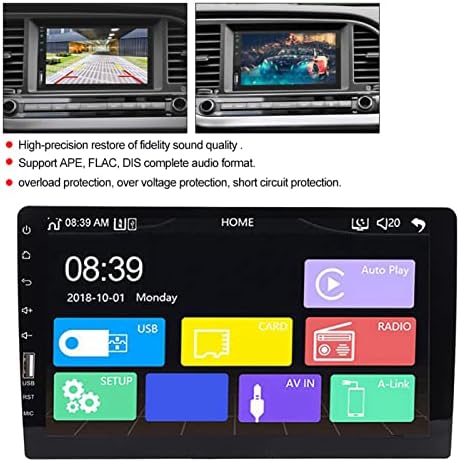
Image: A visual summary of the MP5 player's core features, including its high-fidelity sound restoration, support for APE, FLAC, and DIS audio formats, and integrated protection mechanisms against overload, overvoltage, and short circuits.
8. Specifications
| Feature | Specification |
|---|---|
| Model | 719234019701 |
| Screen Size | 9 inches |
| Screen Resolution | 1024 x 800 |
| Signal to Noise Ratio | 65dB |
| Frequency Response | 20Hz-20KHz |
| Max Output Power | 4 x 50W |
| Tone Control (Bass) | +/- 7dB (100Hz) |
| Tone Control (Treble) | +/- 7dB (20KHz) |
| FM Frequency Range | 87.5MHz - 108MHz |
| Radio Chip | QN8035 |
| Decoding Chip | C700 |
| Supported Audio Formats | APE, FLAC, DIS |
| DAC | 24-bit |
| Connectivity | Bluetooth, Wifi |
| Compatible Devices | Smartphone (Android 4.4-8.1 for mirroring) |
| Languages | English, Chinese, French, Portuguese, Spanish, Russian, German, Italian, etc. |
| Protection | Overload, Overvoltage, Short Circuit |
| Product Dimensions | 23 x 13 x 9 cm |
| Product Weight | 1.05 kg |
9. Warranty and Support
This product comes with a standard manufacturer's warranty. Please refer to the warranty card included in your package or contact your retailer for specific warranty terms and conditions.
For technical support, troubleshooting assistance beyond this manual, or inquiries about replacement parts, please contact Suuonee customer service through the retailer where you purchased the product or visit the official Suuonee website for contact information.