
Introduction
The BOSS DD-8 Digital Delay Guitar Effects Pedal is a versatile and feature-rich compact delay unit. It offers a wide range of delay sounds, extensive control options, and flexible connectivity for both mono and stereo setups. This manual provides essential information for setting up, operating, and maintaining your DD-8 pedal.
Key Features
- Most advanced BOSS compact series delay ever.
- Eleven versatile modes including standard digital delay, vintage echoes, shimmer, mod, looper, and more.
- Looper function with up to 40 seconds of recording time and overdub capability.
- Three-pedal operation for looper with external footswitches (sold separately).
- Three newly developed delay types: Warm, +RV (delay+reverb), and GLT (rhythmic delay).
- Up to 10 seconds of delay time available with tap tempo input.
Controls and Functions

Figure 1: Top view of the DD-8 pedal showing the control knobs and mode selector.
Control Knobs
- E.LEVEL: Adjusts the volume of the delay effect.
- F.BACK: Controls the number of repeats (feedback) of the delay.
- D.TIME: Sets the delay time.
- MODE: Selects the delay type.
Delay Modes
- LOOP: Activates the looper function for recording and overdubbing.
- ANALOG: Emulates the warm, organic sound of classic analog delays.
- STANDARD: Provides a clear, pristine digital delay.
- TAPE: Simulates the characteristic sound of vintage tape echo units.
- WARM: A newly developed mode offering a mild, warm digital delay.
- REVERSE: Plays the delay repeats in reverse.
- +RV (Delay+Reverb): Combines delay with a lush reverb effect.
- MOD: A digital delay with added modulation for a swirling, chorus-like effect.
- WARP: Creates unique, evolving delay textures by holding the footswitch.
- SHIM: Adds a shimmering, pitch-shifted effect to the delay repeats.
- GLT (Rhythmic Delay): Generates rhythmic, glitch-like delay repeats.
Video Demonstration: DD-8 Overview
This video provides an overview of the BOSS DD-8 Digital Delay Pedal, showcasing its various features and modes. It offers a visual and auditory demonstration of the pedal's capabilities.
Setup
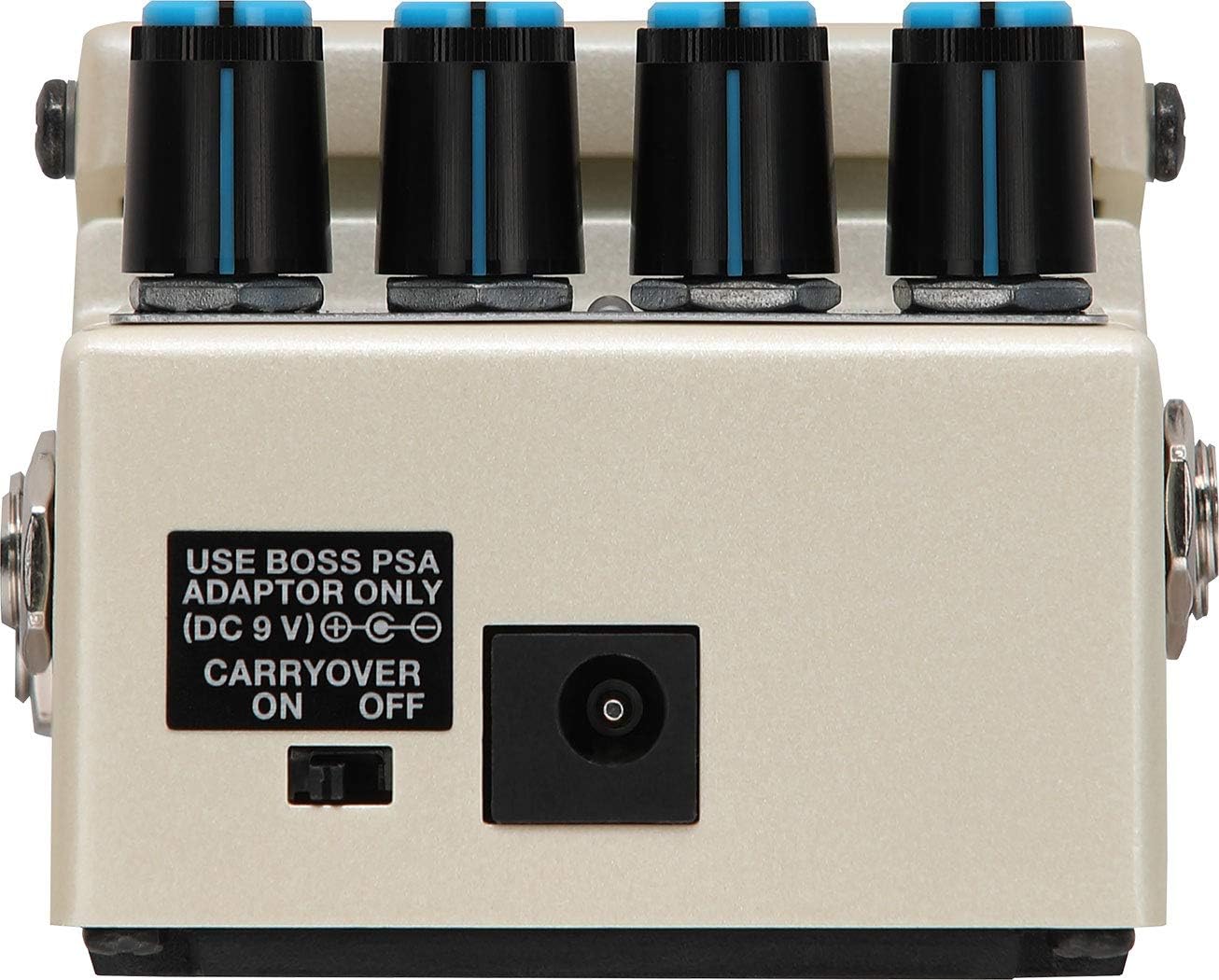
Figure 2: Back view of the DD-8 pedal showing the 9V DC power input.
Connections
- INPUT A (MONO) / INPUT B: Connect your guitar or other instrument here. Use INPUT A for mono input.
- OUTPUT A (MONO) / OUTPUT B: Connect to your amplifier or other effects. Use OUTPUT A for mono output.
- TEMPO / EXP: Connect an external footswitch for tap tempo control or an expression pedal for continuous parameter control.
Power Supply
- The DD-8 operates on a 9V DC power supply. Use a BOSS PSA adaptor for optimal performance.
- Alternatively, the pedal can be powered by a 9V battery (not included).
Operating
To activate the delay effect, press the footswitch. The CHECK indicator will light up. Press the footswitch again to bypass the effect. For specific mode operations like the looper or tap tempo, refer to the detailed instructions below.
Looper Operation
- Select the LOOP mode using the MODE knob.
- Press the footswitch once to start recording. The CHECK indicator will turn red.
- Press the footswitch again to stop recording and start playback. The CHECK indicator will turn green.
- To overdub, press the footswitch during playback. The CHECK indicator will blink red.
- To stop playback, press the footswitch twice quickly.
- To clear the loop, hold the footswitch for 2 seconds.
Tap Tempo
- In any delay mode (except LOOP), hold the footswitch for 2 seconds until the CHECK indicator blinks green.
- Tap the footswitch two or more times at your desired tempo.
- Hold the footswitch for 2 seconds again to exit tap tempo mode.
Maintenance
To ensure the longevity and optimal performance of your BOSS DD-8, keep the unit clean and free from dust. Use a soft, dry cloth for cleaning. Avoid exposing the pedal to extreme temperatures, humidity, or direct sunlight. Disconnect cables and remove the battery when not in use for extended periods.
Troubleshooting
If you experience any issues with your DD-8 pedal, first check all cable connections and ensure the power supply is correctly connected and functioning. If the problem persists, consult the full product manual available on the BOSS website or contact customer support.
Specifications
- Brand: BOSS
- Model Number: DD-8
- Product Dimensions: 3.8"L x 2.6"W x 5.95"H
- Item Weight: 0.49 Kilograms
- Voltage: 9 Volts
- Amperage: 300 Milliamps
- Audio Output Effects: Stereo
- Controls Type: Knob
- Power Source: Electric
- Hardware Interface: 1/4-inch Audio
- Signal Format: Analog
- Finish Type: Painted
- Connector Type: 1/4 inch (6.35mm) audio jack
Warranty and Support
The BOSS DD-8 Digital Delay Pedal comes with a 1-year manufacturer's warranty. For warranty claims, technical support, or further assistance, please refer to the contact information provided in your product packaging or visit the official BOSS website.


