
1. Introduction and Overview
The PELONIS 23" Oscillating Ceramic Tower Space Heater provides instant and directional warmth, ideal for small to medium rooms. It features an innovative and ultra-wide PTC energy-saving heating element designed for efficient heat distribution and rapid temperature improvement.
Key features include:
- Fast Heating: Reaches 70°F in 3 seconds using reliable ceramic heating technology.
- Safety Features: Constructed with high-quality cool-touch flame-resistant material, includes overheating and tip-over switch protection.
- Programmable Thermostat: Offers High (1500W), Low (900W), and ECO modes for customized temperature settings.
- User-Friendly Controls: Features touch control panel, remote control, 8-hour timer, and a convenient carry handle.
- Quiet Operation: Operates at a low noise level of 50dB.
- Wide Oscillation: Provides 70-degree oscillation for broad heat distribution.

Figure 1: PELONIS 23-inch Ceramic Tower Heater with remote control and visual representation of heat distribution.
2. Setup
This appliance is designed for ease of use and typically requires minimal setup. Please follow these general guidelines:
- Unpacking: Carefully remove the heater from its packaging. Retain packaging materials for future storage or transport.
- Placement: Place the heater on a firm, level surface. Ensure it is positioned away from walls, furniture, curtains, and other combustible materials to allow for proper airflow and prevent fire hazards. Do not place it on soft surfaces like rugs or carpets that could block air intake.
- Power Connection: Ensure the power cord is fully extended and plug the heater directly into a standard 110 Volt US electrical outlet. Do not use extension cords or power strips.
- Initial Inspection: Before first use, inspect the heater for any signs of damage. If any damage is observed, do not operate the unit and contact customer support.
3. Operating Instructions
The PELONIS Ceramic Tower Heater offers various settings for optimal comfort and energy efficiency.
3.1 Powering On/Off
- To power on, press the Power button on the control panel or remote control. The display will illuminate.
- To power off, press the Power button again. The heater will enter a cool-down phase before completely shutting off.
3.2 Heat Settings
Select your desired heat output:
- High (1500W): For maximum heat output and rapid warming.
- Low (900W): For moderate heat and energy saving.
- ECO Mode: Automatically adjusts heat output (between 900W and 1500W) to maintain the set temperature, optimizing energy consumption.

Figure 2: ECO Mode functionality for energy saving.
3.3 Thermostat Control
Set your desired room temperature between 40°F and 95°F. The heater will cycle on and off to maintain this temperature.
- Use the '+' and '-' buttons on the control panel or remote to adjust the temperature.

Figure 3: Precise temperature control from 40°F to 95°F.
3.4 Oscillation Function
Activate the oscillation feature to distribute warm air across a wider area (70-degree oscillation).
- Press the Oscillation button on the control panel or remote to turn oscillation on or off.

Figure 4: Wide-angle oscillation for comprehensive warmth.
3.5 Timer Function
Set the heater to operate for a specific duration up to 8 hours.
- Press the Timer button repeatedly to select the desired operating time.
3.6 Remote Control
All functions available on the control panel can also be operated using the included remote control.
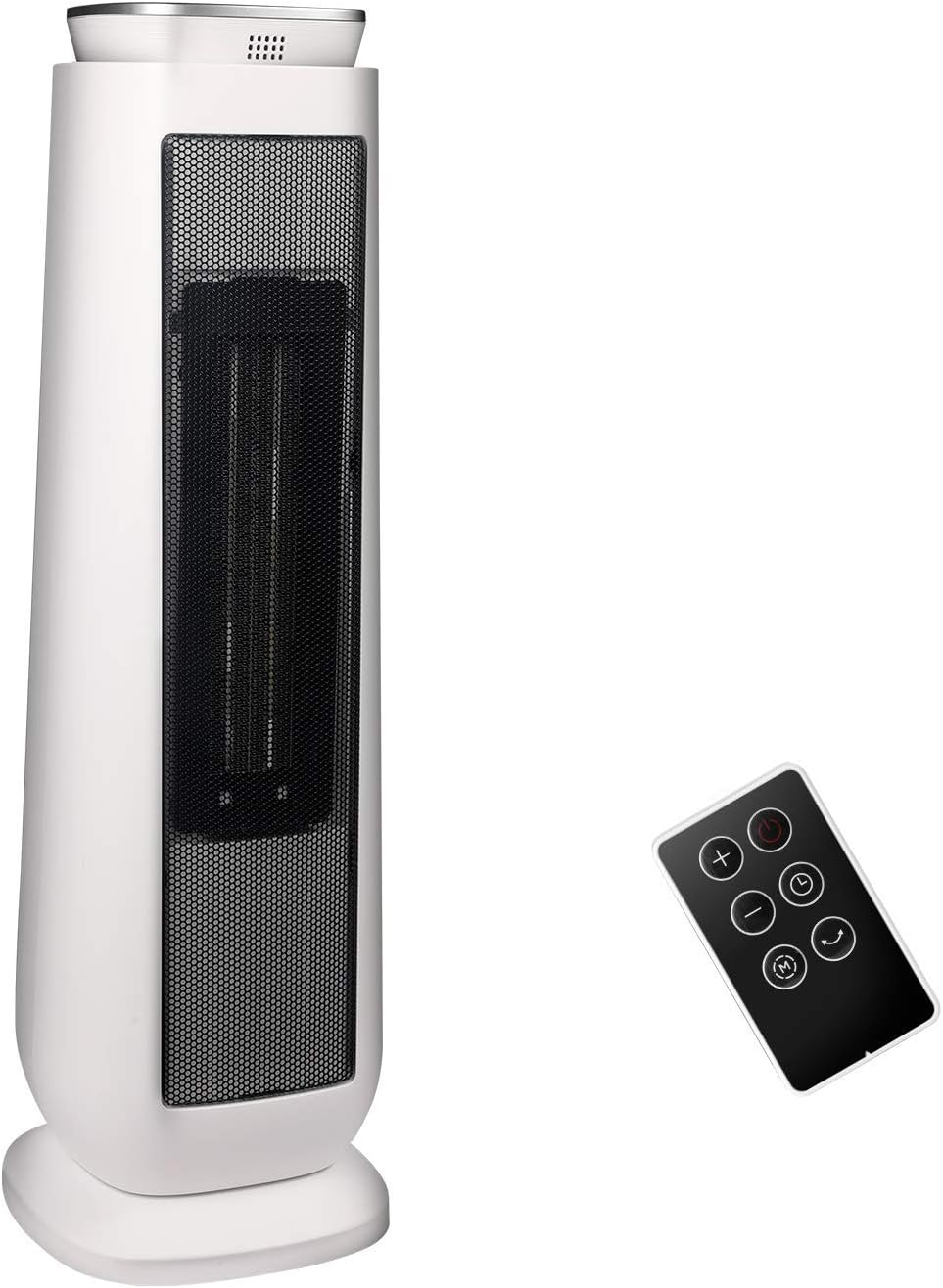
Figure 5: Remote control for convenient operation.
4. Maintenance
Regular maintenance ensures optimal performance and longevity of your heater.
- Cleaning: Always unplug the heater before cleaning. Use a soft, damp cloth to wipe the exterior surfaces. Do not use abrasive cleaners or allow water to drip into the interior.
- Storage: When not in use, store the heater in a cool, dry place. It is recommended to store it in its original packaging to protect it from dust and damage.
- Air Intake/Outlet: Periodically check the air intake and outlet grilles for dust or lint accumulation. Use a vacuum cleaner with a brush attachment to gently remove any debris.
5. Troubleshooting
If you encounter issues with your PELONIS heater, refer to the following common troubleshooting tips:
- Heater does not turn on:
- Ensure the power cord is securely plugged into a working electrical outlet.
- Check if the household circuit breaker has tripped.
- Verify the power button is pressed and the unit is not in standby mode.
- Confirm the tip-over switch has not been activated (if the unit was bumped or moved).
- No heat output:
- Check the selected heat setting (High, Low, ECO).
- Adjust the thermostat setting to a temperature higher than the current room temperature.
- Ensure the air intake and outlet grilles are not blocked.
- Unit shuts off unexpectedly:
- This may be due to the overheating protection feature. Unplug the unit, allow it to cool down for 30 minutes, and then restart.
- Ensure the heater is on a stable, flat surface to prevent the tip-over switch from activating.
For issues not covered here, please contact customer support.
6. Specifications
| Feature | Detail |
|---|---|
| Brand | PELONIS |
| Model Number | PHTPU1501 |
| Color | White |
| Form Factor | Tower |
| Product Dimensions | 7.17"D x 7.17"W x 22.95"H |
| Item Weight | 6.1 pounds |
| Fuel Type | Electric |
| Voltage | 110 Volts |
| Maximum Energy Usage | 1500 Watts |
| Heating Levels | High (1500W), Low (900W), ECO Mode |
| Temperature Range | 40°F to 95°F |
| Oscillating Angle | 70 degrees |
| Heating Coverage | 106-167 sq. ft. (up to 200 sq. ft. with oscillation) |
| Max Noise Level | 52 dB (advertised as 50dB working noise) |
| Timer | Up to 8 hours |
| Safety Features | Overheating protection, Tip-over switch protection, Flame-resistant material, ETL Certified |
7. Safety Information
Your safety is paramount. This PELONIS heater is designed with multiple safety features:
- Overheating Protection: The heater will automatically shut off if it detects an internal temperature that is too high.
- Tip-Over Switch Protection: The unit will automatically turn off if it is accidentally knocked over.
- Flame-Resistant Material: Constructed from high-quality, cool-touch, flame-resistant materials for enhanced safety.
- ETL Certified: This product is ETL certified, ensuring it meets recognized safety standards.
- Always plug directly into a wall outlet. Avoid using extension cords or power strips.
- Do not cover the heater or block its air intake/outlet.
- Keep children and pets away from the heater.

Figure 6: Overview of safety features including tip-over and overheat protection.
8. Official Product Video
Video 1: Official product video demonstrating the Pelonis Digital Tower Heater (Model PHTPU1501) features and operation.
9. Warranty and Support
Pelonis, as the manufacturer, offers a 1-Year manufacturer's warranty with your purchase. This warranty covers defects in materials and workmanship under normal use.
For any questions, concerns, or warranty claims, please feel free to contact Pelonis customer support at any time. Refer to the contact information provided in your product packaging or on the official Pelonis website.


