Product Overview
The adidas RPT-01 Bluetooth Sport On-Ear Headphones are engineered for performance and durability, making them ideal for training and active lifestyles. They deliver clear, powerful sound and boast an impressive battery life to keep your music going through long workouts and beyond.
Key Features:
- Sweat proof & Water resistant (IPX4)
- Up to 40 hours of playtime
- Intuitive control knob for easy interaction
- Bluetooth 5.0 connectivity
- Washable ear cushions and inner headband for hygiene

Image: The adidas RPT-01 headphones in Night Grey, showcasing their on-ear design and textured headband.
What's in the Box
Your adidas RPT-01 package includes the following components:
- adidas RPT-01 Headphones Unit
- USB-C Charging Cable
- Quick Start Guide
- Legal and Safety Information

Image: All components included in the adidas RPT-01 box: the headphones, USB-C charging cable, and removable, washable ear cushions and headband padding.
Setup
Charging the Headphones
Before first use, fully charge your RPT-01 headphones. A full charge ensures optimal battery performance and longevity.
- Locate the USB-C charging port on the headphones.
- Connect the supplied USB-C charging cable to the headphones and to a compatible USB power source (e.g., wall adapter, computer USB port).
- The LED indicator on the headphones will show charging status and turn off or change color when fully charged.
Bluetooth Pairing
Follow these steps to connect your RPT-01 headphones to your Bluetooth-enabled device:
- Ensure the headphones are powered off.
- Press and hold the multi-directional control knob on the right ear cup for approximately 3 seconds until the LED indicator begins to flash rapidly, indicating pairing mode.
- On your audio device (smartphone, tablet, computer), enable Bluetooth and search for available devices.
- Select "adidas RPT-01" from the list of found devices.
- Once successfully paired, the LED indicator will glow solid blue.
Using the adidas Headphones App
For enhanced control and customization, download the official adidas Headphones app from your device's app store. The app allows you to:
- Adjust equalizer settings.
- Customize the action button functionality.
- Receive firmware updates.
- Monitor battery status.
Operation
Control Knob Functions
The multi-directional control knob on the right ear cup provides intuitive control over your audio and calls:
- Short Press: Play/Pause audio, Answer/End calls.
- Long Press: Power On/Off, Initiate Bluetooth pairing.
- Push Up/Down: Adjust volume (Volume Up/Volume Down).
- Push Left/Right: Skip tracks (Previous Track/Next Track).
Action Button
The dedicated action button on the left ear cup can be programmed via the adidas Headphones app to perform various functions, such as launching a specific music service or voice assistant.
Wearing the Headphones
Adjust the headband to ensure a snug yet comfortable fit. The RPT-01's design is optimized for stability during dynamic movements, making them suitable for various sports and activities.
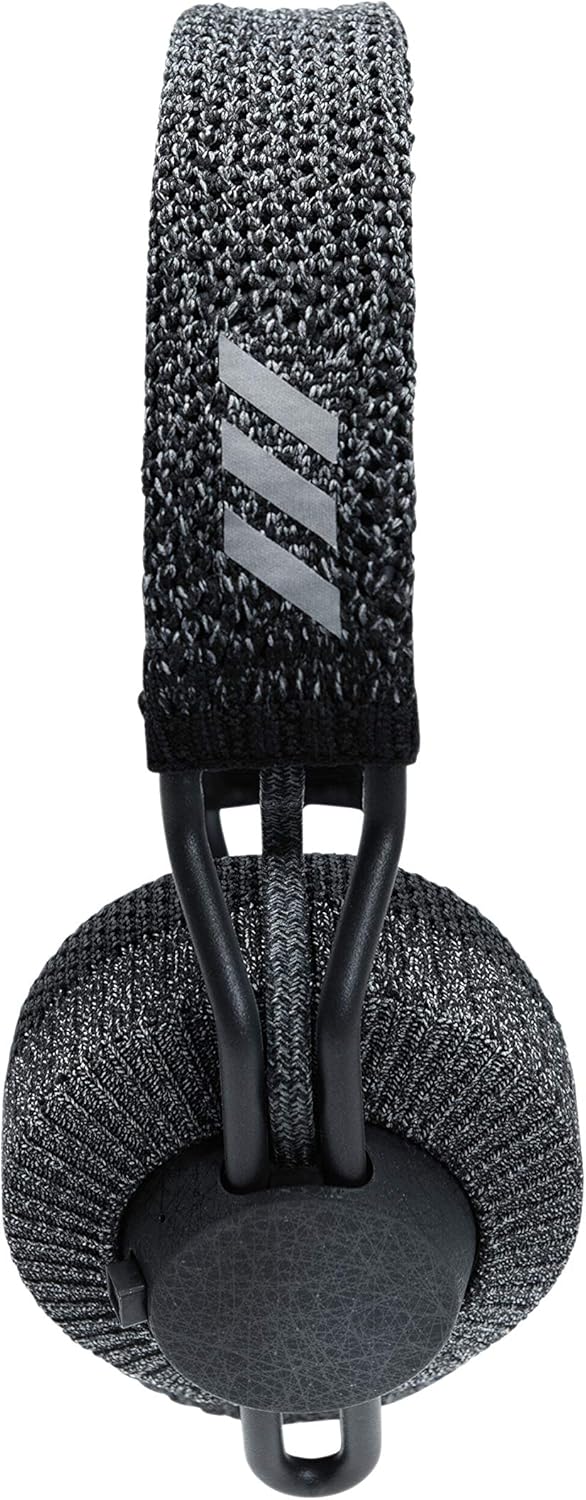
Image: A top-down view of the adidas RPT-01 headphones, highlighting the adjustable, textured headband and the adidas logo.
Care and Maintenance
Cleaning Washable Components
The RPT-01 features removable and washable ear cushions and inner headband for easy cleaning after intense workouts.
- Gently detach the ear cushions and inner headband from the headphone frame. Refer to the quick start guide or adidas Headphones app for detailed removal instructions.
- Hand wash the components with mild soap and cool water. Avoid using harsh detergents or abrasive cleaners.
- Rinse thoroughly and allow the components to air dry completely before reattaching them to the headphones. Ensure they are fully dry to prevent moisture damage.
General Care
- Wipe the main body of the headphones with a soft, damp cloth as needed.
- Avoid exposing the headphones to extreme temperatures, direct sunlight, or excessive humidity.
- Store the headphones in a clean, dry place when not in use.
Troubleshooting
If you encounter issues with your adidas RPT-01 headphones, consult the table below for common problems and solutions.
| Issue | Possible Cause | Solution |
|---|---|---|
| Headphones do not power on | Low or depleted battery | Charge the headphones using the supplied USB-C cable. |
| Cannot pair with Bluetooth device | Headphones not in pairing mode; Device Bluetooth is off; Interference | Ensure headphones are in pairing mode (long press control knob). Verify Bluetooth is enabled on your device. Move closer to the device and away from other wireless signals. |
| Poor sound quality or intermittent connection | Weak Bluetooth signal; Obstructions; Dirty ear cushions | Ensure your device is within the effective range (up to 10 meters). Remove any physical obstructions. Clean the ear cushions as per maintenance instructions. |
| Controls not responding | Temporary software glitch; Low battery | Restart the headphones by powering them off and on. Ensure the headphones are sufficiently charged. Check the adidas Headphones app for any available firmware updates. |
For more detailed troubleshooting or persistent issues, please refer to the adidas Headphones app or visit the official adidas support website.
Technical Specifications
| Feature | Detail |
|---|---|
| Model Name | Adidas RPT-01 Bluetooth Sport On-Ear Headphones |
| Model Number | 1002737 |
| Connectivity Technology | Bluetooth 5.0 |
| Battery Life | Up to 40 hours playtime |
| Water Resistance Level | IPX4 (Sweat proof & Water resistant) |
| Item Weight | 215 Grams (7.6 ounces) |
| Product Dimensions | 2.8 x 5.59 x 7.52 inches |
| Included Components | Unit, USB-C charging cable, Quick start guide, Legal and Safety information |
| Control Type | Control knob, Action button, App |
| Manufacturer | Zound Industries |
| UPC | 840028440446 |
Warranty and Support
For detailed warranty information, product registration, and customer support, please refer to the legal and safety documentation included with your adidas RPT-01 headphones. You can also visit the official adidas support website for frequently asked questions, software downloads, and contact information.
Keep your proof of purchase for any warranty claims.


