
1. Introduction
This manual provides detailed instructions for the proper use and care of your Casio MTP-E202-3AVDF analog watch. Please read this manual thoroughly to ensure correct operation and to maximize the lifespan of your timepiece. Keep this manual for future reference.
2. Product Overview
The Casio MTP-E202-3AVDF is a robust analog watch featuring a round case, a grey dial, and a durable fabric band. It includes a day and date display, an illuminator function for low-light visibility, and is water-resistant up to 50 meters.
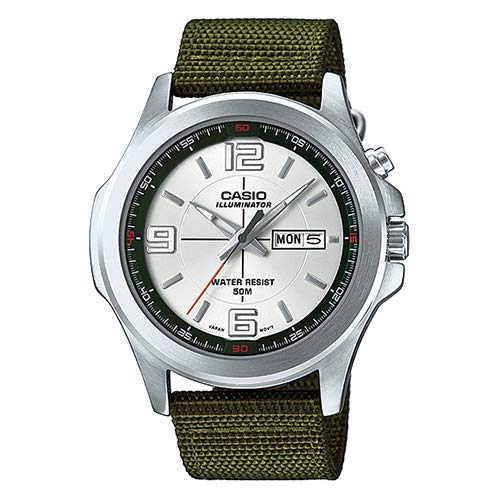
Figure 2.1: Front view of the Casio MTP-E202-3AVDF watch. This image displays the watch with its round silver-tone case, grey dial with clear hour markers, day and date display at the 3 o'clock position, and a green fabric strap. The watch face also indicates "CASIO ILLUMINATOR" and "WATER RESIST 50M".
Key Features:
- Model Number: MTP-E202-3AVDF
- Display Type: Analog
- Movement: Quartz
- Case Shape: Round
- Band Material: Fabric
- Water Resistance: 50 meters (5 ATM)
- Functions: Time (Hour, Minute, Second), Day, Date, Illuminator
3. Setup and Initial Settings
Before using your watch, it is necessary to set the correct time and date.
3.1 Setting the Time
- Pull the crown out to the second click position. The second hand will stop.
- Rotate the crown to move the hour and minute hands to the desired time. Ensure AM/PM is correctly set if your watch has a 24-hour indicator or if setting the date.
- Push the crown back in to the normal position. The second hand will resume movement.
3.2 Setting the Day and Date
- Pull the crown out to the first click position.
- Rotate the crown clockwise to adjust the date.
- Rotate the crown counter-clockwise to adjust the day of the week.
- Once the correct day and date are displayed, push the crown back in to the normal position.
Note: Avoid setting the date between 9:00 PM and 1:00 AM, as this may interfere with the automatic date change mechanism. If you need to set the date during this period, first set the time to outside this range, adjust the date, and then reset the time.
4. Operating the Watch
4.1 Illuminator Function
Your Casio MTP-E202-3AVDF watch is equipped with an illuminator for enhanced visibility in low-light conditions. To activate the illuminator, press the button located on the side of the watch case (typically at the 2 o'clock position, or indicated by a light bulb icon). The dial will illuminate for a few seconds.
4.2 Water Resistance
This watch is water-resistant up to 50 meters (5 ATM). This means it is suitable for everyday use and can withstand splashes, rain, and brief immersion in water. However, it is not suitable for swimming, diving, or showering with hot water, as steam and direct water pressure can compromise the seals. Do not operate the crown or buttons while the watch is wet or submerged.
5. Maintenance and Care
Proper maintenance ensures the longevity and optimal performance of your watch.
5.1 Cleaning
- Watch Case and Glass: Wipe regularly with a soft, dry cloth. For stubborn dirt, a slightly damp cloth can be used, followed by a dry cloth.
- Fabric Band: The fabric band can be gently cleaned with a mild soap solution and a soft brush. Rinse thoroughly with clean water and allow it to air dry completely before wearing. Avoid harsh chemicals or excessive scrubbing.
5.2 Battery Replacement
The watch is powered by a button-cell battery. When the watch stops or the illuminator becomes dim, the battery may need replacement. Battery replacement should be performed by a qualified watch technician or an authorized Casio service center to ensure proper sealing and water resistance integrity.
5.3 Storage
When not in use, store your watch in a cool, dry place away from direct sunlight, extreme temperatures, and strong magnetic fields.
6. Troubleshooting
| Problem | Possible Cause | Solution |
|---|---|---|
| Watch has stopped or runs intermittently. | Low battery. | Have the battery replaced by a professional. |
| Time or date is incorrect. | Time/date not set correctly or crown accidentally pulled out. | Refer to Section 3.1 and 3.2 to reset the time and date. Ensure the crown is fully pushed in. |
| Illuminator is dim or not working. | Low battery. | Have the battery replaced by a professional. |
| Condensation inside the watch glass. | Exposure to extreme temperature changes or compromised water resistance. | Seek immediate professional service to prevent internal damage. |
7. Specifications
- Model: MTP-E202-3AVDF
- Manufacturer: Casio
- Movement: Quartz
- Display: Analog (Hour, Minute, Second, Day, Date)
- Water Resistance: 50 meters (5 ATM)
- Case Material: Stainless Steel
- Band Material: Fabric
- Dial Color: Grey
- Illumination: Illuminator LED
- Battery Type: Button-cell
8. Warranty and Support
Your Casio watch is covered by a manufacturer's warranty. For specific warranty terms and conditions, please refer to the warranty card included with your purchase or visit the official Casio website for your region. For technical support, repairs, or genuine replacement parts, please contact an authorized Casio service center.
Official Casio Website: www.casio.com
