
1. Introduction
Thank you for choosing the OMAX LCD-M283 Digital Watch. This manual provides detailed instructions to help you understand and operate your watch effectively. Please read this manual carefully before using your watch to ensure proper function and longevity.
2. Product Overview
The OMAX LCD-M283 is a stylish unisex digital watch featuring a rectangular metal case and a durable metal strap. It offers a clear digital display with time, date, alarm, and chronograph functions. Its robust construction is designed for everyday wear.
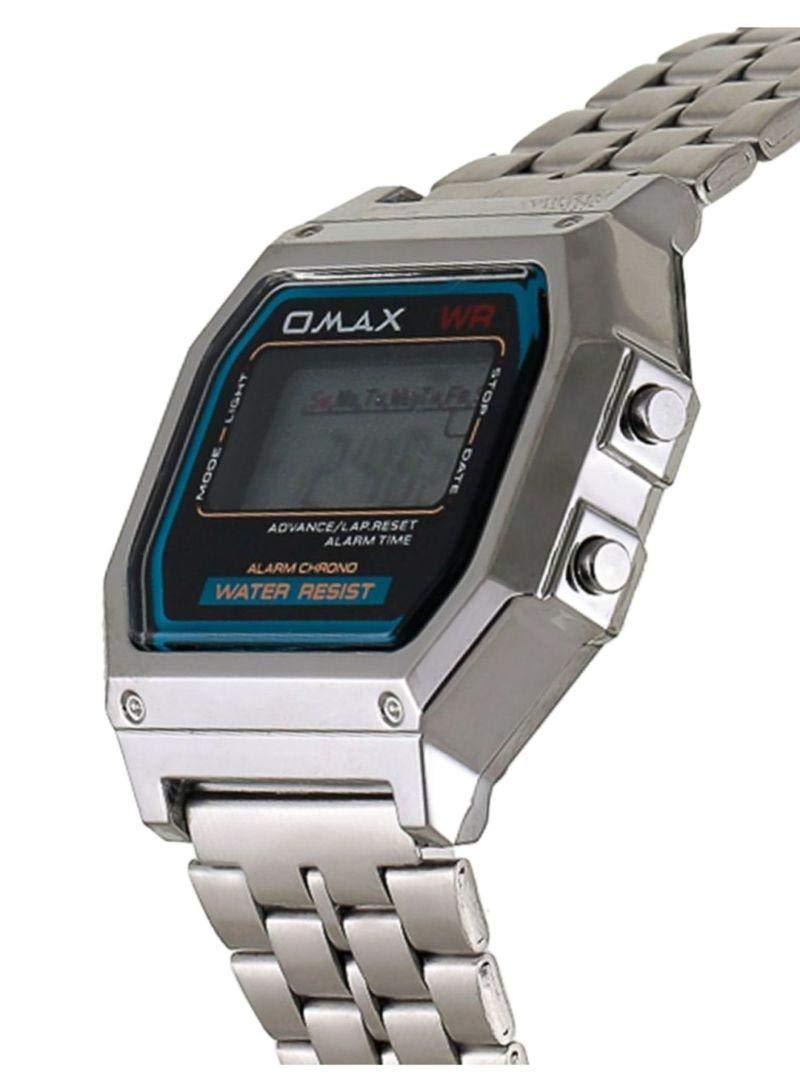
Figure 1: Front view of the OMAX LCD-M283 Digital Watch. This image shows the watch's rectangular silver-toned case, metal strap, and the digital display indicating time, day of the week, and function labels like 'ALARM CHRONO' and 'WATER RESIST'.
Key Features:
- Rectangular watch shape
- Metal band material
- Digital display type
- Unisex design
- Alarm and Chronograph functions
- Water resistance
3. Setup
Button Functions:
- MODE/LIGHT: Cycles through modes (Time, Alarm, Chronograph) and activates backlight.
- ADVANCE/LAP.RESET: Adjusts values during setting, or acts as Lap/Reset in Chronograph mode.
- STOP/DATE: Stops functions or displays the current date.
Setting Time and Date:
- From the normal time display, press the MODE/LIGHT button repeatedly until the time setting mode is activated (usually indicated by flashing digits).
- Use the ADVANCE/LAP.RESET button to adjust the flashing hour digit.
- Press the MODE/LIGHT button again to move to the minute digits, then use ADVANCE/LAP.RESET to adjust.
- Continue pressing MODE/LIGHT to cycle through setting seconds, month, date, and day of the week, adjusting each with ADVANCE/LAP.RESET.
- Once all settings are correct, press the MODE/LIGHT button to exit the setting mode and return to the normal time display.
4. Operating Instructions
Viewing Time and Date:
- The current time is displayed by default.
- To view the date, briefly press the STOP/DATE button. The date will display for a few seconds before returning to the time.
Using the Alarm:
- Press the MODE/LIGHT button until you reach the Alarm mode (indicated by 'AL' or a bell icon).
- Press and hold the MODE/LIGHT button until the alarm hour digits begin to flash.
- Use the ADVANCE/LAP.RESET button to set the desired alarm hour.
- Press MODE/LIGHT to move to the alarm minute digits, then use ADVANCE/LAP.RESET to set.
- Press MODE/LIGHT to exit alarm setting.
- To turn the alarm ON/OFF, in Alarm mode, press the ADVANCE/LAP.RESET button. An alarm icon will appear/disappear.
- When the alarm sounds, press any button to stop it.
Using the Chronograph (Stopwatch):
- Press the MODE/LIGHT button until you reach the Chronograph mode (indicated by 'CH' or 'STOPWATCH').
- Press ADVANCE/LAP.RESET to start the stopwatch.
- Press ADVANCE/LAP.RESET again to pause the stopwatch.
- Press STOP/DATE to reset the stopwatch to zero.
Activating Backlight:
Press and hold the MODE/LIGHT button briefly to illuminate the display in low-light conditions.
5. Maintenance
- Cleaning: Wipe the watch with a soft, dry cloth. For stubborn dirt, a slightly damp cloth can be used, followed by drying. Avoid harsh chemicals.
- Water Resistance: The watch is water-resistant. This means it can withstand splashes or brief immersion in water, but it is not suitable for swimming, diving, or hot showers. Do not operate buttons while the watch is wet.
- Battery Replacement: When the display becomes dim or functions become erratic, the battery may need replacement. This should be performed by a qualified watch technician to ensure water resistance is maintained.
- Storage: Store your watch in a cool, dry place away from direct sunlight and extreme temperatures.
6. Troubleshooting
| Problem | Possible Cause | Solution |
|---|---|---|
| Display is blank or dim. | Low battery. | Replace the battery. |
| Time is incorrect. | Time needs to be reset. | Follow the "Setting Time and Date" instructions in Section 3. |
| Alarm does not sound. | Alarm is not activated or set incorrectly. | Ensure the alarm is set and turned ON (alarm icon visible). |
| Buttons are unresponsive. | Watch may be wet or battery is very low. | Ensure watch is dry. If problem persists, replace battery. |
7. Specifications
| Feature | Detail |
|---|---|
| Brand | OMAX |
| Model Number | LCD-M283 |
| Display Type | Digital |
| Movement | Quartz |
| Case Material | Metal |
| Band Material | Metal |
| Band Color | Silver |
| Dial Color | Grey |
| Case Shape | Rectangular |
| Case Diameter | 26 mm |
| Band Width | 18 mm |
| Clasp Type | Tang Buckle |
| Target Group | Unisex (Adult) |
| Water Resistance | Yes (General water resistance, not for swimming/diving) |
8. Warranty and Support
This product is covered by the standard manufacturer's warranty. Please refer to the warranty card included with your purchase for specific terms and conditions. For technical support, service, or warranty claims, please contact your retailer or the OMAX customer service department.
Keep your purchase receipt as proof of purchase for warranty purposes.