
1. Introduction
The JOYO JT-09 Clip-On Digital Electronic Tuner is a compact and precise tuning device designed for a variety of string instruments. Its highly sensitive vibration sensor ensures accurate tuning even in noisy environments. This manual provides essential information for the proper setup, operation, and maintenance of your JT-09 tuner.
Compatible Instruments: Guitar, Bass, Ukulele, Violin, Mandolin, Banjo, and other string instruments (via Chromatic mode).

Figure 1: JOYO JT-09 Clip-On Digital Electronic Tuner
2. Safety Information
- Keep the device away from water or excessive moisture.
- Avoid extreme temperatures.
- Do not attempt to disassemble or modify the tuner.
- Dispose of batteries responsibly according to local regulations.
3. Package Contents
Please check that all items are present in your package:
- 1 x JOYO JT-09 Clip-On Digital Electronic Tuner
- 1 x CR2032 Battery
- 1 x User Manual (this document)
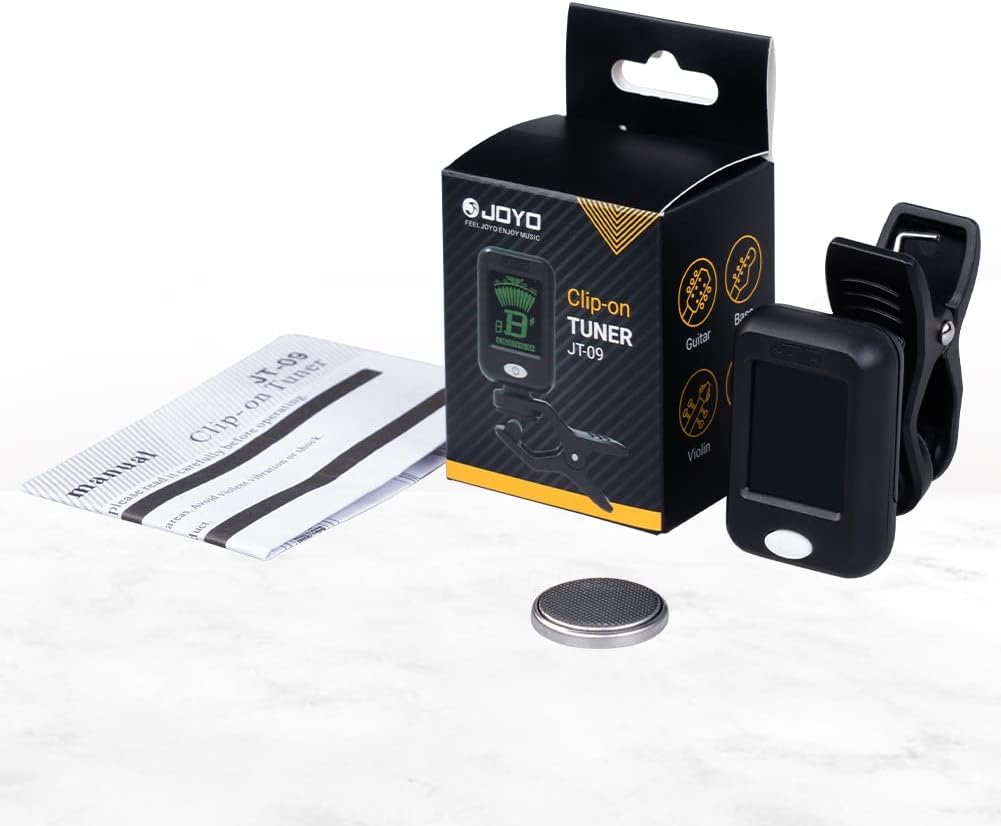
Figure 2: Package Contents
4. Product Overview
4.1 Key Features
- High Sensitivity: Accurate tuning via vibration sensor.
- Multi-Instrument Support: Chromatic, Guitar, Bass, Ukulele, Violin modes.
- Clear LCD Display: Easy-to-read screen with color-changing backlight (blue for flat/sharp, green for in-tune).
- Flexible Design: 360-degree rotatable and 135-degree tilted clip for optimal viewing angle.
- Durable Clamp: High-quality rubber clamp protects your instrument's finish.
- Power Saving: Automatic shut-off after 5 minutes of inactivity.
4.2 Components

Figure 3: Power/Mode Button and Rubber Clamp
- Display Screen: Shows note name, string number, and tuning indicator.
- Power / Mode Button: Long press to turn ON/OFF, short press to change tuning mode.
- Clip: Attaches to the instrument's headstock.
- Swivel Joint: Allows for rotation and tilting of the display.

Figure 4: Flexible Viewing Angles
5. Setup
5.1 Battery Installation
- Open the battery compartment cover on the back of the tuner.
- Insert one CR2032 battery with the positive (+) side facing up.
- Close the battery compartment cover securely.
5.2 Attaching the Tuner
- Gently open the clip.
- Attach the tuner securely to the headstock of your instrument. Ensure the rubber pads make good contact with the instrument's surface to protect it and allow for accurate vibration detection.
- Adjust the display angle using the swivel joint for optimal visibility.
6. Operation
6.1 Power On/Off
- To Power On: Long press the Power / Mode button for approximately 2 seconds.
- To Power Off: Long press the Power / Mode button for approximately 2 seconds.
- The tuner will automatically shut off after 5 minutes of no signal input to conserve battery life.
6.2 Mode Selection
After powering on, short press the Power / Mode button repeatedly to cycle through the available tuning modes:
- C (Chromatic): Tunes all notes.
- G (Guitar): Standard guitar tuning.
- B (Bass): Standard bass tuning.
- V (Violin): Standard violin tuning.
- U (Ukulele): Standard ukulele tuning.

Figure 5: Multi-Instrument Compatibility
6.3 Tuning Process
- Select the appropriate tuning mode for your instrument.
- Pluck a single string on your instrument. The tuner will detect the vibration and display the note name and string number.
- Observe the display:
- If the display is blue and the needle points to the left, the note is flat. Tighten the string.
- If the display is blue and the needle points to the right, the note is sharp. Loosen the string.
- If the display turns green and the needle is centered, the note is in tune.
- Repeat for all strings until your instrument is fully tuned.

Figure 6: Tuning Display Indicators
7. Maintenance
7.1 Cleaning
Wipe the tuner with a soft, dry cloth. Do not use abrasive cleaners or solvents.
7.2 Battery Replacement
When the display becomes dim or the tuner does not respond, it is time to replace the battery. Follow the battery installation steps in Section 5.1.
7.3 Storage
Store the tuner in a dry place, away from direct sunlight and extreme temperatures, when not in use for extended periods.
8. Troubleshooting
| Problem | Possible Cause | Solution |
|---|---|---|
| Tuner does not power on. | Dead or incorrectly installed battery. | Replace the CR2032 battery or ensure it is installed correctly. |
| Inaccurate tuning. | Incorrect tuning mode selected; tuner not securely clipped; excessive ambient noise. | Verify the correct tuning mode. Re-clip the tuner firmly to the instrument's headstock. Tune in a quieter environment. |
| Display is dim or flickering. | Low battery. | Replace the CR2032 battery. |
| Tuner does not detect notes. | Tuner not securely clipped; instrument not vibrating sufficiently. | Ensure the tuner is firmly clipped. Pluck strings more assertively. |
9. Specifications

Figure 7: JOYO JT-09 Specifications
- A4 Frequency: 440Hz
- Tuning Items: Chromatic (C), Guitar (G), Bass (B), Violin (V), Ukulele (U)
- Tuning Range: 0A (27.5Hz) - 8C (4186.01Hz)
- Precision: ±1 cent
- Weight: Approximately 19.6g (0.69 oz)
- Dimensions: 50(L) x 26(W) x 76(H) mm (1.97 x 1.02 x 2.99 inches)
- Power: 1 x CR2032 Battery
- Auto Shut-off: 5 minutes
- Material: Environmentally friendly ABS plastic
10. Warranty and Support
JOYO products are manufactured to high-quality standards. For warranty information and customer support, please refer to the official JOYO website or contact your local distributor. Keep your purchase receipt as proof of purchase.
For further assistance, please visit the JOYO Official Store on Amazon.


