
1. Introduction
Thank you for purchasing the Rfiver MT1005 Mobile TV Stand. This stand is designed to provide a versatile and stable solution for displaying televisions and monitors ranging from 32 to 75 inches. Featuring a dual-column design, height adjustability, and smooth-rolling casters with locking mechanisms, it is suitable for various environments including homes, offices, and commercial spaces. This manual provides detailed instructions for assembly, operation, and maintenance to ensure safe and optimal use of your product.
2. Safety Information
- Read all instructions carefully before assembly and use. Failure to follow instructions may result in property damage or personal injury.
- Ensure all components are present and undamaged before assembly. Do not use if any parts are missing or defective.
- Do not exceed the maximum load capacity of 40 kg (88 lbs) for the TV mount and 5 kg (11 lbs) for the media shelf.
- Ensure the TV's VESA pattern is compatible with the stand (100x100mm to 600x400mm).
- Always use the safety stoppers on the casters to secure the stand when it is in a desired position to prevent accidental movement.
- Keep children and pets away from the stand during assembly and operation.
- If you have any questions or encounter issues, contact customer support.
3. Package Contents
Verify that all parts listed in the instruction manual are present before beginning assembly. The package includes all necessary hardware and tools for installation.
Note: Specific part numbers and diagrams are provided in the included Japanese instruction manual for easy identification.
4. Assembly Instructions
Follow these steps to assemble your Rfiver MT1005 Mobile TV Stand. It is recommended to have two people for certain steps, especially when mounting the TV.
4.1. Base Assembly and Caster Installation
Attach the support columns to the base and install the casters. Ensure the casters with locking mechanisms are placed on the front for easy access.

Image Description: This image illustrates the base of the TV stand with its four casters. It highlights the 360-degree rotation capability of the casters and shows how to engage the safety stopper on the front wheels with a foot. The text indicates that the stand is easy to move and secure.
4.2. Column and TV Bracket Installation
Secure the dual columns and attach the TV mounting bracket. The bracket supports VESA patterns from 100x100mm to 600x400mm.

Image Description: A detailed diagram showing various VESA mounting patterns (W x H) from 100x100mm up to 600x400mm. It also displays different screw sizes (M6x12mm, M8x16mm, M6x35mm, M8x50mm) and spacers provided for TV mounting, ensuring compatibility with a wide range of televisions.
4.3. Media Shelf Attachment
Install the media shelf onto the main columns. The shelf height is adjustable to accommodate various peripheral devices.

Image Description: This image displays the TV stand with a laptop placed on its adjustable media shelf. The shelf features ventilation holes, indicating its design for electronic devices. The base of the stand is also visible, showing its stable structure.
4.4. TV Mounting
Carefully attach your TV to the mounting bracket. Ensure the TV is securely fastened and centered. The stand is designed to hold TVs up to 40 kg.

Image Description: A technical diagram detailing the dimensions of the TV stand in centimeters, including overall height (112-162 cm), width (74.5 cm), and depth (59.6 cm). It specifies a load capacity of 40 kg for the TV mount and 5 kg for the shelf. VESA compatibility from 10x10cm to 60x40cm is also indicated.
5. Operating Instructions
5.1. Height Adjustment
The TV stand offers adjustable height for optimal viewing. The TV bracket can be adjusted in multiple steps, and the main columns allow for height changes from 1120mm to 1620mm. Loosen the adjustment knobs, set to the desired height, and tighten securely.
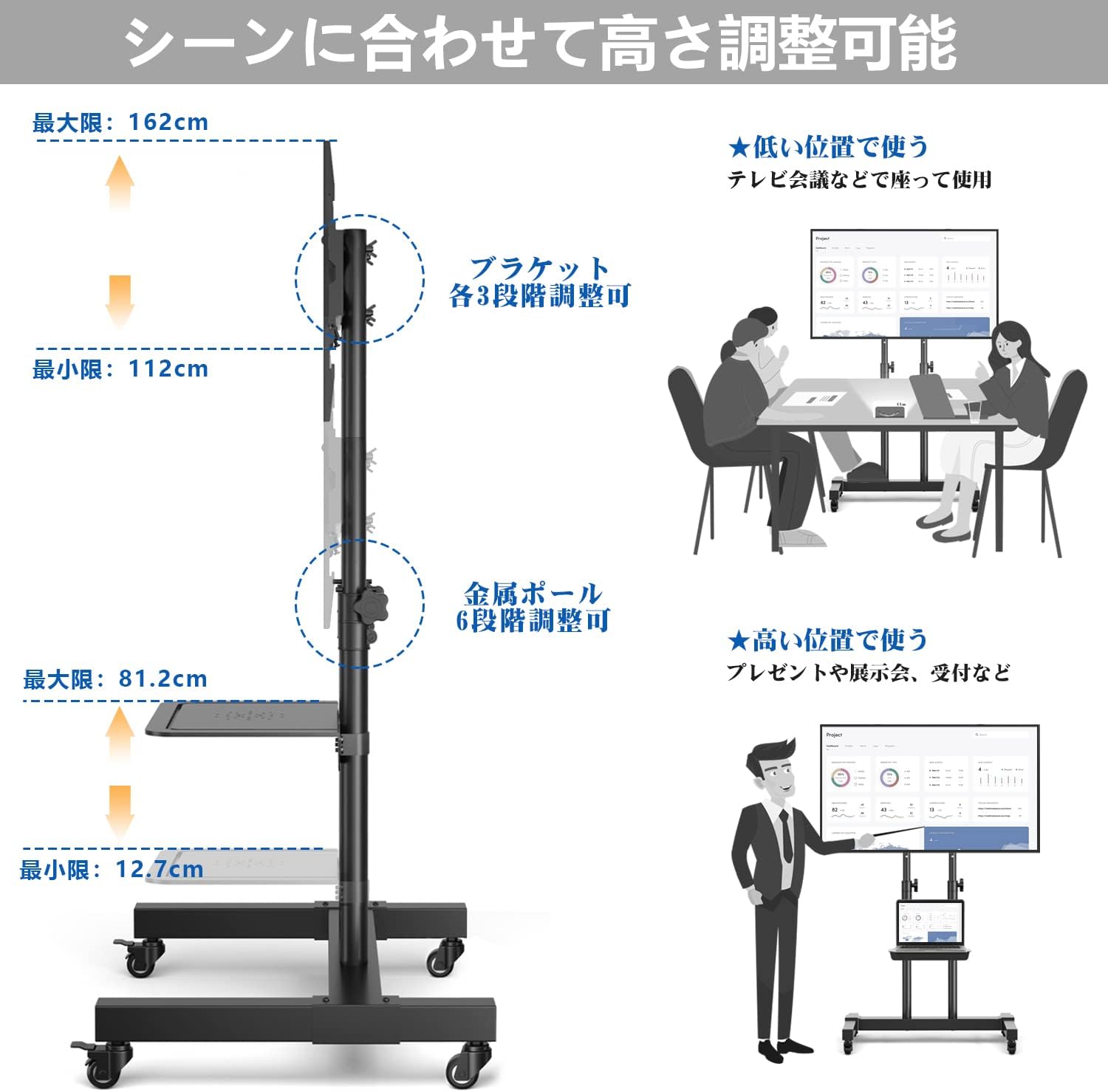
Image Description: This diagram illustrates the height adjustment capabilities of the TV stand. It shows the minimum height of 112cm and maximum height of 162cm for the TV, with the bracket adjustable in 3 steps and the metal pole in 6 steps. Examples of use at low (for TV conferences) and high (for presentations/receptions) positions are provided.
5.2. Mobility and Locking
The stand is equipped with 360-degree rotating casters for easy movement. To move the stand, unlock the front casters. Once in the desired position, engage the safety stoppers on the front casters by pressing down with your foot to prevent unintended movement.
5.3. Cable Management
Utilize the integrated cable management system located behind the TV stand to organize wires and power strips. This helps maintain a tidy appearance and simplifies cleaning.
6. Maintenance
- Regularly check all screws and connections to ensure they are tight and secure.
- Clean the stand with a soft, dry cloth. Avoid abrasive cleaners or solvents that may damage the finish.
- Keep the casters free of debris to ensure smooth movement.
7. Troubleshooting
- Stand is wobbly: Ensure all screws are tightened. Verify the TV weight does not exceed the maximum load capacity. Ensure the stand is on a flat, stable surface.
- Difficulty moving the stand: Check if the caster stoppers are engaged. Clean any debris from the casters.
- TV not level: Adjust the TV mounting bracket or re-check the installation of the main columns.
- Missing parts: Refer to the package contents list. If parts are missing, contact customer support immediately.
8. Specifications
| Feature | Specification |
|---|---|
| Brand | Rfiver |
| Model Number | MT1005 |
| Compatible TV Sizes | 32 - 75 inches |
| VESA Compatibility | 100x100mm to 600x400mm |
| Maximum TV Load Capacity | 40 kg (88 lbs) |
| Maximum Shelf Load Capacity | 5 kg (11 lbs) |
| Height Adjustment Range | 1120mm - 1620mm |
| Material | Steel |
| Color | Black |
| Product Dimensions (L x W x H) | 74.5 x 59.6 x 162 cm |
| Product Weight | 11.4 kg |
| Mounting Type | Floor Stand with Casters |
| Movement Type | Articulating (TV bracket) |
| UPC | 786784035666 |
9. Warranty and Support
Rfiver provides a 5-year quality warranty from the date of purchase for this product. If you have any questions, concerns, or require assistance with assembly or operation, please do not hesitate to contact our customer support team. We are committed to providing high-quality products and service.
For support, please refer to the contact information provided with your purchase or visit the official Rfiver website.


