
1. Introduction
The BESTEK 300W Modified Sine Wave Car Inverter is designed to convert your vehicle's DC 12V power into household AC 100V power. This device allows you to power a wide range of electronic appliances and charge mobile devices while on the go. It features advanced Power Conversion Quick Charge (PowerCQC) technology, including USB-C PD 30W and USB-A QC 18W ports for rapid charging.
This inverter is suitable for various applications, from powering laptops and small appliances during car trips to serving as an emergency power source during outages.
2. Safety Precautions
Please read all safety instructions carefully before use to prevent injury or damage to the product.
- This product is designed exclusively for DC 12V negative ground vehicles. Do not use it with 24V systems.
- Do not connect any appliance that exceeds the inverter's rated power of 300W.
- If using appliances with a total power consumption exceeding 150W, you must use a separate battery connection cable (Model MRS301A, sold separately) for direct connection to the car battery.
- When connecting the battery clips, ensure correct polarity: connect the red clip to the positive (+) terminal and the black clip to the negative (-) terminal of the car battery. Incorrect connection can cause severe damage.
- Do not operate the vehicle while the inverter is connected directly to the car battery using battery clips.
- Keep the inverter away from water, moisture, and flammable materials.
- Ensure adequate ventilation around the inverter during operation to prevent overheating.
- Do not disassemble or modify the inverter. Contact customer support for service.
Integrated Protection Features:
The BESTEK 300W Car Inverter is equipped with six levels of protection to ensure safe operation:
- Overload Protection: Automatically shuts down if connected devices exceed the rated power.
- Short Circuit Protection: Protects against short circuits in the output.
- Overheat Protection: Shuts down if the internal temperature exceeds 85°C.
- Low Voltage Protection: Prevents damage to your car battery by shutting down if the input voltage drops below 10V.
- Overvoltage Protection: Shuts down if the input voltage exceeds 15V.
- Reverse Connection Protection: Protects against damage from incorrect battery polarity connection.
3. Product Features
- PowerCQC Technology: Equipped with Power Conversion Quick Charge technology, featuring one USB-C PD 30W port and one USB-A QC 18W port for fast charging of compatible devices.
- Versatile Power Source: Converts DC 12V from your car to AC 100V, allowing you to power household appliances and charge various electronic devices like laptops, smartphones, tablets, and more.
- Emergency Preparedness: Ideal as a backup power source during natural disasters such as earthquakes or typhoons, providing essential power for communication and lighting.
- Durable and Safe Design: Features a heat-dissipating aluminum alloy casing and V0 flame-retardant materials for enhanced safety and durability.
- Efficient Cooling System: Incorporates an intelligent smart fan that adjusts its speed based on power consumption, ensuring optimal heat dissipation and quiet operation.
- Compact and Portable: Designed with a compact form factor for easy placement and use within your vehicle.
4. Package Contents
- BESTEK 300W Modified Sine Wave Car Inverter (MRI3010BU-GR-PD30W)
- Instruction Manual
5. Setup and Installation
5.1. Connecting via Cigarette Lighter Socket (Up to 150W)
For devices with a total power consumption of 150W or less, use the integrated cigarette lighter plug.
- Ensure the inverter's power switch is in the OFF position.
- Insert the cigarette lighter plug firmly into your vehicle's 12V cigarette lighter socket.
- Plug your AC or USB devices into the inverter.
- Turn the inverter's power switch to the ON position. The power indicator light will illuminate.

Image: Cigarette lighter plug for connecting the inverter to the vehicle's 12V socket.

Image: BESTEK 300W Car Inverter providing power for a laptop and smartphone in a car.
Video: Demonstrating power connection methods via cigarette lighter socket and direct battery connection.
5.2. Connecting via Battery Clips (Up to 300W)
For devices with a total power consumption exceeding 150W (up to 300W), use the optional battery connection cable (MRS301A, sold separately).
- Ensure the inverter's power switch is in the OFF position.
- Connect the red battery clip to the positive (+) terminal of your car battery.
- Connect the black battery clip to the negative (-) terminal of your car battery.
- Connect the other end of the battery cable to the inverter's DC input terminals.
- Plug your AC or USB devices into the inverter.
- Turn the inverter's power switch to the ON position. The power indicator light will illuminate.

Image: Optional battery connection clips for direct battery connection.
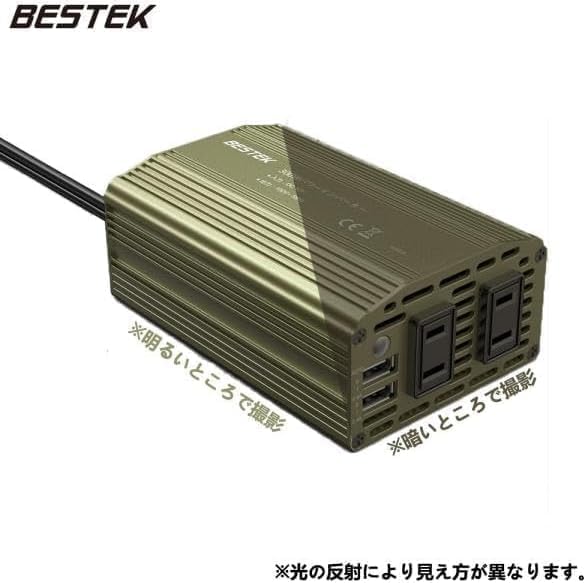
Image: Battery clips connected to a car battery for higher power output.
6. Operation
Once the inverter is properly connected and powered on, you can begin using it to power and charge your devices.
- AC Devices: Plug your AC-powered devices (e.g., laptop chargers, small fans) into the two AC 100V outlets.
- USB Devices: Connect your USB-powered devices (e.g., smartphones, tablets, gaming consoles) to the USB-C PD 30W port or the USB-A QC 18W port.
- Power Indicator: The power lamp on the inverter will indicate its operational status.

Image: BESTEK 300W Car Inverter powering multiple devices simultaneously.
Video: Demonstrating the BESTEK 300W Car Inverter charging various devices like smartphones, tablets, and laptops in a car.
7. Maintenance
To ensure the longevity and optimal performance of your BESTEK Car Inverter, follow these maintenance guidelines:
- Cleaning: Regularly wipe the exterior of the inverter with a dry, soft cloth. Do not use liquid cleaners or solvents.
- Ventilation: Keep the ventilation openings clear of dust and debris to ensure proper airflow for the smart fan.
- Storage: When not in use, store the inverter in a cool, dry place, away from direct sunlight and extreme temperatures.
- Cable Inspection: Periodically check the power cables and plugs for any signs of damage or wear. Replace if necessary.
8. Troubleshooting
If you encounter issues with your BESTEK Car Inverter, refer to the following common problems and solutions:
- No Power Output:
- Check if the inverter's power switch is ON.
- Ensure the cigarette lighter plug or battery clips are securely connected.
- Verify that your vehicle's 12V power outlet is functioning.
- Check if the connected device's power consumption exceeds the inverter's capacity (150W for cigarette lighter, 300W for battery clips).
- The inverter may have entered a protection mode (e.g., low voltage, overload). Disconnect devices, turn the inverter off and on again, and re-evaluate the load.
- Inverter Shuts Down Automatically:
- This indicates one of the built-in protection features has been activated (overload, overheat, low/over voltage, short circuit, reverse connection).
- Review the Safety Precautions section and address the potential cause. Reduce the load, ensure proper ventilation, or check battery voltage.
- Fan Noise:
- The intelligent smart fan adjusts its speed based on the internal temperature and power load. Increased fan noise during high power usage is normal and indicates effective cooling.
- Device Not Charging via USB:
- Ensure your USB cable is functional and properly connected.
- Verify your device is compatible with PD (Power Delivery) or QC (Quick Charge) for fast charging.
If the problem persists after following these steps, please contact BESTEK customer support.
9. Specifications

Image: Diagram illustrating power supply methods and power output.
| Feature | Specification |
|---|---|
| Model Number | MRI3010BU-GR-PD30W |
| Dimensions (L x W x H) | 12 cm x 7.8 cm x 4.6 cm |
| Weight (Main Unit) | Approx. 430 g |
| Body Material | Aluminum |
| Cigarette Lighter Cable Length | Approx. 70 cm |
| Input Voltage | DC 12V |
| Output Voltage | AC 100V |
| Output Frequency | 55 Hz (compatible with 50Hz/60Hz devices) |
| Output Waveform | Modified Sine Wave |
| Rated Output Power | 300W |
| Peak Output Power | 350W |
| Conversion Efficiency | >85% |
| AC Outlets | 2 |
| USB-C PD Port | 1 (30W) |
| USB-A QC Port | 1 (18W) |
| Origin | China |
10. Warranty and Support
This BESTEK product comes with a 1-year warranty from the date of purchase. If you encounter any quality issues or require assistance, please contact BESTEK customer support. As a Japanese company, BESTEK provides dedicated customer support.
For further information or support, please visit the official BESTEK website or contact our customer service team.


