1. Introduction
This manual provides essential information for the safe and effective use of the GalaxyElec S-60-12 60W 12VDC 5A Single Group Switching Power Supply. This device is designed to convert AC input voltage (85-132VAC or 170-264VAC) to a stable 12VDC output, suitable for various industrial and scientific applications requiring a reliable DC power source.
2. Safety Precautions
WARNING: HIGH VOLTAGE INSIDE. DO NOT REMOVE THIS COVER. QUALIFIED SERVICE PERSONNEL ONLY.
- Ensure the power supply is disconnected from the AC mains before any installation, wiring, or maintenance.
- Proper grounding is essential to prevent electric shock. Connect the ground terminal (⏚) to a reliable earth ground.
- Do not operate the power supply in environments exceeding its specified temperature and humidity ranges.
- Ensure adequate ventilation around the unit to prevent overheating. Do not block ventilation holes.
- Avoid exposing the unit to moisture, dust, or corrosive substances.
- All wiring should comply with local and national electrical codes.
3. Product Overview and Features
The S-60-12 is a compact and efficient switching power supply featuring:
- Selectable AC input voltage range (85-132VAC or 170-264VAC).
- Overload protection with auto-recovery.
- Adjustable DC output voltage (+10% for 12V model).
- Compact design for easy integration.
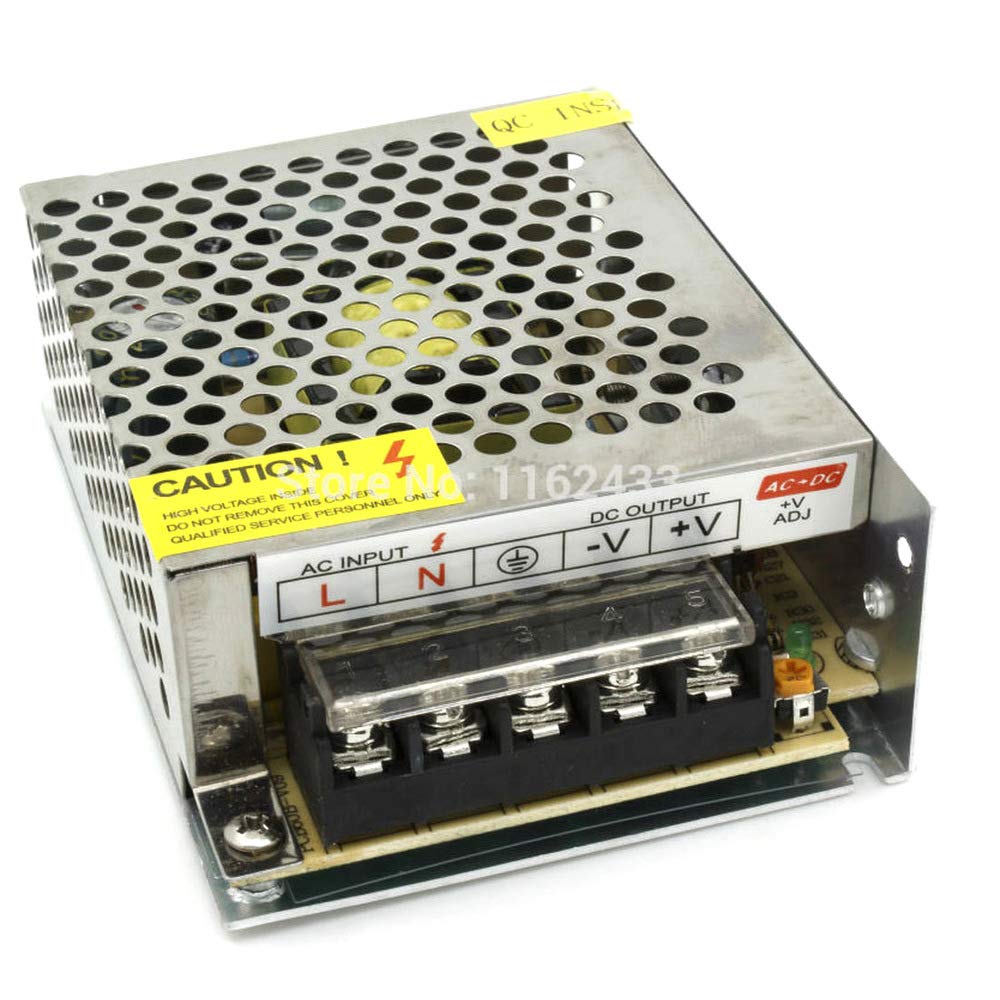
Figure 3.1: Front view of the S-60-12 power supply, showing the AC input and DC output terminal blocks.
4. Specifications
| Parameter | Value (S-60-12) |
|---|---|
| DC Output Voltage | 12V |
| Rated Output Current | 5A |
| DC Output Power | 60W |
| Efficiency | 78% |
| Adjustable Range for DC Voltage | +10% |
| AC Input Voltage Range | 85-132VAC / 170-264VAC (selected by switch), 47-63Hz; 240-370VDC |
| AC Inrush Current | Cold-start: 30A/115V, 60A/230V |
| Overload Protection | 105%-150% Type: Foldback current limiting, Rest: auto-recovery |
| Working Temperature | -10°C to 60°C |
| Working Humidity | 20%-90%RH |
| Storage Temperature | -20°C to 85°C |
| Storage Humidity | 10%-95%RH |
| External Dimension (LxWxH) | 157 x 97 x 38 mm |
| Weight | 0.55 kg |
| Safety Standards | UL1012 TUV refer to 6050 (IEC, UL1950) verification |
| EMC Standards | CISPR22 (refer to 55022), IEC801-2,3,4 IEC555-2 verification |

Figure 4.1: Front label of the S-60-12, indicating model, AC input, and DC output specifications.
5. Installation and Wiring
Follow these steps for safe and correct installation:
- Mounting: Secure the power supply to a stable surface using appropriate screws through the mounting holes. Ensure adequate clearance for ventilation.
- Input Voltage Selection: Locate the voltage selection switch (usually a small red switch) on the side of the unit. Set it to the correct AC input voltage for your region (115V or 230V). Incorrect setting can damage the unit.
- AC Input Wiring: Connect the AC mains supply to the input terminal block.
- Connect the Live (L) wire to the 'L' terminal.
- Connect the Neutral (N) wire to the 'N' terminal.
- Connect the Earth Ground (⏚) wire to the ground terminal.
- DC Output Wiring: Connect your load to the DC output terminal block.
- Connect the positive (+) wire of your load to the '+V' terminal.
- Connect the negative (-) wire of your load to the '-V' terminal.
- Output Voltage Adjustment: If fine-tuning of the output voltage is required, use a small screwdriver to carefully adjust the '+V ADJ' potentiometer. Turn clockwise to increase voltage, counter-clockwise to decrease. Do not exceed the specified adjustable range.

Figure 5.1: Bottom view of the S-60-12 power supply, illustrating the mounting hole locations for secure installation.
6. Operation
Once properly installed and wired, connect the power supply to the AC mains. The unit will power on and provide the regulated DC output voltage. Monitor your load's performance to ensure it operates within its specified parameters. The power supply is designed for continuous operation within its rated specifications.
7. Maintenance
The S-60-12 power supply is designed for minimal maintenance. However, regular checks can prolong its lifespan:
- Keep the unit clean and free from dust and debris, especially around ventilation openings.
- Ensure that ventilation is not obstructed.
- Periodically check all wiring connections for tightness and signs of wear or corrosion.
- Do not attempt to open the casing or perform internal repairs. Refer all servicing to qualified personnel.

Figure 7.1: Side view of the S-60-12 power supply, highlighting the ventilation holes for proper airflow.
8. Troubleshooting
If you encounter issues with your power supply, consider the following common problems and solutions:
- No Output Voltage:
- Check AC input connections and ensure power is supplied.
- Verify the input voltage selection switch is set correctly (115V/230V).
- The unit may be in overload protection mode. Disconnect the load, wait a few minutes for auto-recovery, then reconnect the load ensuring it is within the power supply's rated capacity. - Incorrect Output Voltage:
- Check the '+V ADJ' potentiometer setting. Adjust as needed.
- Ensure the load is not drawing excessive current, which can cause voltage drop. - Overheating:
- Ensure adequate ventilation. Clear any obstructions around the unit.
- Verify the ambient temperature is within the specified operating range.
For issues not resolved by these steps, contact qualified service personnel or the manufacturer.
9. Warranty and Support
Specific warranty details for this product may vary by region and seller. Please refer to your purchase documentation or contact your point of sale for warranty information.
For technical support or inquiries, please contact GalaxyElec customer service or your authorized distributor. When contacting support, please provide the product model (S-60-12) and a detailed description of the issue.