
1. Introduction
This manual provides comprehensive instructions for the installation, operation, and maintenance of the DSC PG9914 Wireless PowerG Digital Pet-Immune PIR Motion Detector. This device is designed to offer reliable motion detection and temperature monitoring within indoor environments, specifically for use with PowerSeries Neo alarm systems. Please read this manual thoroughly before installation and use to ensure proper functionality and safety.
2. Safety Information
- Indoor Use Only: This device is designed for indoor applications. Do not expose it to rain, moisture, or extreme temperatures.
- Battery Safety: Use only recommended battery types. Ensure correct polarity when inserting batteries. Dispose of used batteries according to local regulations.
- Installation: Installation should be performed by qualified personnel or in accordance with local electrical codes.
- Interference: Avoid installing near sources of strong electromagnetic interference.
- Cleaning: Use a soft, dry cloth for cleaning. Do not use liquid or aerosol cleaners.
3. Product Overview
The DSC PG9914 is a wireless, pet-immune Passive Infrared (PIR) motion detector that integrates seamlessly with PowerSeries Neo alarm systems. It detects movement by sensing changes in infrared radiation within its field of view. Its pet-immune feature helps prevent false alarms caused by pets weighing up to a certain limit (typically 40 lbs, though specific limits should be confirmed with system documentation).

Figure 3.1: Front view of the DSC PG9914 Wireless PowerG Digital Pet-Immune PIR Motion Detector. The device is white with a sleek, rectangular design, featuring a central lens area for motion detection.
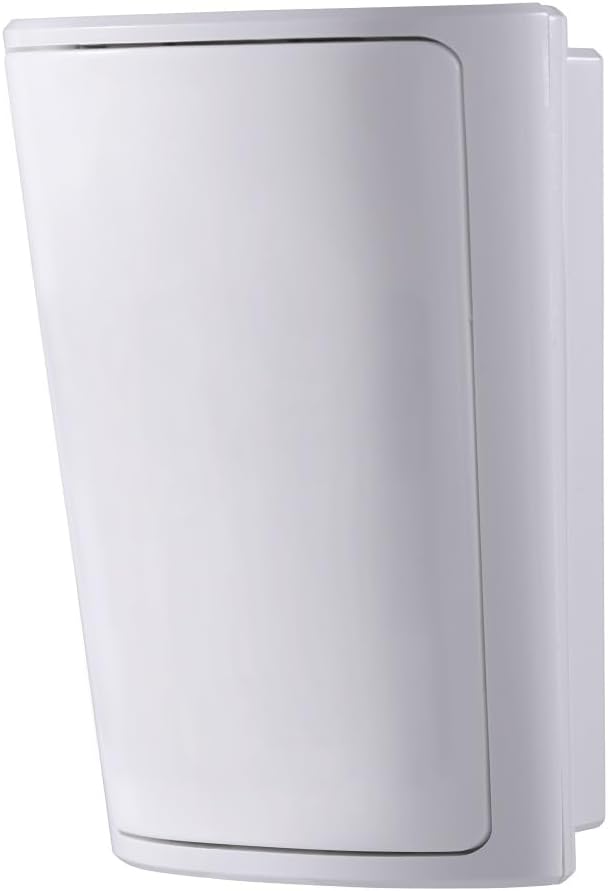
Figure 3.2: Side view of the DSC PG9914 Wireless PowerG Digital Pet-Immune PIR Motion Detector. This angle highlights the slim profile and mounting points on the side of the device.
Key Features:
- Wireless PowerG technology for secure and reliable communication.
- Digital PIR motion detection.
- Pet immunity (consult system documentation for specific weight limits).
- Temperature monitoring capability.
- Battery-powered for flexible placement.
4. Setup and Installation
4.1 Choosing an Installation Location
Select a location that provides optimal coverage of the area to be protected, avoiding direct sunlight, heat sources, or areas with strong air currents (e.g., near vents, windows). For pet immunity, mount the detector at the recommended height (typically 2.1 to 2.7 meters or 7 to 9 feet) and ensure pets cannot climb into the detection zone.
- Avoid aiming directly at windows or heat sources.
- Ensure a clear line of sight to the protected area.
- Mount securely to a stable surface.
4.2 Mounting the Detector
- Open the detector casing by gently prying the front cover.
- Mark the desired mounting holes on the wall.
- Drill pilot holes if necessary and insert wall anchors.
- Secure the backplate of the detector to the wall using appropriate screws.
- Ensure the detector is level and firmly attached.
4.3 Battery Installation
The PG9914 uses a Lithium battery. Refer to the specifications for the exact battery type.
- Locate the battery compartment inside the detector.
- Insert the battery, observing the correct polarity (+/-).
- Close the battery compartment cover securely.
4.4 Enrolling with the PowerSeries Neo System
The enrollment process typically involves placing the alarm system into enrollment mode and then activating the detector. Consult your PowerSeries Neo alarm system's main instruction manual for detailed steps on enrolling wireless devices.
- Access the system's installer programming menu.
- Navigate to the wireless device enrollment section.
- Activate the PG9914 (e.g., by re-inserting the battery or pressing a tamper switch) to transmit its unique ID.
- Confirm successful enrollment on the system keypad.
5. Operating the Detector
Once installed and enrolled, the PG9914 operates automatically. When the alarm system is armed, the detector will monitor for motion within its detection zone. Upon detecting motion, it will transmit a signal to the alarm panel, triggering an alarm according to your system's programming.
5.1 Pet Immunity
The pet immunity feature is designed to differentiate between human movement and the movement of small animals. For optimal pet immunity, ensure the detector is mounted at the recommended height and that pets cannot get close to the detector or climb onto furniture within the detection zone. Large pets or multiple pets may reduce the effectiveness of pet immunity.
5.2 Temperature Monitoring
The PG9914 also provides temperature monitoring. This data can be accessed and utilized by your PowerSeries Neo alarm system, depending on its configuration and capabilities. Refer to your alarm system's manual for details on how to view or use temperature readings from connected devices.
6. Maintenance
6.1 Battery Replacement
The detector will indicate a low battery condition to the alarm system. When this occurs, replace the battery promptly to ensure continuous operation.
- Disarm your alarm system before proceeding.
- Open the detector casing.
- Remove the old battery and dispose of it responsibly.
- Insert a new, fresh battery of the correct type, observing polarity.
- Close the detector casing.
- Test the detector to confirm proper operation and clear the low battery signal from your alarm system.
6.2 Cleaning
Periodically clean the detector's lens and casing with a soft, dry, lint-free cloth. Do not use abrasive cleaners, solvents, or spray directly onto the device, as this can damage the sensor or electronics.
7. Troubleshooting
| Problem | Possible Cause | Solution |
|---|---|---|
| Detector not responding / No signal |
|
|
| False alarms |
|
|
| Low battery indication | Battery is nearing end of life. | Replace the battery immediately (refer to Section 6.1). |
8. Specifications
| Model Number | PG9914 |
| Brand | DSC |
| Power Source | Battery Powered (Lithium) |
| Item Weight | 5.28 ounces (approx. 150 grams) |
| Product Dimensions | 4 x 3 x 3 inches (approx. 10.16 x 7.62 x 7.62 cm) |
| Maximum Range | 2 Meters (approx. 6.5 feet) - Note: This range might refer to a specific feature, typical PIR range is much larger. Consult full product datasheet for detection area. |
| Compatible Devices | PowerSeries Neo alarm systems |
| UPC | 766871250509 |
9. Warranty Information
DSC products are typically covered by a limited warranty against defects in materials and workmanship. The specific terms and duration of the warranty may vary by region and retailer. Please retain your proof of purchase. For detailed warranty information, refer to the documentation provided with your purchase or contact DSC customer support.
10. Technical Support
If you encounter issues that cannot be resolved using this manual, or require further assistance with your DSC PG9914 motion detector, please contact your alarm system installer or DSC technical support. Contact information can usually be found on the DSC website or through your alarm service provider.
Note: Some specific product versions (e.g., PG9914 M6 (915-6:xxx)) may be locked to specific alarm systems (e.g., Telus systems). Verify compatibility with your alarm service provider before purchase and installation.


