
ZACO A8s
ZACO A8s Robot Vacuum and Mop Cleaner User Manual
Model: A8s
1. Introduction
This manual provides essential information for the safe operation, maintenance, and troubleshooting of your ZACO A8s Robot Vacuum and Mop Cleaner. Please read this manual thoroughly before using the product and retain it for future reference.
The ZACO A8s is a 3-in-1 robot vacuum and mop cleaner, designed for efficient cleaning of hard floors, tiles, and carpets. It features both vacuuming and mopping functions. The robot can be controlled via the ZACO ROBOT app, Alexa, Google Assistant, or the included remote control. Key features include automatic charging, a runtime of up to 160 minutes, 360° camera navigation for mapping, V-bristle brushes for carpets, and an ultra-flat design (7.2cm) to clean under furniture. It includes a 300ml water tank and a 300ml dustbin, powered by a BLDC-Cyclone-Power Gen3 motor, operating quietly at less than 64 dB.

Figure 1: The ZACO A8s Robot Vacuum Cleaner shown alongside its smartphone application interface, demonstrating its smart control capabilities.
2. Safety Instructions
- Read all instructions before operating the appliance.
- Do not allow children to operate the robot. Supervise children and pets when the robot is operating.
- Ensure the charging station is placed on a level surface against a wall, with adequate clear space around it.
- Remove any loose cables, small objects, or fragile items from the cleaning area before operation to prevent entanglement or damage.
- Do not use the robot in wet environments or on surfaces with standing water.
- Use only the original charger and accessories provided by ZACO.
- Do not attempt to repair or modify the robot yourself. Contact authorized service personnel for repairs.
- Turn off the robot and unplug the charging station before cleaning or performing maintenance.
3. Product Components
The ZACO A8s comes with the following components:
- ZACO A8s Robot Vacuum Cleaner
- Charging Station
- Power Adapter Cable
- Remote Control (batteries included)
- Rubber Lamella Brush
- V-Brush
- Fine Particle Filter
- 300 ml Dustbin (pre-installed)
- 300 ml Cleaning Water Tank
- 2 Microfiber Cloths
- Pair of Additional Side Brushes
- Cleaning Tool
- User Manual (German, English, Italian, Spanish, French)
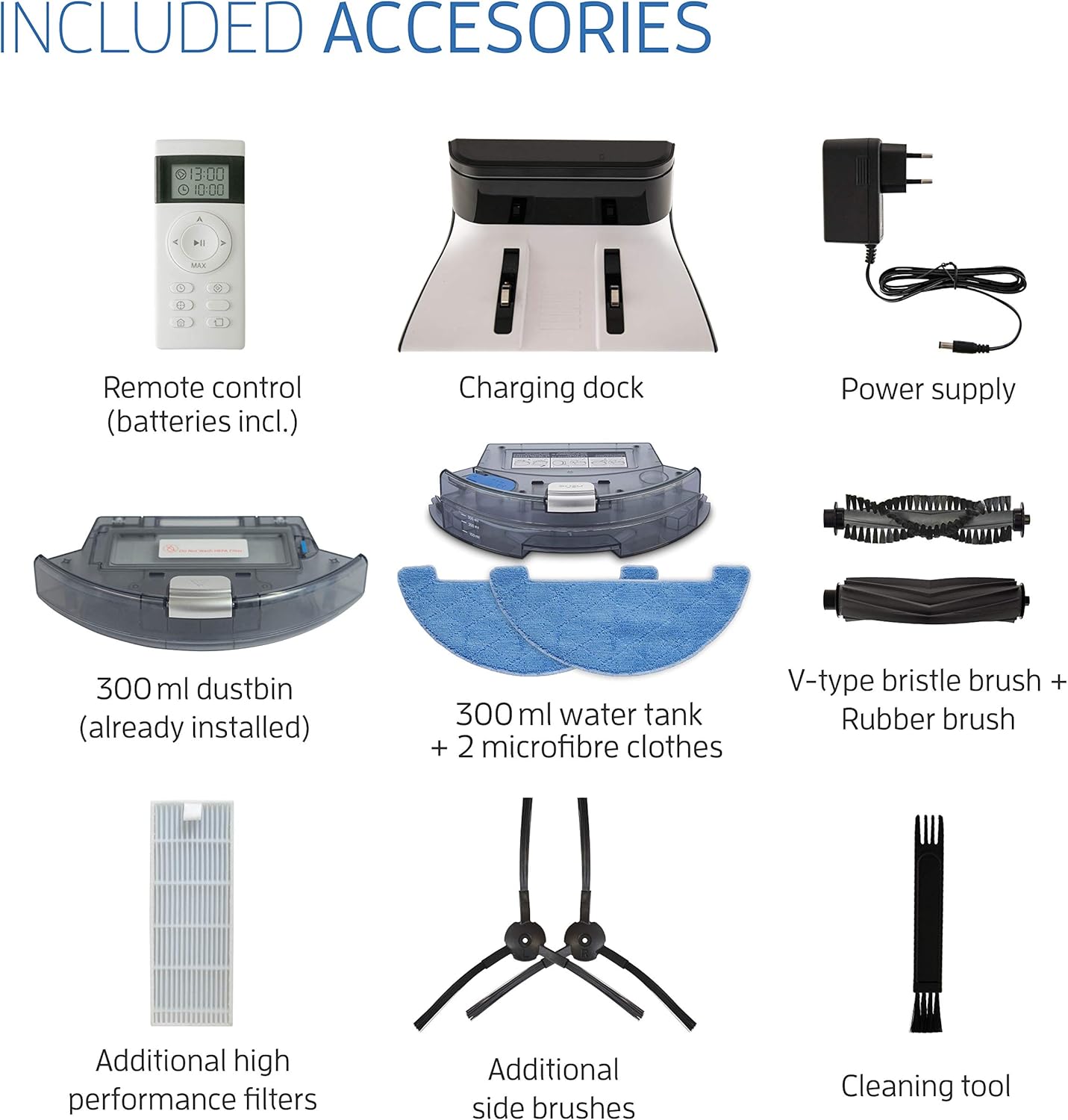
Figure 2: All components included with the ZACO A8s robot vacuum cleaner, such as the remote control, charging dock, power supply, dustbin, water tank, brushes, filters, and cleaning tool.
4. Setup
4.1 Charging Station Placement
Place the charging station against a wall in an open area. Ensure there is at least 1 meter (3 feet) of clear space on both sides and 2 meters (6 feet) in front of the charging station for optimal navigation and docking.

Figure 3: The ZACO A8s robot vacuum automatically returning to its charging station, demonstrating its self-charging capability.
4.2 Initial Charge
Before first use, fully charge the robot. Place the robot directly onto the charging station, ensuring the charging contacts align. The indicator light on the robot will show charging status. A full charge takes approximately 4-5 hours.
4.3 Installing Side Brushes
Attach the side brushes by pressing them onto the posts on the underside of the robot until they click into place. Ensure they are securely fastened.
4.4 App Connection (Optional)
Download the "ZACO ROBOT" app from your smartphone's app store. Follow the in-app instructions to connect your ZACO A8s to your home Wi-Fi network. This enables remote control, scheduling, and access to cleaning maps.
5. Operating Instructions
5.1 Cleaning Modes
The ZACO A8s offers multiple cleaning modes:
- Auto Cleaning: The robot automatically cleans the entire area, adjusting its path based on its 360° camera navigation.
- Spot Cleaning: The robot focuses on a specific dirty area, cleaning in a spiral pattern.
- Edge Cleaning: The robot cleans along walls and furniture edges.
- Scheduled Cleaning: Set a cleaning schedule via the app or remote control for automated cleaning at specific times.

Figure 4: The ZACO A8s robot vacuum operating in a home environment, demonstrating its ability to clean around obstacles. The accompanying smartphone app displays real-time cleaning status.
5.2 Vacuuming Function
For vacuuming, ensure the dustbin is installed. The robot uses its powerful BLDC-Cyclone-Power Gen3 motor and V-bristle brushes to effectively pick up dust, debris, and pet hair from hard floors and carpets.
5.3 Mopping Function
To use the mopping function, remove the dustbin and install the 300 ml water tank with a damp microfiber cloth attached. Fill the water tank with clean water. The robot will then mop hard floor surfaces. Do not use the mopping function on carpets.

Figure 5: A visual representation of the ZACO A8s performing both vacuuming (left) and mopping (right) functions on different floor types.
5.4 Navigation and Mapping
The ZACO A8s utilizes 360° PanoView camera navigation to create a virtual 3D map of your environment. This allows for efficient, systematic cleaning paths, ensuring comprehensive coverage without missing areas or damaging furniture.

Figure 6: The ZACO A8s robot vacuum employing its 360° camera navigation system to map and clean a living space.
5.5 Ultra-Flat Design
With a height of only 7.2 cm, the ZACO A8s can easily clean under furniture such as beds, sofas, and cabinets, reaching areas that are typically difficult to access.

Figure 7: The ZACO A8s robot vacuum demonstrating its ability to clean under low-clearance furniture, such as a bed, due to its ultra-flat design.
6. Maintenance
Regular maintenance ensures optimal performance and extends the lifespan of your ZACO A8s.
6.1 Emptying the Dustbin
Empty the 300 ml dustbin after each cleaning cycle or when full. Press the release button to remove the dustbin, open it, and discard the contents. Clean the filter as needed.
6.2 Cleaning the Water Tank and Microfiber Cloths
After mopping, empty any remaining water from the 300 ml water tank. Remove and wash the microfiber cloths. Allow both to air dry completely before reinstallation.
6.3 Cleaning Brushes
Regularly check and clean the main brush (V-brush or rubber lamella brush) and side brushes. Use the provided cleaning tool to remove tangled hair and debris. Replace brushes if they show signs of wear.

Figure 8: The underside view of the ZACO A8s, highlighting the main brush, side brushes, and the attached mop pad, all of which require regular cleaning.
6.4 Cleaning Sensors and Charging Contacts
Wipe the anti-drop sensors, bumper sensors, and charging contacts on both the robot and the charging station with a clean, dry cloth. This prevents dust buildup from affecting performance.
7. Troubleshooting
| Problem | Possible Cause | Solution |
|---|---|---|
| Robot does not start or respond. | Low battery; Power switch off; Robot stuck. | Charge the robot; Ensure power switch is ON; Clear obstructions. |
| Robot cannot find charging station. | Charging station obstructed; Robot too far from station. | Ensure clear space around station; Manually place robot near station. |
| Poor cleaning performance. | Dustbin full; Brushes tangled; Filter clogged. | Empty dustbin; Clean brushes; Clean or replace filter. |
| App connection issues. | Incorrect Wi-Fi password; Router too far; 5GHz Wi-Fi network. | Verify Wi-Fi password; Move robot closer to router; Ensure 2.4GHz Wi-Fi is used. |
If the problem persists, please refer to the contact information in the Support section.
8. Specifications
- Brand: ZACO
- Model Number: A8s
- Color: Piano Black
- Dimensions (L x W x H): 31 x 31 x 7.2 cm
- Item Weight: 2.77 Kilograms
- Power: 22 Watts
- Voltage: 14.4 Volts
- Noise Level: <64 Decibels
- Battery Type: 1 Lithium-ion (included)
- Runtime: Up to 160 minutes
- Dustbin Capacity: 300 ml
- Water Tank Capacity: 300 ml
- Navigation: 360° Camera (PanoView Mapping)
- Control Type: Remote Control, App (ZACO ROBOT), Alexa, Google Assistant
- Filter Type: Cartridge
- Material: Plastic
- Country of Origin: China
9. Warranty and Support
9.1 Warranty Information
The ZACO A8s Robot Vacuum and Mop Cleaner comes with a manufacturer's warranty. Please refer to the warranty card included in your packaging for specific terms and conditions. Spare parts availability is guaranteed for 2 years.
9.2 Customer Support
For technical assistance, troubleshooting not covered in this manual, or warranty claims, please contact ZACO customer support. Contact details can typically be found on the official ZACO website or on the product packaging.
Related documentsA8s


Ask a question about this manual
Ask about setup, troubleshooting, compatibility, parts, safety, or missing instructions. Manuals+ will review the question and use this page’s manual context to help answer it.