
1. Introduction
This manual provides instructions for the proper use and maintenance of the KOAMTAC KDC180 Ring Band (Model 382800). This accessory is designed to securely hold the KOAMTAC KDC180 data collector, allowing for hands-free operation. Please read this manual thoroughly before use to ensure optimal performance and longevity of the product.
Important Note: The KOAMTAC KDC180 data collector and KDC180 Ring Trigger are sold separately and are not included with this Ring Band accessory.
2. Product Overview
The KDC180 Ring Band is an ergonomic accessory designed for comfortable and secure attachment of the KDC180 data collector to the user's hand. It consists of a main housing and adjustable straps.
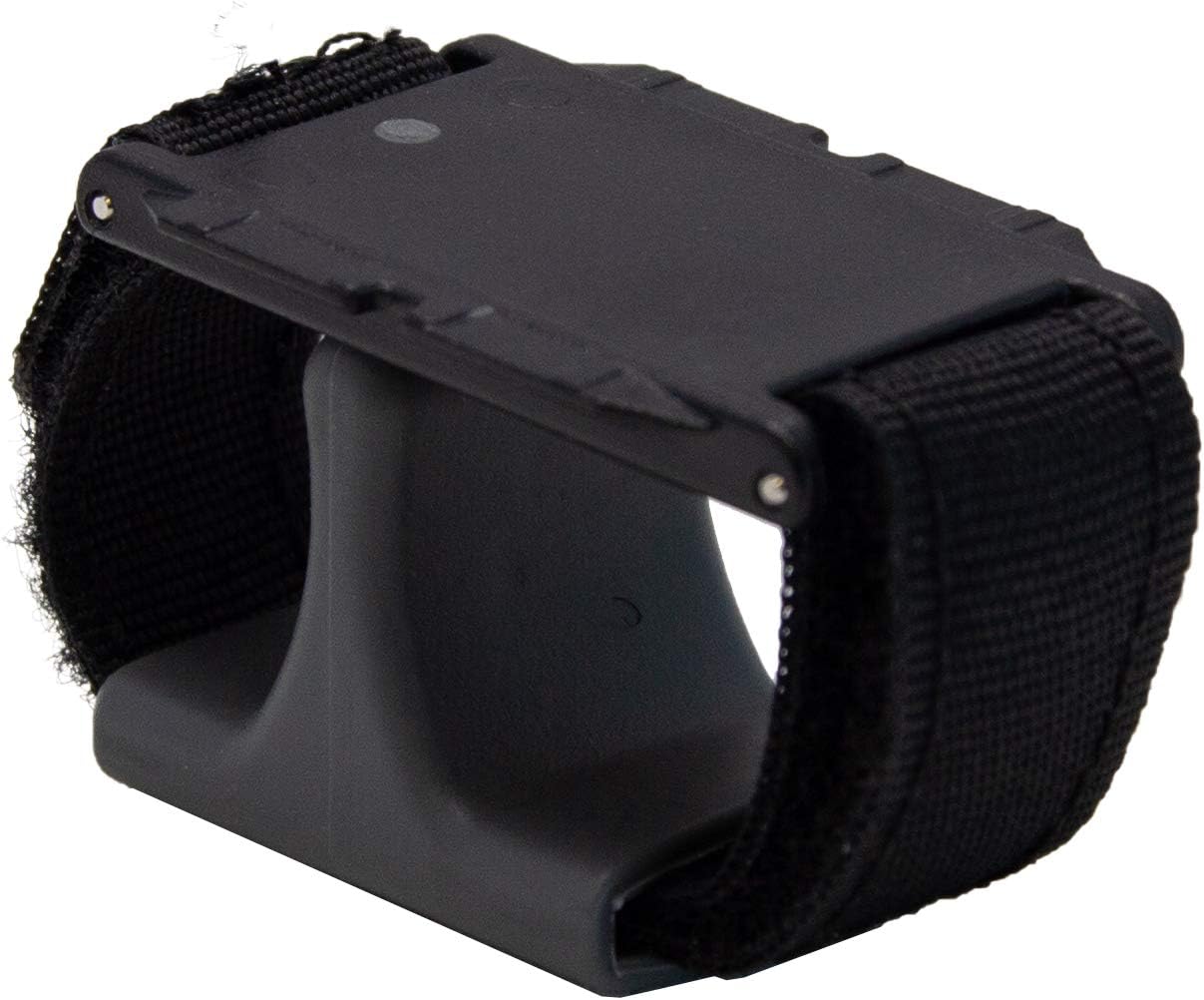
Figure 2.1: The KOAMTAC KDC180 Ring Band accessory. This image shows the black plastic housing with adjustable fabric straps designed to fit around the user's fingers and hand.

Figure 2.2: The KDC180 data collector securely mounted onto the Ring Band. The scanner window is visible at the front, and the green trigger button is accessible.

Figure 2.3: Side view of the KDC180 data collector mounted on the Ring Band, showing the device's profile and how it integrates with the band.
3. Setup
3.1 Attaching the KDC180 to the Ring Band
- Ensure the KDC180 data collector is powered off before attachment.
- Align the KDC180 data collector with the mounting points on the Ring Band's housing. The KDC180 should slide into place securely.
- Gently press the KDC180 until it clicks into position, indicating a secure connection. Verify that the device is firmly seated and does not wobble.
3.2 Wearing the Ring Band
- Slide your index finger through the smaller loop of the ring band.
- Position the main housing of the ring band on the back of your hand, ensuring the KDC180 is oriented correctly for scanning.
- Adjust the larger strap around your hand or wrist for a comfortable and secure fit. The straps should be snug but not restrictive.
- Ensure the KDC180's trigger button (if using the KDC180 Ring Trigger) is easily accessible by your thumb or another finger.
4. Operating Instructions
Once the KDC180 is securely attached to the Ring Band and worn comfortably, you can proceed with operating the KDC180 data collector as per its own instruction manual. The Ring Band facilitates hands-free scanning by keeping the device readily available on your hand.
- Scanning: Position the KDC180 scanner towards the barcode and activate the trigger.
- Comfort: Periodically check the fit of the ring band to ensure continued comfort during extended use. Adjust straps as needed.
5. Maintenance
To ensure the longevity of your KOAMTAC KDC180 Ring Band, follow these maintenance guidelines:
- Cleaning: Wipe the plastic housing with a soft, damp cloth. For the fabric straps, a mild soap solution can be used, followed by air drying. Do not use harsh chemicals or abrasive cleaners.
- Storage: Store the Ring Band in a clean, dry environment away from direct sunlight and extreme temperatures when not in use.
- Inspection: Regularly inspect the straps and attachment points for any signs of wear or damage. Replace the accessory if significant wear is observed to prevent accidental detachment of the KDC180.
6. Troubleshooting
This section addresses common issues related to the KDC180 Ring Band. For issues related to the KDC180 data collector itself, please refer to its dedicated instruction manual.
- Device feels loose on the band:
- Ensure the KDC180 is fully seated and clicked into the mounting points.
- Inspect the mounting points on both the KDC180 and the Ring Band for any obstructions or damage.
- Ring Band feels uncomfortable:
- Adjust the straps to achieve a snug but comfortable fit. Avoid overtightening.
- Ensure the band is positioned correctly on your hand, not pinching or rubbing.
7. Specifications
- Model Number: 382800
- Compatibility: Specifically designed for the KOAMTAC KDC180 data collector.
- Material: Durable plastic housing with adjustable fabric straps.
- Manufacturer: KOAMTAC
- Date First Available: September 19, 2019
8. Warranty and Support
For detailed warranty information and technical support, please refer to the official KOAMTAC website or contact KOAMTAC customer service directly. Keep your purchase receipt for warranty claims.
KOAMTAC Official Website: www.koamtac.com