
1. Introduction
Thank you for choosing the Wendry 9601G Car Stereo. This multimedia player is designed to enhance your in-car entertainment and connectivity. It features a 7-inch high-definition touchscreen, Bluetooth for hands-free calls and music streaming, and support for various media formats via USB and TF card. This manual provides essential information for installation, operation, maintenance, and troubleshooting to ensure optimal performance and user satisfaction.
2. Safety Information
- Read all instructions carefully before installation and operation.
- Installation should be performed by a qualified technician to prevent damage to the unit or vehicle.
- Do not operate the unit in a way that distracts you from driving. Always prioritize road safety.
- Avoid exposing the unit to extreme temperatures, direct sunlight for prolonged periods, or moisture.
- Use only specified power supply (DC12V). For 24V systems, a transformer is required.
- Do not attempt to disassemble or modify the unit. This may void the warranty and cause damage.
3. Package Contents
Verify that all items are present in the package:
- 1 x Main Unit (Wendry 9601G Car Stereo)
- 1 x Infrared Remote Control
- 1 x Instruction Manual (this document)
- 1 x Power Cable
- 1 x Disassembly Tool
- 1 x Reversing Camera Kit
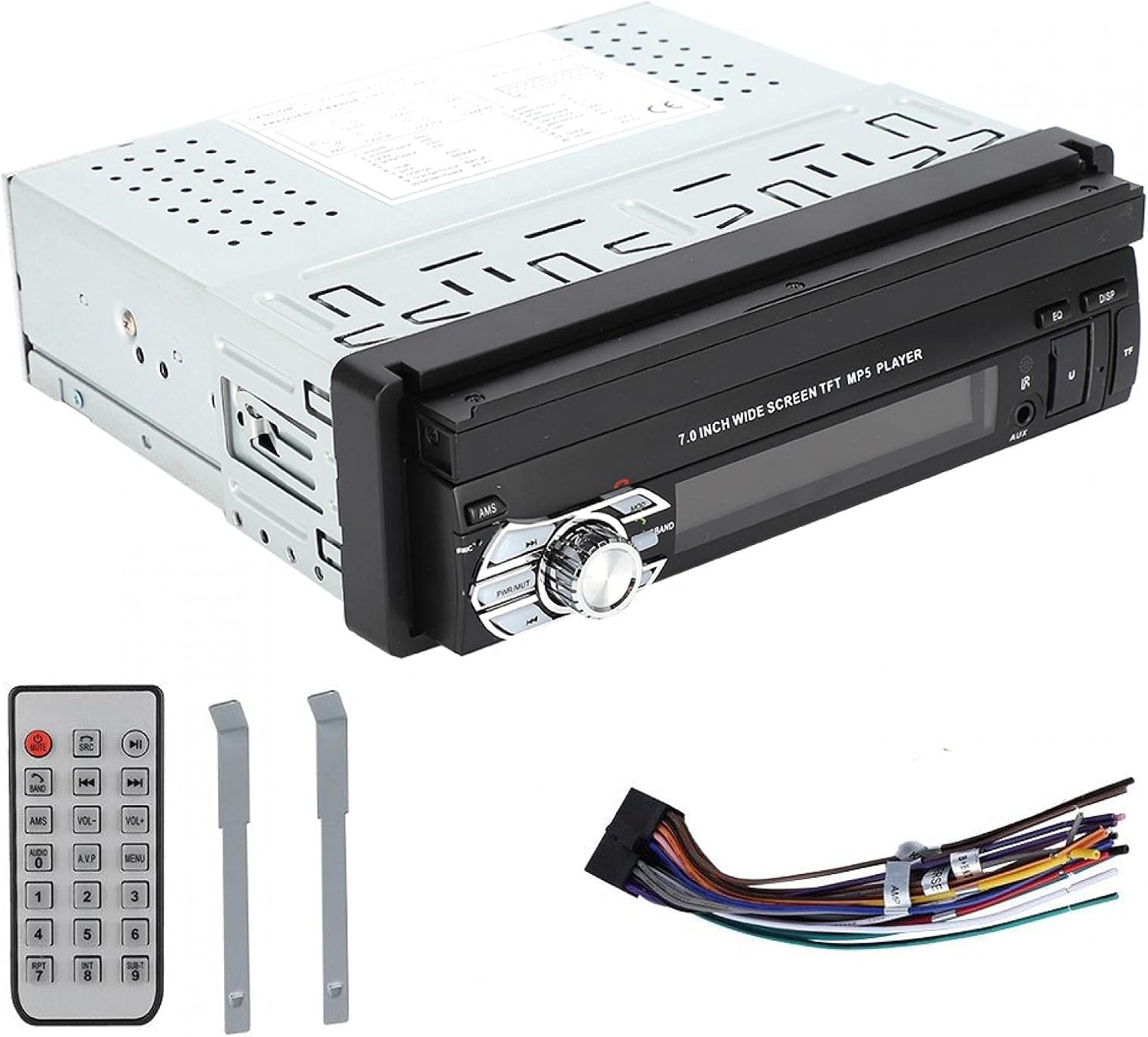
Image: Included accessories: remote control, wiring harness, and disassembly tools.
4. Product Overview
The Wendry 9601G is a single DIN car multimedia player featuring a retractable 7-inch touchscreen. It supports various audio and video formats, Bluetooth connectivity, and includes inputs for USB, TF card, and a reverse camera.
Key Features:
- 7-inch High-Definition Retractable Touchscreen
- Bluetooth for Hands-Free Calling and Music Streaming
- Supports 24-bit 96kHz WAV audio format for high-fidelity sound
- USB 2.0 Interface for U disks and mobile hard drives
- TF Card Slot for media playback
- Reverse Video Input with reversing priority (requires compatible camera)
- Dynamic Menu Interface

Image: The Wendry 9601G car stereo with its 7-inch screen extended, showing multimedia playback.

Image: Front view of the car stereo with the screen retracted, showing the 'BT AUDIO' display.
5. Setup and Installation
5.1 Wiring Diagram
Refer to the wiring diagram provided on the unit's casing or in the separate wiring guide for correct connections. Incorrect wiring can cause damage to the unit or your vehicle's electrical system.

Image: Rear view of the car stereo, illustrating the connection ports for power, audio, video, and reverse camera input.
5.2 General Installation Steps
- Disconnect Battery: Before starting, disconnect the negative terminal of your vehicle's battery to prevent electrical shorts.
- Remove Old Unit: Carefully remove your existing car stereo using appropriate tools.
- Connect Wiring: Connect the power cable, speaker wires, antenna, and any other necessary cables (e.g., reverse camera, external amplifier) to the new unit according to the wiring diagram. Ensure all connections are secure.
- Test Functionality: Before fully mounting, reconnect the battery and briefly test the unit's basic functions (power on/off, audio, screen operation).
- Mount Unit: Slide the stereo into the single DIN slot and secure it using the provided mounting brackets or screws.
- Reconnect Battery: Reconnect the negative terminal of the battery.
6. Operating Instructions
6.1 Power On/Off and Screen Operation
- Power: Press the power button (usually labeled PWR/MUTE) to turn the unit on or off.
- Screen Retraction: The 7-inch screen is retractable. Use the dedicated button or menu option to extend or retract the screen.
- Touchscreen: Navigate through menus and control functions by touching the icons on the screen.

Image: The car stereo's screen extended, showing video playback.
6.2 Bluetooth Connectivity
- Enable Bluetooth: On the stereo, navigate to the Bluetooth menu. Ensure Bluetooth is enabled on your mobile device.
- Pairing: Search for available devices on your mobile phone. Select "9601G" (or similar device name) from the list. Enter the default PIN (usually "0000" or "1234") if prompted.
- Hands-Free Calls: Once paired, you can make and receive calls directly through the stereo.
- Music Streaming: Play music from your paired device, and control playback (play/pause, skip) via the stereo's touchscreen or remote control.
6.3 Media Playback (USB/TF Card)
- Insert Media: Insert a USB drive into the USB 2.0 port or a TF card into the TF card slot.
- Select Source: On the stereo, select the USB or TF card source from the main menu.
- Browse Files: Use the touchscreen to browse and select audio or video files for playback.
- USB Charging: The USB port supports high current output, allowing you to charge most mobile phones.

Image: The car stereo's USB port can charge mobile phones.
6.4 Reverse Camera Input
If a compatible reverse camera is connected, the stereo will automatically switch to the camera view when the vehicle is put into reverse gear. This feature provides reversing priority for enhanced safety.
7. Maintenance
- Cleaning the Screen: Use a soft, lint-free cloth to gently wipe the touchscreen. Do not use abrasive cleaners or solvents.
- General Cleaning: Keep the unit free from dust and debris. Use a soft, dry cloth for cleaning the main body.
- Avoid Liquids: Do not spill liquids on the unit.
- Temperature: Avoid leaving the unit in extreme hot or cold conditions for extended periods.
8. Troubleshooting
| Problem | Possible Cause | Solution |
|---|---|---|
| Unit does not power on. | Incorrect wiring; Blown fuse; Vehicle battery issue. | Check power connections; Inspect vehicle fuse box; Verify battery charge. |
| No sound. | Volume too low; Mute activated; Incorrect speaker wiring. | Increase volume; Deactivate mute; Check speaker connections. |
| Bluetooth not connecting. | Bluetooth not enabled; Device out of range; Pairing issue. | Ensure Bluetooth is on for both devices; Bring devices closer; Re-attempt pairing. |
| USB/TF card not recognized. | Unsupported format; Corrupted files; Loose connection. | Check file formats; Try a different USB/TF card; Ensure secure connection. |
| Reverse camera not displaying. | Camera not connected; Incorrect wiring; Faulty camera. | Verify camera connection; Check reverse trigger wire; Test camera functionality. |
If problems persist after attempting these solutions, please contact customer support.
9. Specifications
| Brand | Wendry |
| Model | 9601G |
| Power Supply Voltage | DC12V (24V requires transformer) |
| Screen Size | 7 Inches |
| Connectivity Technology | Bluetooth, USB |
| Compatible Devices | Smartphone, Tablet, Personal Computer |
| Special Features | Touch screen |
| Audio Output Mode | Stereo |
| Product Dimensions | 18.4 x 17.8 x 6.2 cm (7.2 x 7.0 x 2.4 inches) |
| Product Weight | 1.42 kg (59.3 oz) |

Image: Dimensions of the Wendry 9601G car stereo.
10. Warranty and Support
For warranty information, please refer to the documentation provided at the time of purchase or contact your retailer. If you encounter any issues or require technical assistance, please reach out to Wendry customer support through the official channels provided by your seller.