
Soundstream STM-2000
Soundstream Sound Tower Portable Bluetooth Speaker User Manual
Model: STM-2000
Brand: Soundstream
1. Introduction
Thank you for choosing the Soundstream Sound Tower Portable Bluetooth Speaker. This manual provides essential information for the safe and efficient operation of your device. Please read it thoroughly before use and retain it for future reference.
The Soundstream Sound Tower is a versatile portable speaker designed to deliver high-quality audio with its 5-speaker 360° omnidirectional sound system, including a 5" subwoofer. It features Bluetooth 4.2 for wireless streaming, TWS (True Wireless Stereo) broadcasting to a second speaker, and an HDMI input for home audio integration. Its rechargeable battery allows for use anywhere.
2. Safety Information
- Do not expose the speaker to extreme temperatures, direct sunlight, or high humidity.
- Do not disassemble, repair, or modify the unit. This will void the warranty.
- Keep the speaker away from water and other liquids. While it is waterproof, prolonged submersion is not recommended.
- Use only the provided or recommended charging cables and power adapters.
- Avoid placing the speaker near heat sources such as radiators, heat registers, stoves, or other apparatus (including amplifiers) that produce heat.
- Clean only with a dry cloth.
- Ensure proper ventilation and do not block any ventilation openings.
3. What's Included
Carefully unpack the box and ensure all items are present and in good condition. If any items are missing or damaged, contact your retailer.
- Soundstream Sound Tower Speaker
- USB Type-C Cable
- AUX / 3.5mm Cable
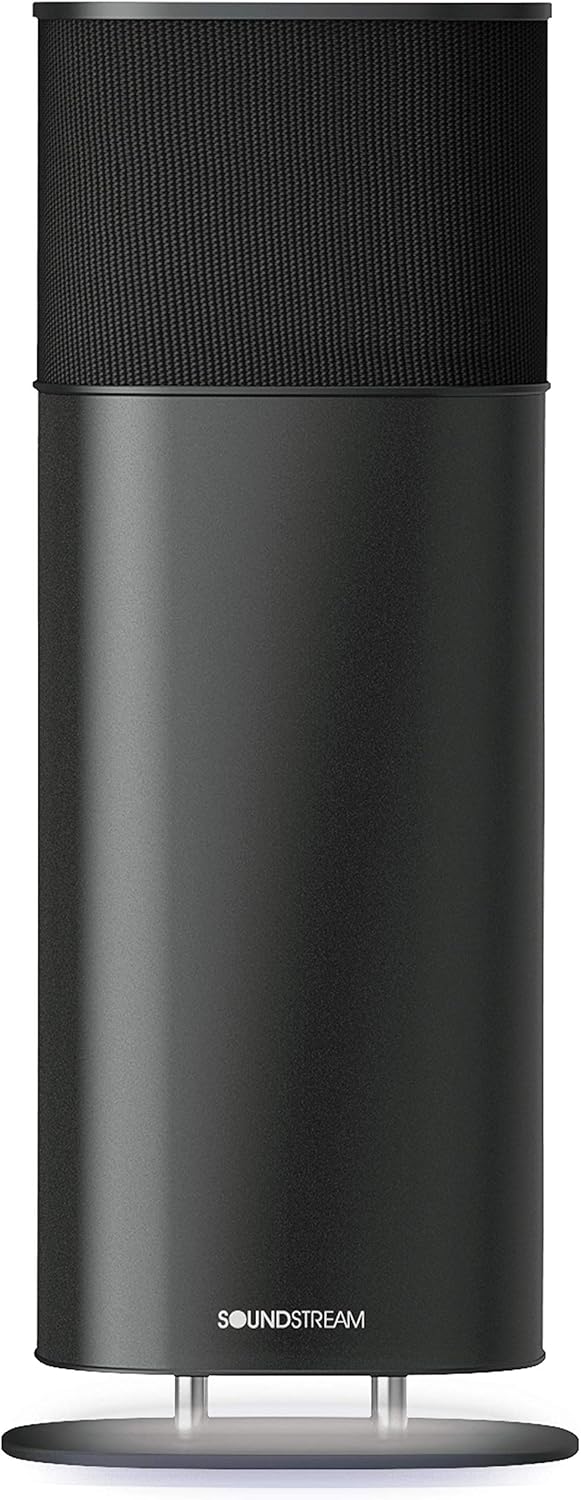
Image: The Soundstream Sound Tower speaker shown with its USB Type-C and AUX cables.
4. Product Overview
4.1 Front View
Image: Front view of the Soundstream Sound Tower, showcasing its sleek black cylindrical design with the Soundstream logo at the base.
4.2 Top Panel Controls

Image: Close-up of the top panel of the Soundstream Sound Tower, showing the touch-sensitive controls including mode selection (M), Bluetooth (BT), AUX, HDMI (ARC), Music, Movie, and power (E) buttons, along with a circular play/pause button surrounded by LED indicators.
4.3 Rear Panel Ports

Image: Rear view of the Soundstream Sound Tower, highlighting the input/output ports: RST (Reset), OUT, AUX, USB, and HDMI (ARC).
4.4 Internal Components (Exploded View)

Image: An exploded diagram showing the internal components of the Soundstream Sound Tower, including the main speaker drivers, subwoofer, and circuit boards.
5. Setup
5.1 Charging the Speaker
Before first use, fully charge the speaker. Connect the provided USB Type-C cable to the speaker's USB port and the other end to a compatible USB power adapter (not included). The LED indicators on the top panel will show charging status.
- Battery Capacity: 8800mAh NiMh
- Charging Time: Approximately 5 hours via 5V 3A USB Type-C.
5.2 Placement
Place the Sound Tower on a stable, flat surface. For optimal 360° sound dispersion, ensure there are no obstructions around the speaker.
6. Operating Instructions
6.1 Power On/Off
Press and hold the power button (marked 'E' on the top panel) for a few seconds to turn the speaker on or off.
6.2 Bluetooth Pairing
- Turn on the speaker. It will automatically enter Bluetooth pairing mode, indicated by a flashing LED.
- On your device (smartphone, tablet, laptop), enable Bluetooth and search for available devices.
- Select "Soundstream Sound Tower" from the list.
- Once paired, the LED indicator will become solid, and you will hear a confirmation tone.
Bluetooth Range: Up to 10 meters (33 feet).
6.3 AUX Input
Connect one end of the provided 3.5mm AUX cable to the speaker's AUX port and the other end to the audio output of your device. The speaker will automatically switch to AUX mode or you may need to select it using the 'M' (Mode) button on the top panel.
6.4 HDMI (ARC) Input
Connect an HDMI cable (not included) from your TV's HDMI ARC port to the speaker's HDMI (ARC) port. This allows for high-quality audio transmission from your TV to the speaker. Select HDMI mode using the 'M' (Mode) button.
6.5 USB Playback
Insert a USB flash drive into the USB port on the rear panel. The speaker can play audio files directly from the drive. Use the controls on the top panel to navigate tracks.
6.6 True Wireless Stereo (TWS) Pairing
If you have two Soundstream Sound Tower speakers, you can pair them together for a true wireless stereo experience. Refer to the specific TWS pairing instructions that may be provided with a second unit or on the manufacturer's website.
6.7 Control Buttons
- M (Mode): Press to cycle through input modes (Bluetooth, AUX, HDMI, USB).
- Play/Pause Button: Press to play or pause audio.
- Volume Control: Adjust volume by rotating your finger along the circular LED ring on the top panel.
- Music/Movie Modes: Press to switch between optimized audio profiles for music or movies.
7. Maintenance
- Cleaning: Use a soft, dry cloth to clean the speaker's surface. Do not use abrasive cleaners or solvents.
- Storage: When not in use for extended periods, store the speaker in a cool, dry place, away from direct sunlight.
- Battery Care: To prolong battery life, avoid fully discharging the battery frequently. Charge it regularly, even if not in use.
8. Troubleshooting
| Problem | Possible Cause | Solution |
|---|---|---|
| Speaker does not turn on. | Battery is depleted. | Charge the speaker using the provided USB Type-C cable. |
| Cannot pair via Bluetooth. | Speaker is not in pairing mode; device Bluetooth is off; too far from speaker. | Ensure speaker is in pairing mode (flashing LED). Turn on Bluetooth on your device. Move device closer to speaker (within 10m). |
| No sound. | Volume too low; incorrect input mode; cable not connected properly. | Increase volume on both speaker and source device. Select correct input mode (Bluetooth, AUX, HDMI). Check cable connections. |
| Sound distortion. | Volume too high; source audio quality is poor. | Lower the volume. Try a different audio source or file. |
9. Specifications
- Model Name: Soundstream
- Model Number: STM-2000
- Speaker Type: Subwoofer
- Special Feature: Portable
- Recommended Uses: Music
- Compatible Devices: Laptop, Tablet, Smartphone
- Subwoofer Diameter: 57.15 Centimeters (approx. 22.5 inches)
- Controller Type: Button, Touch
- Surround Sound Channel Configuration: 4.2
- Battery Life: 5 Hours
- Included Components: Sound Tower, USB Type-C Cable, AUX / 3.5mm Cable
- Item Weight: 4.45 Kilograms (approx. 9.79 pounds)
- Is Waterproof: TRUE
- Battery Capacity: 8800 Milliamp Hours
- Warranty Type: Limited
- Wireless Communication Technology: Bluetooth
- Speaker Size: 26 Centimeters (approx. 10.2 inches)
- Power Source: Battery Powered
- Signal-to-Noise Ratio: 95 dB
- Woofer Diameter: 5 Inches
- Number of Batteries: 1 12V batteries required. (included)
- Bluetooth Range: 10 Meters
- Connectivity Protocol: Bluetooth
- UPC: 709483059634
- Manufacturer: Soundstream
- Product Dimensions: 0.39 x 0.39 x 0.39 inches (Note: This dimension appears to be a placeholder or error in the source data.)
- Date First Available: September 18, 2019
- Country of Origin: China
- Speaker Maximum Output Power: 100 Watts
- Audio Output Mode: Stereo
- Mounting Type: Freestanding

Image: A graphic summarizing key technical specifications for the Soundstream STM-2000, including speaker drivers, system output, physical characteristics, and what's included.

Image: A graphic detailing the rechargeable battery specifications (8800mAh NiMh, 5 hours operation, 5V 3A charging via USB Type-C) and Bluetooth connectivity (V4.2+EDR, 66ft/20 meters range, A2DP, AVRCP profiles).
10. Warranty and Support
The Soundstream Sound Tower Portable Bluetooth Speaker comes with a Limited Warranty. Please refer to the warranty card included in your package or visit the official Soundstream website for detailed warranty terms and conditions.
For technical support, troubleshooting assistance, or service inquiries, please contact Soundstream customer support through their official website or the contact information provided with your purchase.
Manufacturer: Soundstream
Country of Origin: China
Date First Available: September 18, 2019
Related documentsSTM-2000


Ask a question about this manual
Ask about setup, troubleshooting, compatibility, parts, safety, or missing instructions. Manuals+ will review the question and use this page’s manual context to help answer it.