
1. Introduction
Thank you for purchasing the Soundstream BTC-3100 Sound Tower Speaker. This device is designed to provide a versatile audio experience with its 360-degree sound output, integrated 20W subwoofer, and a unique detachable Bluetooth speaker for portable use. This manual provides essential information for safe operation, setup, and maintenance of your speaker system.
2. Safety Instructions
- Read all instructions carefully before using the product.
- Do not expose the device to water, moisture, or extreme temperatures.
- Do not attempt to disassemble or repair the unit yourself. Refer all servicing to qualified personnel.
- Keep the speaker away from heat sources such as radiators, heat registers, stoves, or other apparatus (including amplifiers) that produce heat.
- Use only attachments/accessories specified by the manufacturer.
- Unplug the apparatus during lightning storms or when unused for long periods.
3. Package Contents
Please check that the following items are included in your package:
- Soundstream BTC-3100 Sound Tower Speaker (Main Unit)
- Detachable Bluetooth Speaker
- Power Adapter
- Auxiliary Audio Cable
- User Manual (This document)
4. Product Overview
Familiarize yourself with the components of your Sound Tower Speaker system.

Figure 1: The Soundstream BTC-3100 Sound Tower Speaker, illustrating the main tower unit and the detachable portable speaker both connected and separated. The portable speaker sits atop the tower, and an arrow indicates its detachment.

Figure 2: Top view of the detachable speaker, showing the control panel. From left to right, buttons include 'M' (Mode), '-' (Volume Down/Previous Track), '+' (Volume Up/Next Track), and the Power button.
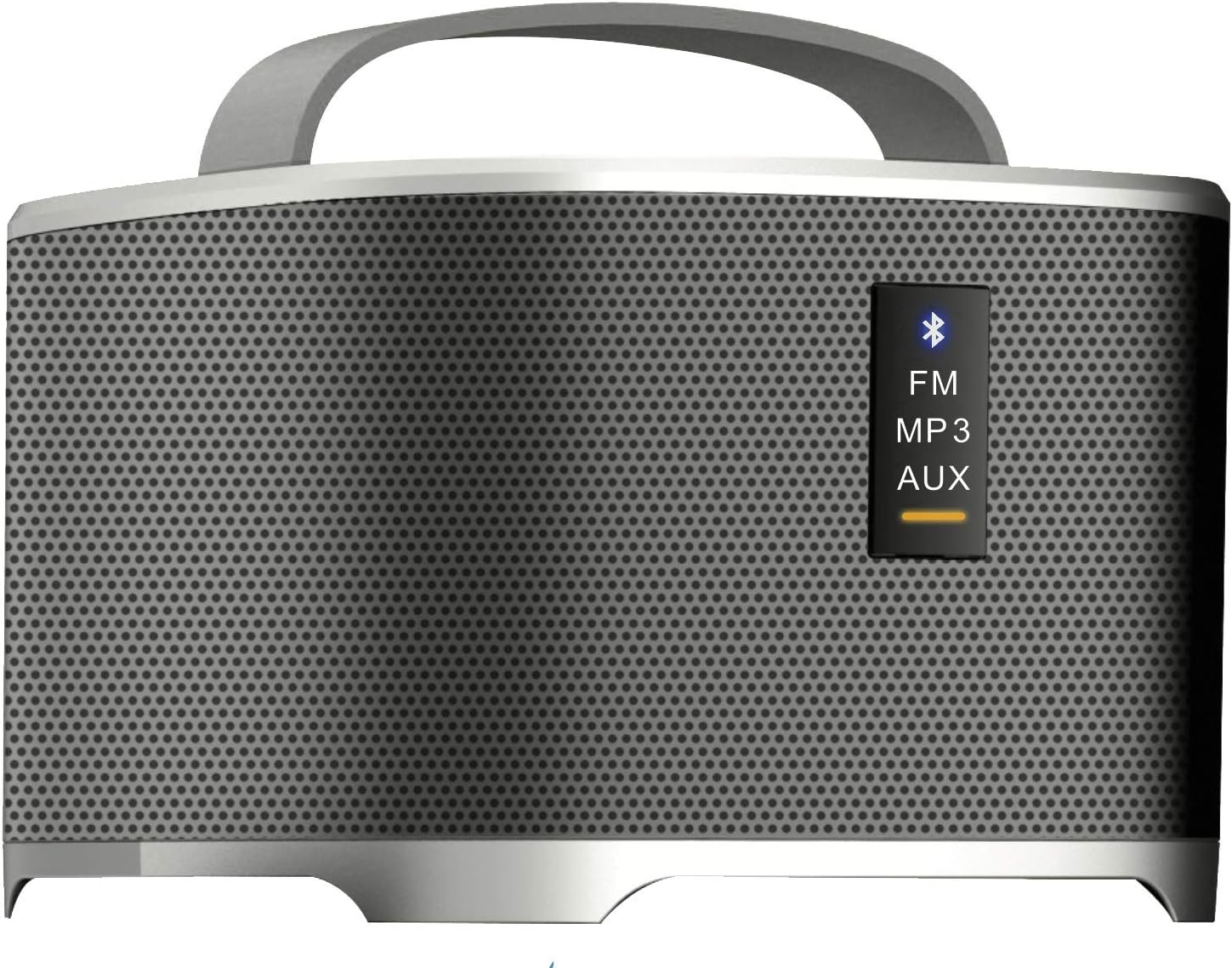
Figure 3: Front panel of the detachable speaker, displaying indicator lights for different modes: Bluetooth (blue icon), FM, MP3, and AUX. A yellow bar indicates the active mode.
Main Tower Unit
- Docking Station: For charging and integrating the detachable speaker.
- Power Input: Connects to the power adapter.
- Subwoofer: Provides enhanced bass audio.
Detachable Bluetooth Speaker
- Power Button: Turns the speaker on/off.
- Mode Button (M): Switches between Bluetooth, FM, MP3, and AUX modes.
- Volume/Track Control (+/-): Adjusts volume with short presses; changes tracks/stations with long presses.
- Bluetooth Indicator: Flashes when pairing, solid when connected.
- Charging Port: For direct charging when detached.
- AUX Input: For wired audio connection.
5. Setup
5.1 Initial Setup
- Place the Sound Tower Speaker on a stable, flat surface.
- Ensure the detachable speaker is securely docked on top of the main tower unit.
- Connect the power adapter to the power input port on the main tower unit, then plug it into a wall outlet.
- The detachable speaker will begin charging automatically when docked and the main unit is powered.
5.2 Charging the Detachable Speaker
The detachable speaker has an internal rechargeable battery.
- While docked: The detachable speaker charges automatically when placed on the main tower unit, provided the tower is connected to power.
- While detached: Connect a compatible USB charging cable (not included, typically Micro-USB) to the charging port on the detachable speaker and a USB power source.
6. Operating Instructions
6.1 Powering On/Off
- Main Tower Unit: The main unit powers on when connected to an electrical outlet. There is no separate power button for the tower itself.
- Detachable Speaker: Press and hold the Power button on the top panel of the detachable speaker for 2-3 seconds to turn it on or off.
6.2 Bluetooth Pairing (Detachable Speaker)
- Ensure the detachable speaker is powered on and in Bluetooth mode. The Bluetooth indicator light will flash. If not, press the 'M' (Mode) button until the Bluetooth indicator flashes.
- Enable Bluetooth on your audio device (smartphone, tablet, etc.).
- Search for available devices and select "BTC-3100" from the list.
- Once connected, the Bluetooth indicator light will become solid.
6.3 Using the Detachable Speaker Independently
When detached from the main tower, the portable speaker functions as a standalone Bluetooth speaker. All controls (power, mode, volume/track) are located on the speaker itself.
6.4 FM Radio Mode
- With the detachable speaker powered on, press the 'M' (Mode) button repeatedly until the FM indicator light is active.
- Long press the '+' or '-' buttons to scan for the next/previous available FM station.
- Short press the '+' or '-' buttons to fine-tune the frequency.
6.5 MP3/AUX Input Mode
- AUX: Connect one end of the auxiliary audio cable to the AUX input port on the detachable speaker and the other end to the audio output of your device. Press the 'M' button until the AUX indicator is active.
- MP3: If the speaker supports USB or MicroSD card input (check product specifications for confirmation), insert the storage device. Press the 'M' button until the MP3 indicator is active.
6.6 Volume Control
Short press the '+' button to increase volume and the '-' button to decrease volume on the detachable speaker. Volume can also be controlled from your connected audio device.
7. Maintenance
- Cleaning: Use a soft, dry cloth to clean the exterior of the speaker. Do not use liquid cleaners or abrasive materials.
- Storage: When not in use for extended periods, store the speaker in a cool, dry place, away from direct sunlight and extreme temperatures.
- Battery Care: To prolong the life of the detachable speaker's battery, avoid fully discharging it frequently. Charge it regularly, even if not in use.
8. Troubleshooting
If you encounter issues with your Soundstream BTC-3100, refer to the following common problems and solutions:
- No Power:
- Ensure the main tower unit's power adapter is securely plugged into both the speaker and a working wall outlet.
- For the detachable speaker, ensure it is charged or docked correctly.
- No Sound:
- Check the volume level on both the speaker and your connected audio device.
- Ensure the correct input mode (Bluetooth, AUX, FM, MP3) is selected on the detachable speaker.
- If using Bluetooth, ensure the speaker is properly paired and connected to your device.
- Bluetooth Not Connecting:
- Make sure the detachable speaker is in Bluetooth pairing mode (indicator flashing).
- Ensure your audio device's Bluetooth is enabled and within range (typically 10 meters/33 feet).
- Try unpairing and re-pairing the speaker from your device's Bluetooth settings.
- Turn both the speaker and your device off and on again.
- Poor FM Reception:
- Relocate the speaker to an area with better signal reception.
- Ensure no large metal objects are obstructing the signal.
9. Specifications
| Brand | Soundstream |
| Model Number | BTC-3100 |
| Speaker Type | Subwoofer, Surround Sound |
| Special Feature | Portable (Detachable Speaker) |
| Compatible Devices | Laptop, Smartphone, Tablet |
| Surround Sound Channel Configuration | 4.2 |
| Power Source | Battery Powered (Detachable Speaker) |
| Control Method | App (if supported), On-device buttons |
| Speaker Maximum Output Power | 20 Watts (Subwoofer) |
| Connectivity Technology | Bluetooth |
| Audio Output Mode | Stereo, Surround |
| Mounting Type | Floor Standing |
| Item Weight | 11.13 pounds |
| Package Dimensions | 36 x 8.8 x 7.9 inches |
| UPC | 709483059689 |
10. Warranty and Support
Soundstream products are designed and manufactured to the highest quality standards. For information regarding warranty coverage, please refer to the warranty card included with your product or visit the official Soundstream website. For technical support or customer service inquiries, please contact Soundstream customer support through their official channels.