
SRJTEK Huawei P9 Dual AL00/P9 L09/P9 Dual L19/P9 Dual AL10/P9 Dual L29
SRJTEK Huawei P9 LCD Screen Replacement User Manual
Model: Huawei P9 Dual AL00/P9 L09/P9 Dual L19/P9 Dual AL10/P9 Dual L29
1. Product Overview
This manual provides essential information for the installation, maintenance, and troubleshooting of the SRJTEK LCD Screen Replacement for Huawei P9 series mobile phones. This product is designed to replace a broken or malfunctioning screen, restoring full display and touch functionality to your device.

Image 1.1: SRJTEK LCD Screen Replacement Kit for Huawei P9. The kit includes the replacement LCD screen, a set of opening tools, a tempered glass film, and double-sided adhesive tape for installation.
The replacement screen is a TFT LCD with a resolution of 1080x1920 pixels and a size of 5.2 inches, ensuring compatibility and performance similar to the original display.
2. Installation Guidelines
Installing a mobile phone screen requires precision and professional skills. It is highly recommended to seek assistance from a professional repair center to ensure proper installation and prevent damage to your device or the new screen.
2.1. Important Precautions
- The screen replacement is made of glass and is very fragile. Handle with extreme care during unpacking and installation. Any small crack can render the screen non-functional.
- Before installing the new screen, always disconnect the battery connector from the motherboard. This prevents short circuits and potential damage to the phone's components.
- After connecting the new screen's ribbon cable, reconnect the battery and power on your phone/tablet to test the screen thoroughly before final assembly.
- The provided tools are general-purpose and may not be suitable for all phone models. Professional tools may be required.
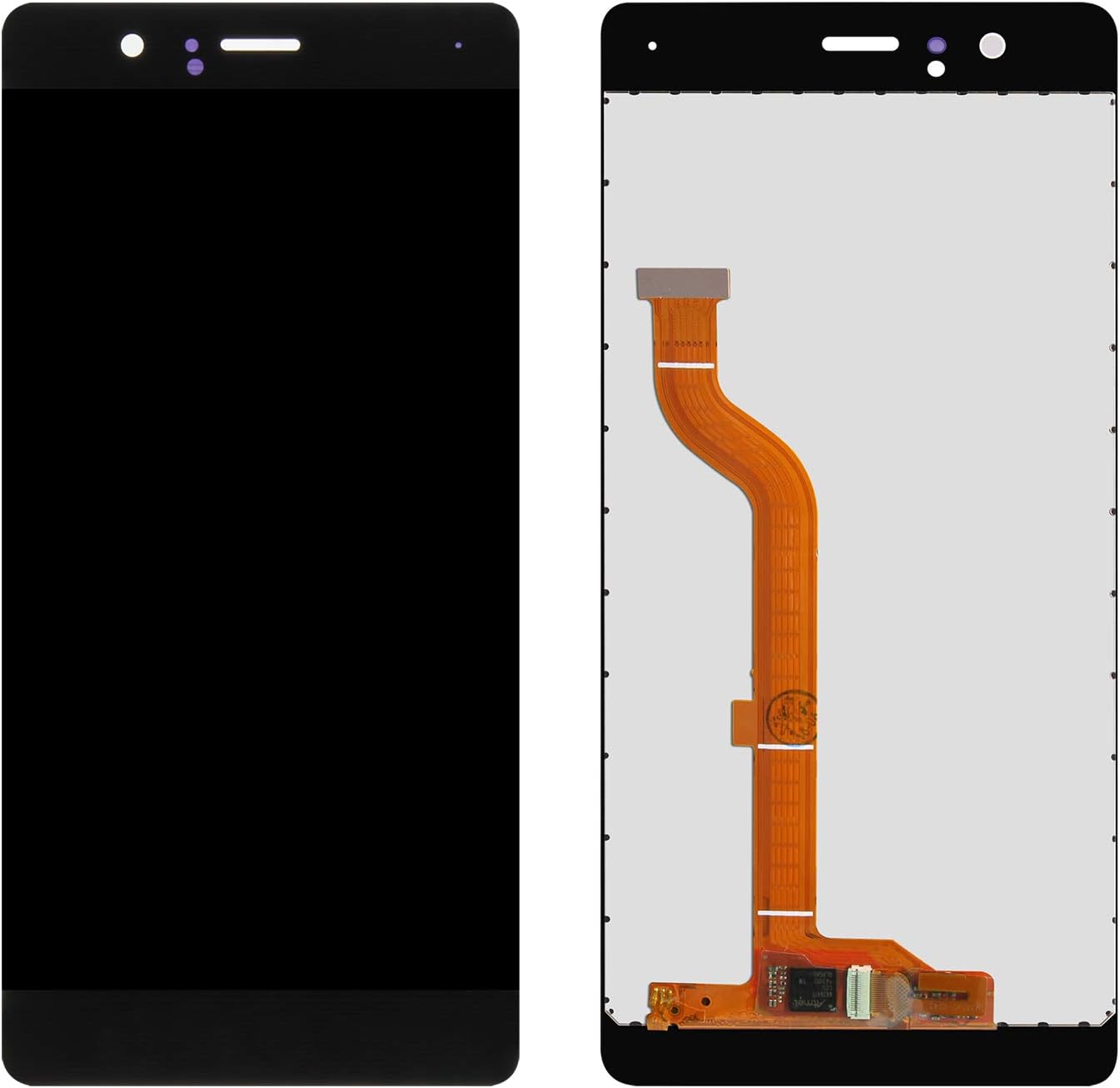
Image 2.1: Front and back view of the replacement LCD screen, highlighting the flex cable connection. Ensure this cable is properly seated and secured during installation.

Image 2.2: Detailed view of the flex cable and its connector. Handle this component with care to avoid damage to the delicate circuitry.
3. Operating and Testing
After connecting the new screen and before fully reassembling your device, it is crucial to perform a comprehensive test of the screen's functionality.
3.1. Post-Installation Testing
- Display Test: Check for any dead pixels, lines, or discoloration across the entire screen area. Ensure brightness and color reproduction are satisfactory.
- Touch Functionality: Test the touch response across all areas of the screen. Drag an icon around the screen to verify uniform touch sensitivity. Test multi-touch gestures if applicable.
- Sensor Functionality: Verify that proximity sensors, ambient light sensors, and front camera are functioning correctly through the screen's cutouts.
If any issues are observed during testing, disconnect the battery, recheck all connections, and retest. If problems persist, refer to the Troubleshooting section.
4. Maintenance
Proper care can extend the lifespan of your replacement screen.
- Cleaning: Use a soft, lint-free cloth, preferably microfiber, to gently wipe the screen. For stubborn smudges, slightly dampen the cloth with water or a screen-specific cleaning solution. Avoid harsh chemicals or abrasive materials.
- Protection: Utilize the included tempered glass film for added scratch and impact protection. Consider a protective case for your device.
- Avoid Pressure: Do not apply excessive pressure to the screen, especially when carrying the device in pockets or bags.
- Temperature: Avoid exposing the device to extreme temperatures, which can affect screen performance and longevity.
5. Troubleshooting
If you encounter issues after installing the SRJTEK LCD screen replacement, consider the following troubleshooting steps:
| Problem | Possible Cause | Solution |
|---|---|---|
| Screen does not turn on / No display | Loose flex cable connection, damaged screen during installation, battery not reconnected. | Ensure battery is connected. Recheck and reseat the screen's flex cable. If damage occurred during installation, it may not be covered by warranty. Professional assistance is recommended. |
| Touchscreen unresponsive or erratic | Loose flex cable, static electricity, software glitch, damaged digitizer. | Disconnect and reconnect the battery. Recheck the flex cable connection. Restart the phone. If the issue persists, the digitizer may be faulty (non-human factor). |
| Dead pixels or lines on display | Manufacturing defect, damage during shipping or installation. | If not caused by physical damage during installation, this may be a manufacturing defect. Contact SRJTEK customer service for warranty claim. |
| Screen flickers or shows distorted colors | Loose connection, incompatible software, faulty display component. | Recheck flex cable connection. Ensure phone software is up to date. If the problem persists, contact customer service. |
Note: Damage incurred during installation is not covered under warranty. Professional installation is strongly advised to prevent such issues.
6. Product Specifications
Detailed specifications for the SRJTEK Huawei P9 LCD Screen Replacement:

Image 6.1: Visual representation of the screen's key display specifications.
- Model Compatibility: Huawei P9 Dual AL00, P9 L09, P9 Dual L19, P9 Dual AL10, P9 Dual L29
- Color: Black
- Screen Type: TFT LCD
- Resolution: 1080x1920 pixels
- Size: 5.2 inches
- Package Contents: 1x LCD screen, 1x opening tools kit, 1x tempered glass film, 1x double-sided sticker
- Package Dimensions: 3.94 x 3.94 x 0.79 inches
- Item Weight: 3.53 ounces
7. Warranty Information
All SRJTEK products come with a warranty to ensure customer satisfaction.
- Warranty Period: 6 months from the date of purchase.
- Coverage: The warranty covers quality problems arising from non-human factors. This includes manufacturing defects such as dead pixels, unresponsive touch areas, or display abnormalities not caused by physical damage or improper installation.
- Exclusions: Damage caused by improper installation, accidental drops, liquid exposure, unauthorized repairs, or any other human-induced factors are not covered under this warranty.
- Claim Process: In case of a valid warranty claim, SRJTEK will provide a new exchange or a refund.
8. Customer Support
For any questions, concerns, or issues regarding your SRJTEK product or order, please do not hesitate to contact our customer service team.
- Contact Method: Please refer to your purchase platform or SRJTEK's official website for contact details.
- Response Time: Our customer service professionals aim to reply to all inquiries within 24 hours.
Your satisfaction is our priority, and we are always ready to assist you.
Ask a question about this manual
Ask about setup, troubleshooting, compatibility, parts, safety, or missing instructions. Manuals+ will review the question and use this page’s manual context to help answer it.