
1. Introduction
This manual provides instructions for the safe and effective use of your BORNMIO BT-24Q replacement battery. This battery is designed for compatibility with TOPCON GPT-1000, GPT-1001, GPT-1002, GTS-300D, GTS-301D, GTS-302D, and GTS-303D total stations. Please read this manual thoroughly before use to ensure proper operation and longevity of the product.
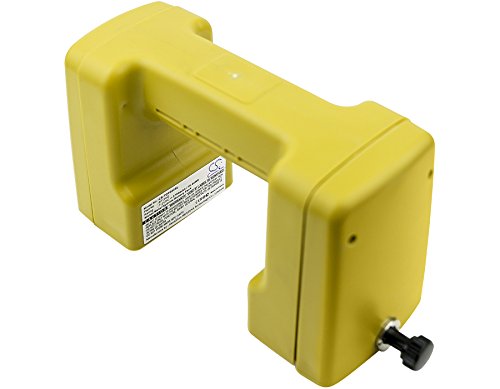
Image of the BORNMIO BT-24Q replacement battery, a yellow, rectangular unit with a handle-like structure.
2. Important Safety Information
Observe the following safety precautions to prevent injury or damage to the battery and connected devices:
- Do not disassemble, open, or shred the battery pack.
- Do not expose the battery to heat or fire. Avoid storage in direct sunlight.
- Do not short-circuit the battery. Do not store battery packs haphazardly in a box or drawer where they may short-circuit each other or be short-circuited by other metal objects.
- Do not remove the battery from its original packaging until required for use.
- Do not expose the battery to mechanical shock.
- In the event of a battery leaking, do not allow the liquid to come into contact with the skin or eyes. If contact has been made, wash the affected area with copious amounts of water and seek medical advice.
- Do not use any charger other than that specifically provided for use with the equipment.
- Observe the plus (+) and minus (-) marks on the battery and equipment and ensure correct use.
- Keep the battery clean and dry.
- Do not leave a battery on prolonged charge when not in use.
- Dispose of properly. This product is RoHS approved for toxic-free materials and holds CE and ISO9001 certificates for quality assurance.
3. Setup: Battery Installation
To install the BT-24Q replacement battery into your compatible TOPCON total station, follow these general steps:
- Ensure the total station is powered off before attempting battery installation or removal.
- Locate the battery compartment on your TOPCON device. Refer to your device's specific manual for exact location and opening instructions.
- Carefully insert the BT-24Q battery into the compartment, aligning the contacts on the battery with the corresponding terminals in the device.
- Gently push the battery until it clicks into place or is securely seated.
- Close the battery compartment cover, ensuring it is latched securely.

Image showing the bottom contacts and switch of the BORNMIO BT-24Q battery, indicating the connection points for installation.
4. Operating
4.1 Charging the Battery
To charge your BT-24Q battery:
- Use only a charger compatible with the TOPCON BT-24Q battery.
- Connect the battery to the charger according to the charger's instructions.
- Plug the charger into a suitable power source.
- Monitor the charging indicator on your charger. Charging times may vary.
- Once fully charged, disconnect the battery from the charger.
4.2 Battery Usage
Once installed and charged, the battery will power your TOPCON total station. Monitor the battery level indicator on your device to determine when recharging is necessary. For optimal performance, avoid completely draining the battery frequently.
5. Maintenance and Storage
Proper maintenance and storage will extend the life of your battery:
- Cleaning: Keep the battery contacts clean and free from dirt or corrosion. Use a dry, clean cloth to wipe them if necessary.
- Temperature: Store the battery in a cool, dry place, away from direct sunlight and extreme temperatures (both high and low). The ideal storage temperature is between 10°C and 25°C (50°F and 77°F).
- Long-term Storage: If storing the battery for an extended period, it is recommended to charge it to approximately 50-70% capacity every 3-6 months to prevent deep discharge and maintain cell health.
- Avoid Over-Discharge: Do not allow the battery to remain fully discharged for long periods.

Image showing the top view of the BORNMIO BT-24Q battery, highlighting the overall structure and connection area.
6. Troubleshooting
If you encounter issues with your battery, refer to the following table:
| Problem | Possible Cause | Solution |
|---|---|---|
| Battery not charging | Incorrect charger, poor connection, charger malfunction, battery too hot/cold. | Ensure correct charger is used. Check connections. Try charging in a moderate temperature environment. Test charger with another battery if possible. |
| Device not powering on with battery | Battery not fully charged, incorrect installation, battery contacts dirty, device malfunction. | Ensure battery is fully charged. Reinstall battery correctly. Clean battery and device contacts. Test device with another known good battery if available. |
| Short operating time after full charge | Battery aging, improper charging, extreme operating conditions. | Ensure battery is fully charged. Avoid operating in extreme temperatures. If battery is old, consider replacement. |
7. Product Specifications
- Model Number: CS-TOP240SL
- Compatible Part Number: BT-24Q
- Battery Type: Ni-MH
- Voltage: 7.2V
- Capacity: 2700mAh
- Energy: 19.44Wh
- Dimensions: 180.30 x 67.90 x 94.18mm
- Weight: Approximately 800g (28.22oz)
- Certifications: RoHS, CE, ISO9001
- Compatible Devices: TOPCON GPT-1000, GPT-1001, GPT-1002, GTS-300D, GTS-301D, GTS-302D, GTS-303, GTS-303D
8. Warranty and Support
For warranty information or technical support, please refer to the seller's policies or contact the manufacturer directly. Keep your purchase receipt as proof of purchase.