
1. Introduction
Welcome to the instruction manual for your BORNMIO replacement battery. This manual provides essential information for the safe and effective use of your new battery. Please read it thoroughly before installation and operation to ensure optimal performance and longevity.
2. Product Overview
The BORNMIO CS-SDT500CL is a high-quality replacement battery designed to meet the specifications of original equipment. It offers reliable power for your compatible devices.
- High-Quality Construction: Manufactured to exact specifications with strict detection and testing to ensure safe and durable use.
- Advanced Protection: Features built-in overcharge, over-discharge, over-voltage, and short-circuit protection for enhanced battery life and safety.
- Specifications: Capacity: 600mAh, Watt-Hours (Wh): 1.44Wh, Type: Ni-MH, Voltage: 2.4V.
- Seamless Compatibility: Equipped with a new fully decoded chip that functions like the original battery.
- Compact Dimensions: 35.40 x 32.50 x 6.70mm.
- Lightweight: Approximately 30g / 1.06oz.
- Certifications: ISO9001, RoHS, and CE certified for quality assurance and environmental compliance.

Figure 1: Front view of the BORNMIO CS-SDT500CL replacement battery, displaying its label with key specifications.

Figure 2: Angled perspective of the battery, highlighting its form factor and wired connector.
3. Compatibility
This battery is compatible with the following MEDION models and battery part numbers. Please verify your device model and existing battery part number carefully before installation.
Compatible MEDION Device Models:
- MEDION Life E63038
- MEDION Life S63006
- MEDION Life S63008
- MEDION Life S63022
- MEDION Life S63049
- MEDION Life S63088
- MEDION 81877
- MEDION 82711
- MEDION 82772
- MEDION 82877
- MEDION 83208
- MEDION 83708
- MEDION 83877
Compatible Battery Part Numbers:
- 5M702BMX
- GP0735
- GP0747
- GP0748
- GP0827
- GP0845
- GP0929
4. Safety Information
Observe the following safety precautions to prevent damage, injury, or fire. Failure to follow these instructions may result in electric shock, fire, or other hazards.
- Do Not Disassemble: Do not attempt to disassemble, open, or service the battery pack. This will void the warranty and may cause damage.
- Avoid Physical Damage: Do not crush, puncture, or subject the battery to strong impacts.
- Prevent Short Circuits: Avoid short-circuiting the external contacts.
- Temperature Control: Do not expose the battery to temperatures above 60°C (140°F). Avoid direct sunlight and extreme heat sources.
- Proper Disposal: Do not dispose of the battery in fire or water. Dispose of used batteries according to local regulations for electronic waste.
- Compatibility: Replace only with the product designated for this battery. Using an incompatible battery may pose risks.
- Keep Away from Children: Store batteries out of reach of children.
5. Setup and Installation
Follow these steps to safely install your new BORNMIO replacement battery:
- Preparation: Ensure your device is completely powered off and disconnected from any power source (e.g., AC adapter, USB cable).
- Locate Battery Compartment: Refer to your device's original instruction manual to locate and open the battery compartment. This often involves removing a cover or screws.
- Remove Old Battery: Carefully disconnect the old battery's connector from the device's port. Gently remove the old battery, noting its orientation for reference.
- Install New Battery: Insert the BORNMIO replacement battery into the compartment. Ensure the battery's connector aligns correctly with the device's port and gently push to connect it. Do not force the connection.
- Secure: Close the battery compartment securely, ensuring any covers or screws are properly reinstalled.
- Initial Charge: It is recommended to fully charge the new battery before its first use to calibrate its capacity.

Figure 3: Bottom view of the battery, illustrating the connector type for proper installation.
6. Operating Instructions
This battery is designed for standard use in compatible devices. Follow your device's operating guidelines for optimal battery performance.
- Charging: Always use the charger supplied with your device or a compatible charger recommended by the device manufacturer.
- Discharging: Allow the battery to discharge naturally during device use. While the battery has over-discharge protection, avoiding frequent complete drainage can contribute to longer overall battery life.
- Temperature: Operate your device with the battery within its recommended temperature range, typically between 0°C and 45°C (32°F and 113°F).
7. Maintenance
Proper maintenance can extend the life of your battery.
- Storage: If storing the battery for an extended period (more than a month), store it in a cool, dry place, ideally at a partial charge (around 50%). Avoid storing fully charged or fully depleted.
- Cleaning: Keep battery contacts clean. Use a dry, soft cloth to gently wipe away any dust or debris that may accumulate on the contacts.
- Avoid Extremes: Do not expose the battery to extreme temperatures, high humidity, or direct sunlight for prolonged periods.
8. Troubleshooting
If you encounter issues with your battery, consider the following troubleshooting steps:
- Battery Not Charging:
- Ensure the battery is correctly installed and its connector is firmly seated.
- Verify that the charger is functioning properly and is securely connected to both the device and a power outlet.
- Check for any visible damage to the battery, device charging port, or charger cable.
- Short Battery Life:
- Ensure the battery has been fully charged before use.
- Review your device's settings (e.g., screen brightness, Wi-Fi/Bluetooth usage, background applications) as these can significantly affect battery drain.
- Note that battery life naturally degrades over time and with the number of charge/discharge cycles.
- Device Not Powering On:
- Confirm the battery is charged and correctly installed.
- Test the device with a known working power source (e.g., AC adapter) or another compatible battery if available, to determine if the issue is with the battery or the device itself.
If issues persist after following these steps, refer to your device's original manual or contact customer support for further assistance.
9. Specifications
Detailed technical specifications for the BORNMIO CS-SDT500CL replacement battery:
| Feature | Detail |
|---|---|
| Model Number | CS-SDT500CL |
| Battery Type | Ni-MH (Nickel-Metal Hydride) |
| Voltage | 2.4V |
| Capacity | 600mAh |
| Watt-Hours (Wh) | 1.44Wh |
| Dimensions | 35.40 x 32.50 x 6.70mm (1.39 x 0.26 x 1.28 inches) |
| Weight | 30g / 1.06oz |
| Certifications | ISO9001, RoHS, CE |
| Manufacturer | CS |
| Date First Available | September 18, 2019 |
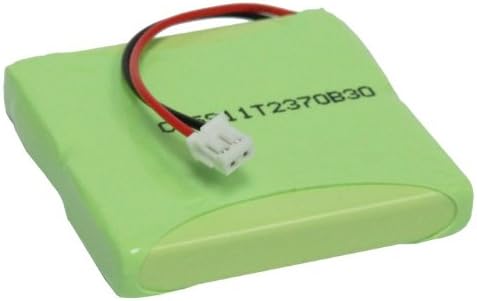
Figure 4: Another angled view of the battery, providing a different perspective of its physical design.
10. Warranty and Support
This BORNMIO replacement battery comes with a 12-month warranty and a 14-day money-back guarantee, providing assurance for your purchase.
For technical support, warranty claims, or any questions regarding your battery, please contact your retailer or the manufacturer directly. Please have your purchase information and battery model number (CS-SDT500CL) available when contacting support.
