
BORNMIO CS-MLE200SL
BORNMIO Replacement Battery for MINELAB Metal Detectors (Model CS-MLE200SL) User Manual
Model: CS-MLE200SL
1. Introduction
This manual provides essential information for the safe and effective use of your BORNMIO CS-MLE200SL replacement battery. This Ni-MH battery is designed to power various MINELAB Explorer series metal detectors. Please read these instructions carefully before installation and use.
2. Product Overview and Specifications
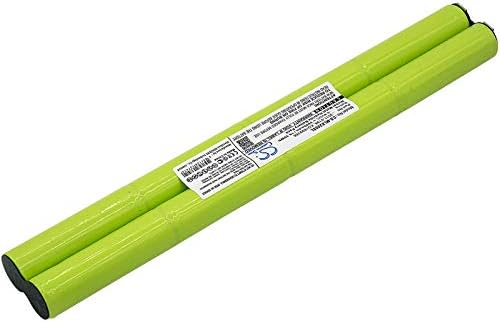
Image 1: Top view of the BORNMIO CS-MLE200SL replacement battery, showing its elongated, cylindrical shape and label.
2.1 Key Features
- High-quality Ni-MH battery cells.
- Built-in protection against overcharge, over-discharge, over-voltage, and short circuits.
- Designed to meet original equipment specifications.
- Certifications: ISO9001, RoHS, CE.
2.2 Technical Specifications
| Specification | Value |
|---|---|
| Battery Type | Ni-MH |
| Capacity | 2000mAh |
| Watt-Hours (Wh) | 19.20Wh |
| Voltage | 9.6V |
| Dimensions | 200.20 x 29.26 x 14.50mm |
| Weight | 250g / 8.82oz |
| Reusability | Rechargeable |
3. Compatibility
This BORNMIO replacement battery (Model CS-MLE200SL) is compatible with the following MINELAB metal detector models and battery part numbers:
3.1 Compatible MINELAB Metal Detector Models:
- MINELAB Explorer 2
- MINELAB Safari
- MINELAB E-TRAC
- MINELAB Explorer II
- MINELAB Explorer S
- MINELAB Explorer SE
- MINELAB Explorer SE Pro
- MINELAB Explorer XS
- MINELAB FBS Metal Detectors
3.2 Compatible Battery Part Numbers:
- 3011-0170
- 3011-0196
- ML-FBS
- XQ1699356
4. Safety Information
Observe the following safety precautions to prevent injury or damage to the battery and your device:
- Do not disassemble, crush, puncture, or short-circuit the battery.
- Do not expose the battery to high temperatures (above 60°C / 140°F) or direct sunlight.
- Do not dispose of the battery in fire or water.
- Use only chargers specified for Ni-MH batteries.
- Keep the battery away from children and pets.
- If the battery leaks, avoid contact with skin and eyes. Rinse immediately with water and seek medical attention.
- Properly recycle used batteries according to local regulations.
5. Setup and Installation
Follow these steps to install the replacement battery into your MINELAB metal detector:
- Power Off Device: Ensure your MINELAB metal detector is completely powered off before beginning installation.
- Locate Battery Compartment: Refer to your metal detector's original manual to locate and open the battery compartment. This is typically found on the control box or handle.
- Remove Old Battery: Carefully disconnect and remove the old battery. Note the orientation of the connectors.
- Insert New Battery: Insert the BORNMIO replacement battery into the compartment, ensuring the connectors align correctly. The battery is designed to fit snugly.
- Secure Compartment: Close and secure the battery compartment cover.
- Initial Charge: It is recommended to fully charge the new battery before its first use.

Image 2: Side view of the BORNMIO CS-MLE200SL replacement battery, showing the product label with model number and specifications.
Note: If your metal detector's battery compartment has specific terminals (+/-), ensure the battery is inserted with the correct polarity. The BORNMIO battery is designed for direct replacement, but always double-check.
6. Operating and Charging
6.1 First Use
For optimal performance, fully charge the battery before its initial use. This helps to condition the battery cells.
6.2 Charging the Battery
Use the original charger provided with your MINELAB metal detector or a compatible Ni-MH battery charger. Follow the charging instructions provided with your metal detector or charger.
- Connect the charger to the battery or metal detector.
- Plug the charger into a power outlet.
- Monitor the charging indicator on your metal detector or charger.
- Disconnect the charger once the battery is fully charged. Avoid overcharging for extended periods.
6.3 Usage
Once installed and charged, the battery will power your metal detector. The operating time will vary depending on the metal detector model, settings, and environmental conditions.
7. Maintenance and Storage
7.1 General Maintenance
- Keep battery contacts clean and dry.
- Avoid exposing the battery to extreme temperatures or humidity.
- Do not drop or subject the battery to strong impacts.
7.2 Storage
If storing the battery for an extended period (more than one month), follow these guidelines:
- Charge the battery to approximately 50-70% capacity before storage.
- Store the battery in a cool, dry place, away from direct sunlight and extreme temperatures.
- Recharge the battery every 3-6 months to prevent deep discharge, which can reduce battery life.
8. Troubleshooting
If you encounter issues with your BORNMIO replacement battery, consider the following common solutions:
- Battery Not Charging:
- Ensure the charger is properly connected to both the battery/device and the power outlet.
- Verify that the charger is functional and compatible with Ni-MH batteries.
- Check for any debris or corrosion on the battery and charger contacts. Clean if necessary.
- Short Operating Time:
- Ensure the battery is fully charged before use.
- Battery capacity naturally degrades over time and with cycles. If the battery is old, replacement may be necessary.
- Operating conditions (e.g., extreme cold) can affect battery performance.
- Battery Not Fitting:
- Double-check the compatibility list in Section 3 to ensure your metal detector model is supported.
- Ensure correct orientation during installation. Do not force the battery into the compartment.
If problems persist, contact customer support for further assistance.
9. Warranty and Support
9.1 Warranty Information
This BORNMIO replacement battery comes with a 12-month warranty and a 14-day money-back guarantee from the date of purchase. This warranty covers manufacturing defects. It does not cover damage caused by misuse, accident, unauthorized modification, or normal wear and tear.
9.2 Customer Support
For technical assistance, warranty claims, or any questions regarding your BORNMIO replacement battery, please contact your retailer or the manufacturer directly. Please have your purchase details and product model number (CS-MLE200SL) available when contacting support.
Note: The manufacturer's contact information is typically found on the product packaging or the seller's website.
Ask a question about this manual
Ask about setup, troubleshooting, compatibility, parts, safety, or missing instructions. Manuals+ will review the question and use this page’s manual context to help answer it.