
1. Introduction
The Autel ML619 is a powerful diagnostic scan tool designed to assist in identifying and resolving issues within your vehicle's On-Board Diagnostics II (OBD2), Anti-lock Braking System (ABS), and Supplemental Restraint System (SRS). This tool provides comprehensive diagnostic functions, including reading and clearing fault codes, viewing live data, and performing various system tests. It is an essential tool for both professional technicians and DIY enthusiasts seeking to maintain vehicle health and safety.
2. Safety Information
Before operating the Autel ML619, please read and understand all safety warnings and instructions. Failure to do so may result in injury or damage to the tool or vehicle.
- Always perform automotive testing in a safe environment.
- Wear safety eye protection that meets ANSI standards.
- Keep clothing, hair, hands, tools, test equipment, etc., away from all moving or hot engine parts.
- Ensure the vehicle is well-ventilated when working.
- Do not connect or disconnect any test equipment while the ignition is on or the engine is running.
- Keep the scan tool dry, clean, and free from oil, water, or grease. Use a mild detergent on a clean cloth to clean the exterior.
3. Package Contents
Verify that all items are present in your Autel ML619 package:
- Autel ML619 Main Unit
- OBD2 Cable
- USB Cable
- User Manual (this document)
- Protective Nylon Case

Figure 3.1: Autel ML619 diagnostic tool, cables, and protective case.
4. Device Overview
The Autel ML619 features a robust design with a clear display and intuitive button layout for easy operation.

Figure 4.1: Front view of the Autel ML619 device, highlighting the screen and control buttons.
4.1. Display
The 3.5-inch color display provides clear visibility of diagnostic data, menus, and results.
4.2. Keypad
- OK Button: Confirms a selection or action.
- ESC Button: Exits a menu or cancels an operation.
- Directional Buttons (Up/Down/Left/Right): Navigate through menus and data.
- I/M Readiness Button: Provides quick access to I/M Readiness status.
- Question Mark Button: Accesses help or information related to the current screen.
5. Setup and Connection
Follow these steps to connect the Autel ML619 to your vehicle:
- Locate the vehicle's Data Link Connector (DLC), typically found under the dashboard on the driver's side.
- Turn the vehicle's ignition to the "ON" position (engine off).
- Plug the OBD2 cable into the vehicle's DLC.
- Connect the other end of the OBD2 cable to the Autel ML619. The device will power on automatically.

Figure 5.1: Step-by-step connection process for the Autel ML619 to a vehicle's OBD2 port.
6. Operating Instructions
Once connected, the ML619 will display the main menu. Use the directional buttons to navigate and the OK button to select options.
6.1. Full OBD2 Functions
The ML619 supports all 10 modes of OBD2 tests, allowing comprehensive vehicle diagnostics for emission-related issues.
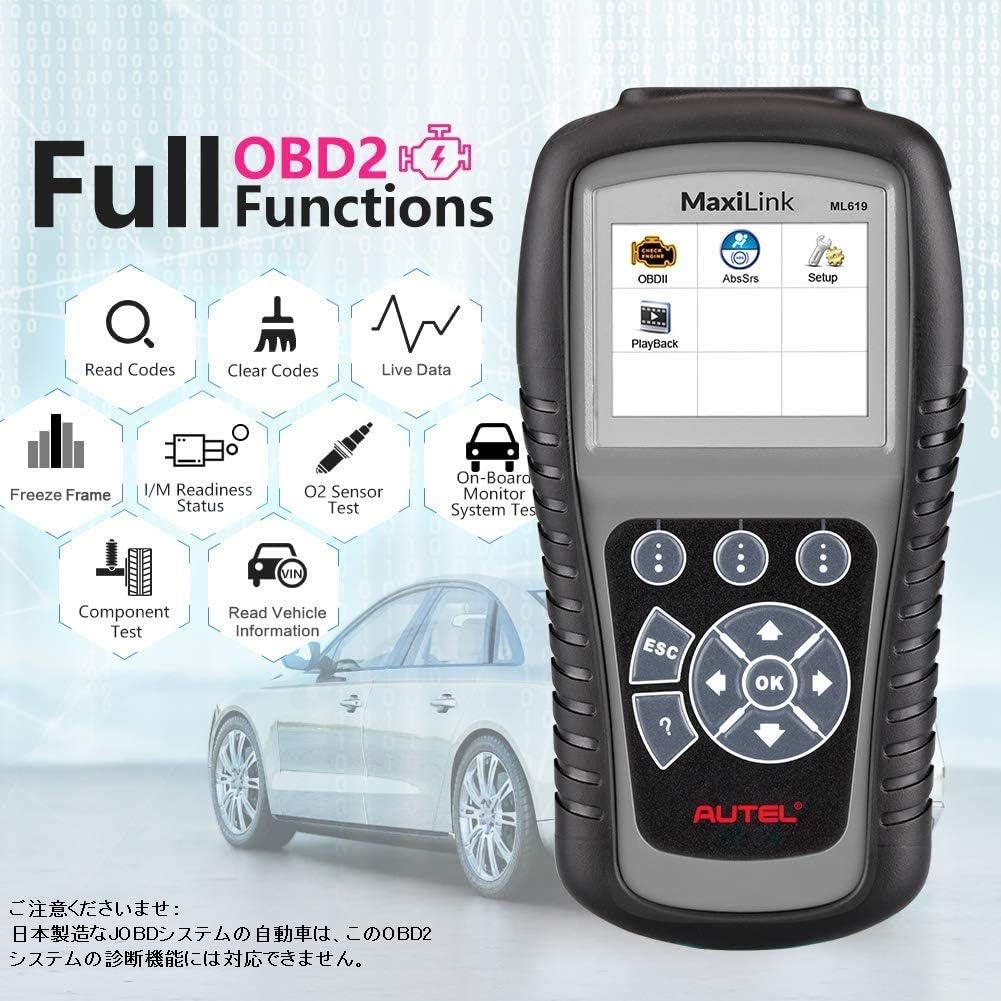
Figure 6.1: Autel ML619 displaying the full range of OBD2 diagnostic functions.
- Read Codes: Retrieves Diagnostic Trouble Codes (DTCs), including generic (P0, P2, P3, U0), manufacturer-specific (P1, P3, U1), and pending codes.
- Clear Codes: Erases DTCs from the vehicle's computer and turns off the Check Engine Light (MIL).
- Live Data: Displays real-time data from the vehicle's sensors in text or graph format.
- Freeze Frame: Shows a snapshot of operating conditions at the time an emission-related fault occurred.
- I/M Readiness Status: Checks the status of emission-related monitors to determine if the vehicle is ready for an inspection/maintenance test.
- O2 Sensor Test: Retrieves O2 sensor monitor test results for the most recently completed tests.
- On-Board Monitor Test: Retrieves test results for emission-related powertrain components and systems that are not continuously monitored.
- Component Test: Allows initiation of a leak test for the vehicle's EVAP system.
- Vehicle Information: Retrieves the Vehicle Identification Number (VIN), Calibration ID (CALID), and Calibration Verification Number (CVN).
6.2. ABS and SRS Diagnostic Functions
The ML619 is capable of diagnosing issues within the Anti-lock Braking System (ABS) and Supplemental Restraint System (SRS).

Figure 6.2: Autel ML619 interface for SRS and ABS system diagnostics.
- Read ABS/SRS Codes: Retrieves current, pending, and permanent fault codes from the ABS and SRS modules.
- Clear ABS/SRS Codes: Erases fault codes from the ABS and SRS modules and turns off associated warning lights.
- View Live Data: Accesses real-time data streams from ABS and SRS sensors.

Figure 6.3: Autel ML619 being used to diagnose a vehicle.
7. Software Updates and Data Printing
The Autel ML619 supports free lifetime software updates to ensure compatibility with the latest vehicle models and diagnostic protocols. It also includes a data printing function.
- Software Updates: Connect the ML619 to a computer via the provided USB cable and visit the official Autel website to download the latest software. Follow the on-screen instructions for installation.
- Data Printing: The tool allows you to print diagnostic data records or customized test reports. Connect the tool to a computer and use the PC Suite software (available on the Autel website) to manage and print data.
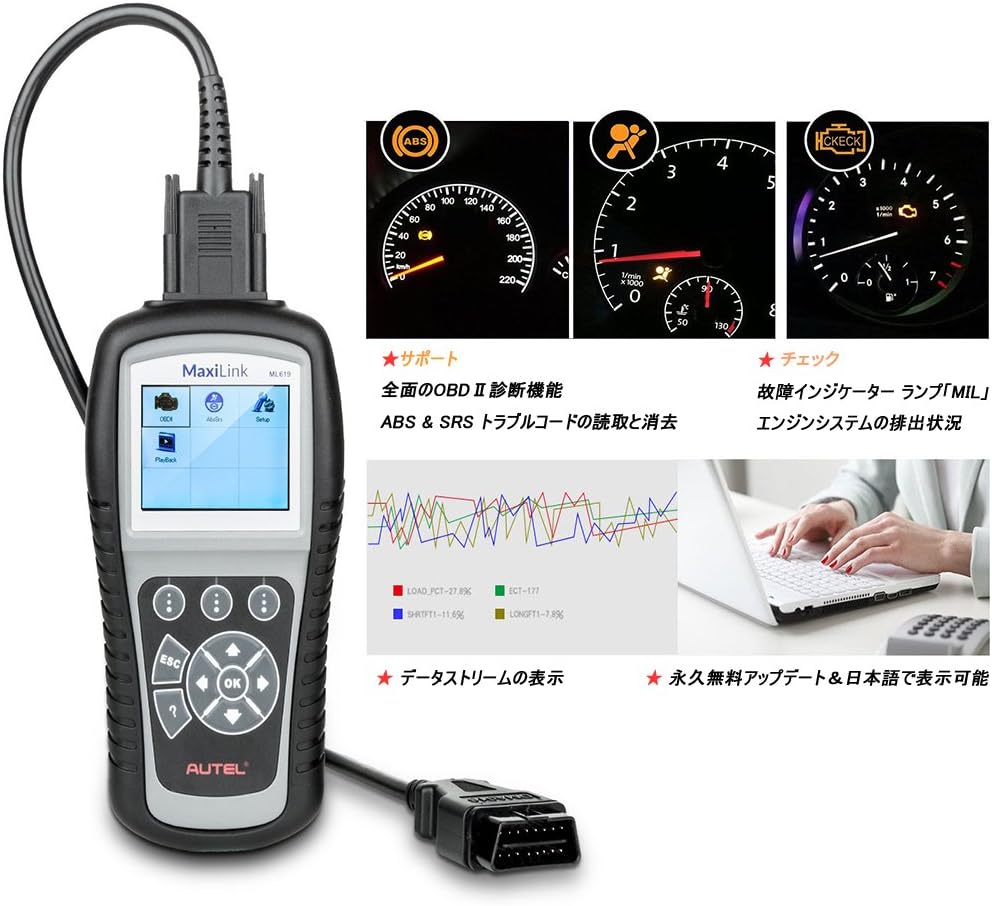
Figure 7.1: Autel ML619 showing data stream and diagnostic indicators, with an illustration of data printing to a laptop.
8. Maintenance
Proper maintenance ensures the longevity and optimal performance of your Autel ML619.
- Cleaning: Use a soft, damp cloth with mild soap to clean the exterior of the tool. Avoid abrasive cleaners or solvents.
- Storage: Store the tool in its protective case in a dry, cool environment, away from direct sunlight and extreme temperatures.
- Cable Care: Inspect the OBD2 and USB cables regularly for any signs of damage. Replace damaged cables immediately.
9. Troubleshooting
If you encounter issues while using the Autel ML619, refer to the following common problems and solutions:
| Problem | Possible Cause | Solution |
|---|---|---|
| Tool fails to power on | Loose connection; vehicle battery low; vehicle not OBD2 compliant. | Check OBD2 cable connection; ensure vehicle battery is charged; verify vehicle is OBD2 compliant (most vehicles 1996 and newer). |
| Communication error with vehicle | Faulty connection; incorrect protocol; vehicle's ECU is not responding. | Verify cable connection; ensure ignition is ON; try on another vehicle to confirm tool functionality. |
| Check Engine Light (MIL) remains on after clearing codes | Underlying fault not repaired; intermittent fault. | The fault may be persistent. Address the root cause of the DTCs before clearing again. |
| ABS/SRS warning light remains on | Underlying fault not repaired; specific manufacturer protocols. | Similar to MIL, the underlying issue must be resolved. Some vehicles may require specific procedures for ABS/SRS light reset. |

Figure 9.1: Autel ML619 demonstrating the ability to turn off the Check Engine Light (MIL).
10. Specifications
| Feature | Detail |
|---|---|
| Brand | Autel |
| Model | ML619 |
| Display Size | 3.5 inches |
| Automotive Mounting Type | Universal Fit |
| Connectivity | Wired (OBD2, USB) |
| Supported Protocols | OBD2/EOBD (ISO9141-2, ISO14230-4, ISO15765-4, KWP2000, J1850 VPW, J1850 PWM) |
| Operating Temperature | 0 to 60°C (32 to 140°F) |
| Storage Temperature | -20 to 70°C (-4 to 158°F) |
| Power | 8.0 to 18.0 V provided via vehicle battery |
| UPC | 792057529411 |
11. Warranty and Support
Autel products are designed for reliability and performance. For specific warranty details, please refer to the warranty card included with your product or visit the official Autel website. For technical support, software updates, or further assistance, please visit the Autel support portal or contact their customer service.
Official Autel Website: www.autel.com


