
VIVOHOME VH515
VIVOHOME Pressurized Biological Pond Filter User Manual
Model: VH515
1. Product Overview
The VIVOHOME Pressurized Biological Pond Filter with a 13-watt UV light is designed to maintain clear and healthy water in your pond. It effectively removes suspended particles, sediments, and organic substances, while the integrated UV lamp helps reduce water pollution and control algae growth. This filter is suitable for ornamental ponds up to 1600 Gallons and fish ponds up to 800 Gallons, with a maximum flow-through of 1580 GPH (6000 L/H).
Key features include:
- Premium Material: Constructed from strengthened ABS material for durability, insulation, and resistance to sunlight, water, and aging.
- Great Filtration: Features 4 built-in filter sponges for mechanical and biological filtration, complemented by a 13W UV lamp for water clarification.
- Easy to Operate: Simple setup and a convenient switch to change function from filtered water output to sewage drainage.
- Superior Performance: High flow rate suitable for various pond sizes.
- Convenient to Maintain: Equipped with a crank handle for easy internal cleaning without disassembling the unit. Sponges and lamp are replaceable.

Figure 1: VIVOHOME Pressurized Biological Pond Filter
2. Safety Information
WARNING: To reduce the risk of electric shock, fire, or injury, read and follow all instructions carefully.
- Always disconnect the filter from the power supply before performing any maintenance, cleaning, or when not in use.
- Do not operate the filter if the power cord or plug is damaged.
- Ensure the filter is placed on a stable, level surface away from direct sunlight and extreme temperatures.
- The UV lamp contains mercury. Handle with care and dispose of according to local regulations. Do not look directly at the UV light when it is on, as it can cause eye damage.
- Ensure all connections are secure and watertight to prevent leaks.
- This filter is designed for outdoor pond use only. Do not submerge the entire unit.
- Do not use pumps that exceed an H-max of 20 FT with this filter.
3. Package Contents
Upon unpacking, please verify that all components are present and undamaged:
- 1 x Pressurized Biological Pond Filter Unit
- 1 x 13W UV Sterilizer Light (pre-installed or separate)
- 3 sets of Pipe Adapters (3/4", 1", 1 1/4")
- Internal Filter Sponges (4 layers)
4. Setup
Follow these steps for proper installation of your pond filter:
- Choose Location: Place the filter on a firm, level surface near your pond. Ensure it is easily accessible for maintenance and protected from extreme weather.
- Connect Inlet Pipe: Attach a suitable pond pump (not included) to the filter's water inlet. Use the appropriate pipe adapter (3/4", 1", or 1 1/4") for a secure connection. Ensure the pump's flow rate is compatible with the filter's maximum capacity (1580 GPH).
- Connect Outlet Pipe: Connect a hose from the filter's drainage outlet back to your pond. This is where the clean, filtered water will return.
- Connect Sewage Exit (Optional): The third outlet is for sewage drainage during cleaning. If not in use, ensure it is properly sealed with the provided cap or plug.
- Secure Connections: Use hose clamps (not included) on all pipe connections to prevent leaks.
- Power Connection: Once all pipes are securely connected and the filter is filled with water, connect the filter's power cord to a GFCI-protected outdoor electrical outlet. The UV light will only operate when water is flowing through the filter.

Figure 2: Connection Mode Diagram

Figure 3: Water Pipe Adapters in 3 Sizes
5. Operating
Once the filter is set up and connected to a pump, it will begin filtering your pond water. The UV light will activate automatically when the unit is powered on and water is flowing.
- Normal Operation: Water from your pond enters the filter, passes through the filter sponges for mechanical and biological filtration, and is exposed to the UV light for algae control. Clean water then exits through the drainage outlet back into your pond.
- Function Switch: The blue function switch on top of the filter allows you to change the water flow. In normal operation, it directs water to the drainage outlet. When cleaning, you can turn the switch to divert the dirty water to the sewage exit.
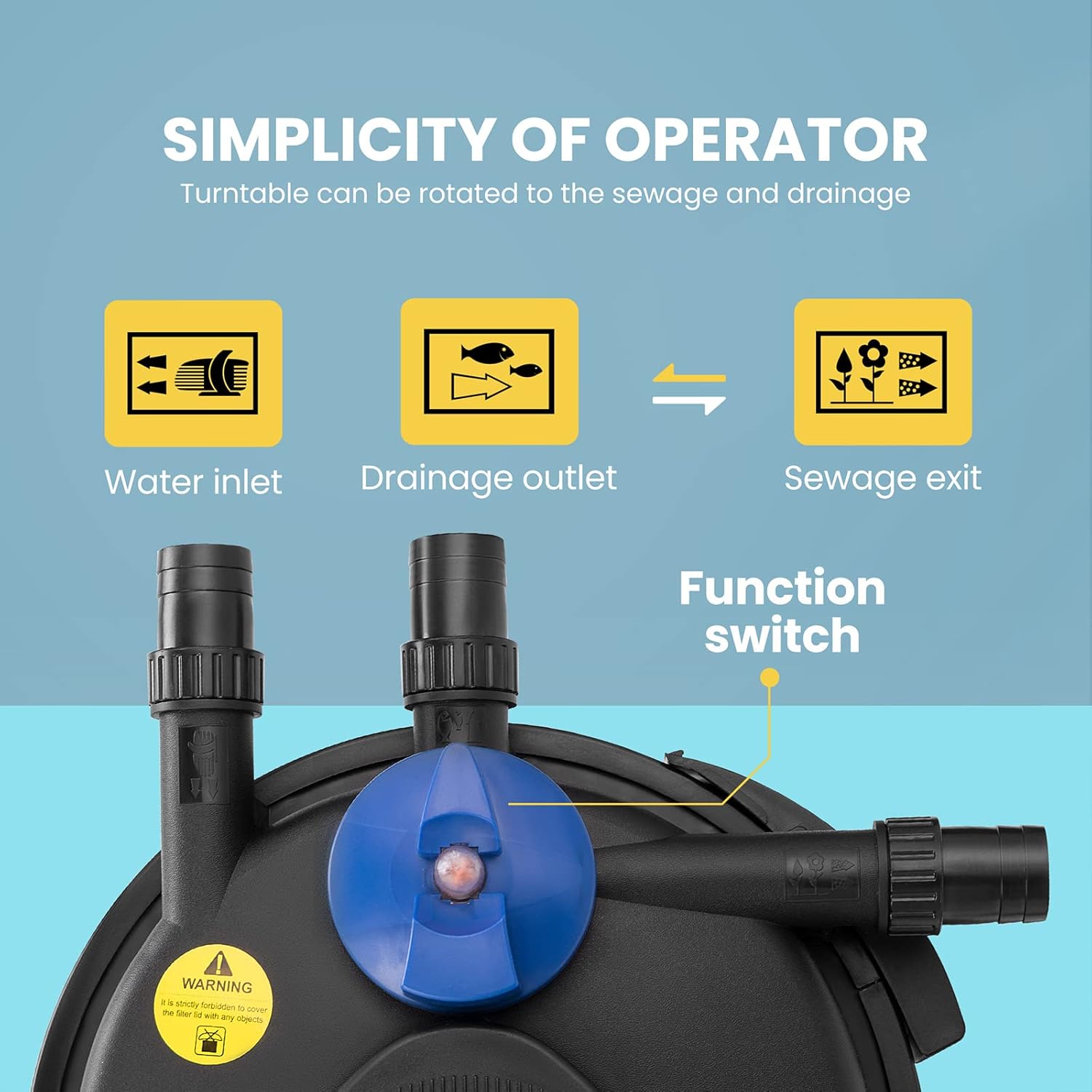
Figure 4: Function Switch for Water Inlet, Drainage Outlet, and Sewage Exit
6. Maintenance
Regular maintenance is crucial for the optimal performance and longevity of your pond filter.
6.1. Cleaning the Filter Sponges
The VIVOHOME filter is designed for easy cleaning without disassembling the unit:
- Switch to Cleaning Mode: Turn the blue function switch to the 'Sewage Exit' position.
- Use Crank Handle: Rotate the crank handle on top of the filter. This activates an internal cleaning rod that squeezes the filter sponges, dislodging accumulated debris.
- Monitor Water: Continue rotating the handle until the water flowing from the sewage exit runs clear. This indicates the sponges are clean.
- Return to Normal Operation: Once clean, switch the function back to the 'Drainage Outlet' position.

Figure 5: Convenient Cleaning with Crank Handle

Figure 6: Cleaning Indicator - Orange rising means sponges need cleaning.
6.2. Replacing Filter Sponges and UV Lamp
The filter sponges and UV lamp are replaceable components. Refer to the product diagram for internal structure.
- Filter Sponges: Over time, sponges may degrade and require replacement. Disconnect power, open the filter housing, remove old sponges, and insert new ones.
- UV Lamp: The 13W UV lamp has a limited lifespan (typically 8000 hours or 1 year of continuous use). Replace it annually or when you notice reduced water clarity despite proper mechanical filtration. Always use a genuine VIVOHOME replacement lamp.

Figure 7: Premium Filter Sponges and Ultraviolet Sterilization
7. Troubleshooting
If you encounter issues with your VIVOHOME pond filter, refer to the following common problems and solutions:
| Problem | Possible Cause | Solution |
|---|---|---|
| Water is not flowing or flow is weak. | Pump is not working; clogged inlet/outlet; kinked hose; filter sponges are dirty. | Check pump power and function. Clear any blockages in hoses. Clean filter sponges using the crank handle. |
| Pond water remains cloudy or green. | Filter sponges are dirty; UV lamp is not working or needs replacement; pond is too large for filter capacity; excessive organic load. | Clean filter sponges. Check if UV lamp is lit (do not look directly). Replace UV lamp if necessary. Ensure filter capacity matches pond size. Reduce fish feeding or remove excess debris. |
| Water is leaking from the filter. | Loose connections; damaged O-rings/seals; cracked housing. | Tighten all hose connections. Inspect O-rings and seals for damage and replace if necessary. If housing is cracked, contact support. |
| UV lamp is not lighting up. | Lamp is burnt out; power issue; lamp housing is not sealed correctly. | Ensure power is connected and water is flowing. Replace the UV lamp. Check that the UV lamp housing is securely tightened and sealed. |
If the problem persists after attempting these solutions, please contact VIVOHOME customer support.
8. Specifications
| Attribute | Value |
|---|---|
| Brand | VIVOHOME |
| Model Number | VH515 |
| Product Dimensions | 12.2 x 12.2 x 15.9 inches |
| Item Weight | 9.3 pounds |
| Material | Acrylonitrile Butadiene Styrene (ABS) |
| UV Lamp Wattage | 13W |
| Max Flow-Through | 1580 GPH (6000 L/H) |
| Suitable Pond Volume (Ornamental) | Up to 1600 Gallons |
| Suitable Pond Volume (Fish) | Up to 800 Gallons |
| Color | Black |
| UPC | 885469880123 |

Figure 8: Product Dimensions
9. Warranty and Support
For warranty information or technical support, please contact VIVOHOME directly. Keep your purchase receipt as proof of purchase.
Visit the official VIVOHOME store for more products and support: VIVOHOME Store
Ask a question about this manual
Ask about setup, troubleshooting, compatibility, parts, safety, or missing instructions. Manuals+ will review the question and use this page’s manual context to help answer it.