
1. Introduction
This manual provides detailed instructions for the installation, operation, and maintenance of the EPEVER MPPT Solar Charge Controller, model XTRA4215N-G3. This advanced Maximum Power Point Tracking (MPPT) controller is designed to maximize the energy harvest from your solar panels and efficiently charge various battery types in off-grid photovoltaic systems. It features high tracking efficiency, multiple battery type selections, and comprehensive electronic protections to ensure reliable and safe operation.
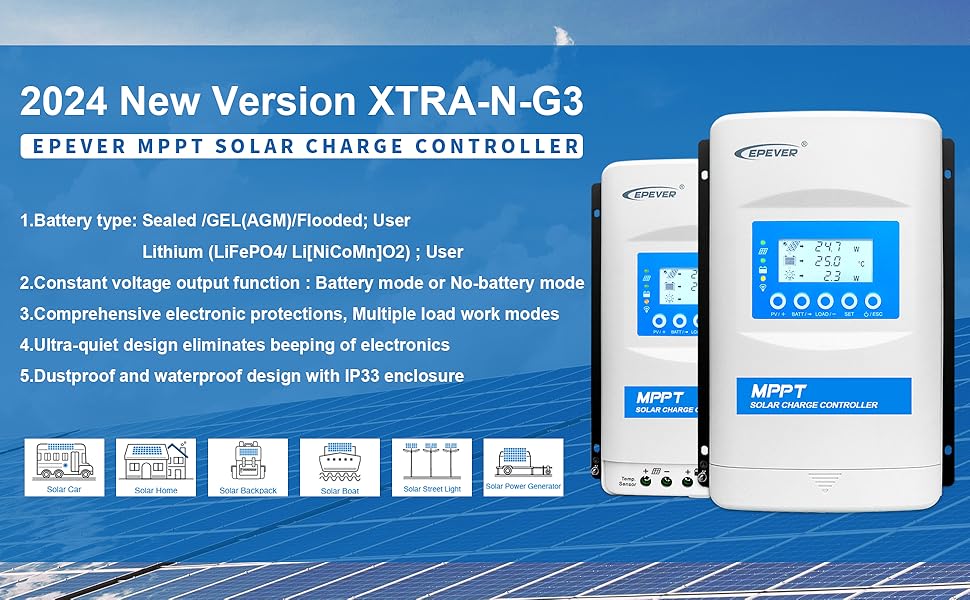
Image: EPEVER MPPT Solar Charge Controller XTRA-N-G3 Series overview, highlighting its application in solar systems.
2. Safety Instructions
Please read all instructions and warnings in this manual carefully before installation and operation. Failure to follow these instructions may result in damage to the controller, batteries, or other components, and may cause personal injury.
- Ensure all wiring is correctly sized and properly terminated.
- Always connect the system in the following order: 1. Battery → 2. Load → 3. PV Array.
- Disconnect the system in the reverse order: 3. PV Array → 2. Load → 1. Battery.
- The controller is designed for common negative grounding. Ensure proper grounding to prevent electrical hazards.
- Do not disassemble or attempt to repair the controller. Refer to qualified personnel for service.
- Install the controller in a well-ventilated area, away from flammable materials and direct sunlight.
3. Product Overview
The EPEVER XTRA4215N-G3 is a robust MPPT solar charge controller featuring an intuitive LCD display and five control buttons for easy parameter adjustment and system monitoring. Its design prioritizes efficiency and user-friendliness.
3.1 Key Features
- Advanced MPPT Technology with tracking efficiency up to 99.5% and peak conversion efficiency of 98%.
- Automatic 12V/24V system voltage detection.
- Supports various battery types: Sealed (AGM), Gel, Flooded, LiFePO4, Li(NiCoMn)O2, and User-defined.
- Independent voltage regulation for direct load connection without a battery.
- Ultra-quiet design and low self-consumption.
- Comprehensive electronic protections: reverse polarity, overcharging, over-discharging, overload, short-circuiting, and reverse current.
- Real-time energy statistics function.
3.2 Controller Components

Image: Front view of the EPEVER MPPT Solar Charge Controller, showing the LCD display and control buttons.
The controller features a clear LCD display that shows various system parameters such as PV voltage, battery voltage, load current, and charging status. Five buttons below the display allow for navigation and parameter settings.

Image: Top-down view of the EPEVER MPPT Solar Charge Controller, illustrating its physical dimensions (255mm length, 189mm width, 83.2mm height).
4. Setup and Installation
Proper installation is crucial for the safe and efficient operation of your solar system. Follow these steps carefully.
4.1 Wiring Connection Order
Always connect the system components in the specified order to prevent damage to the controller or other equipment.
- Connect the Battery: First, connect the battery to the controller's battery terminals. Ensure correct polarity.
- Connect the DC Load: Next, connect your DC loads to the controller's load terminals.
- Connect the PV Array: Finally, connect the solar panel array to the controller's PV terminals.
To disconnect the system, follow the reverse order: PV array first, then load, then battery.

Image: Step-by-step connection diagram for the EPEVER solar charge controller, illustrating the sequence for battery, load, and solar panel connections.
4.2 Connection Modes
The XTRA-N-G3 controller supports both Battery Mode and No-battery Mode connections.
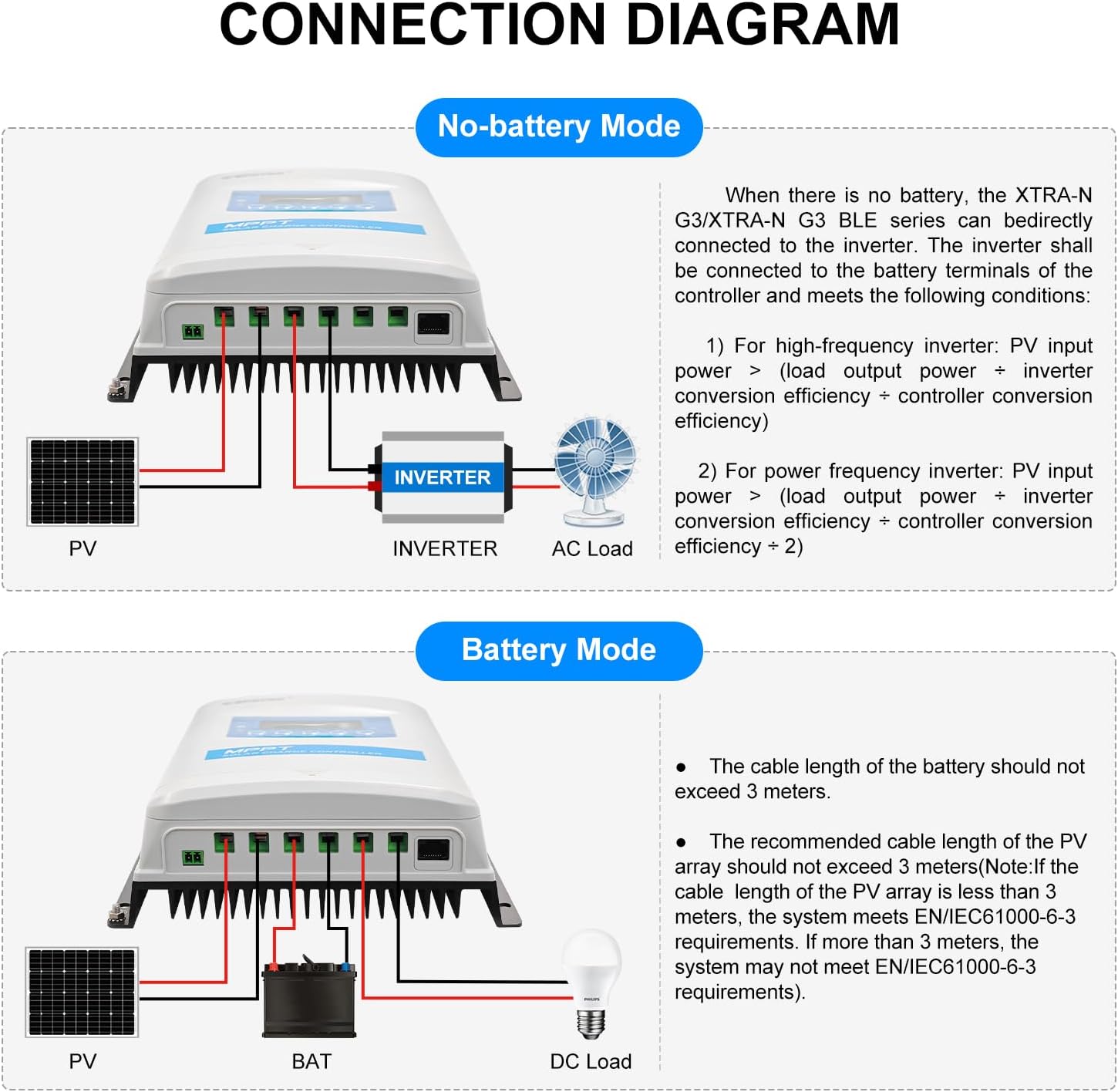
Image: Detailed connection diagrams for the controller in both No-battery Mode (connecting directly to an inverter) and Battery Mode (connecting to a battery and DC load).
No-battery Mode
When no battery is present, the XTRA-N-G3 can be directly connected to an inverter. This mode requires the PV input power to be greater than the sum of the load output power and inverter/controller conversion efficiency losses.
Battery Mode
In Battery Mode, the controller manages charging a battery bank from the PV array and supplying power to DC loads. Ensure the battery cable length does not exceed 3 meters. For the PV array, the recommended cable length should not exceed 3 meters to meet EN/IEC61000-6-3 requirements.
5. Operating Instructions
This section details how to operate your EPEVER MPPT Solar Charge Controller, including navigating the display and setting battery parameters.
5.1 Browsing the Interface
The LCD display provides real-time information about your solar system. Use the buttons to navigate through different screens and view parameters such as PV voltage, battery voltage, charging current, load status, and energy statistics.

Image: Examples of the controller's LCD display screens, illustrating how to browse different system parameters and set battery types.
5.2 Setting Battery Type
The controller supports various battery types. It is crucial to select the correct battery type for optimal charging and battery longevity. The default battery type is Sealed. For Lithium batteries or custom settings, you may need EPEVER accessories like the MT50 remote meter, WiFi/BLE adapter (for phone APP), or PC software via RS485 interface.

Image: Table detailing the supported battery types (Sealed, Gel, Flooded, LiFePO4, Li(NiCoMn)O2, User) and a note on setting Lithium battery parameters.

Image: Comprehensive table of battery voltage parameters for various battery types, including Over Voltage Disconnect, Charging Limit, Boost, Float, and Low Voltage Disconnect settings.
5.3 LED Indicators
The controller features LED indicators that provide quick visual feedback on the system's status.

Image: Table detailing the color, status (On Solid, Flashing, OFF), and instruction for the PV, Battery, and Load LED indicators.
6. Maintenance
Regular maintenance ensures the longevity and optimal performance of your EPEVER solar charge controller.
- Periodically inspect all wiring connections for tightness and corrosion.
- Keep the controller clean and free from dust and debris. Use a dry cloth for cleaning.
- Ensure adequate ventilation around the controller to prevent overheating.
- Check the battery terminals for any signs of corrosion and clean if necessary.
- Monitor the LCD display and LED indicators regularly for any abnormal readings or statuses.
7. Troubleshooting
This section provides guidance on common issues and their potential solutions. Refer to the LED Indicator table in Section 5.3 for basic diagnostics.
- No Display/No Power: Check battery connections and ensure the battery voltage is within the controller's operating range. Verify fuses are intact.
- PV Not Charging: Check PV array connections and ensure solar panels are receiving sufficient sunlight. Verify PV voltage is above the battery voltage. Refer to the PV LED indicator status.
- Load Not Working: Check load connections and ensure the load is not exceeding the controller's rated current. Verify the load output is enabled. Refer to the Load LED indicator status.
- Battery Over-discharged: The battery LED may show red or slowly flashing red. This indicates the battery voltage is too low. Disconnect the load and charge the battery.
- Controller Overheating: The controller may reduce output or shut down. Ensure proper ventilation and ambient temperature is within specifications.
- System Voltage Error: If the PV&BATTLED flashes rapidly, there might be a system voltage identification error. Recheck connections and battery type settings.
For persistent issues or complex problems, contact EPEVER technical support or an authorized service center.
8. Specifications
Technical data for the EPEVER MPPT Solar Charge Controller XTRA4215N-G3.
| Parameter | Value |
|---|---|
| Model | XTRA4215N-G3 |
| Rated Charge and Discharge Current | 40Amp |
| MPPT Tracking Efficiency | ≥99.5% |
| Max. Conversion Efficiency | 98% |
| Nominal System Voltage | 12V/24V DC Auto Work |
| Max. PV Input Power | 520W (12V system) / 1040W (24V system) |
| Max. PV Open Circuit Voltage | 150V (at min. operating temp) / 138V (at 25℃) |
| Supported Battery Types | Sealed (default), Gel (AGM), Flooded, User; LiFePO4 (4s/12V; 8s/24V); Li(NiCoMn)O2 (3s/12V; 6s-7s/24V); User |
| Battery Voltage Range | 8~32V |
| MPP Voltage Range | V(BAT+2V)~108V |
| Grounding | Common Negative Grounding |
| RS485 Interface | 5VDC/200mA (RJ45) |
| Working Environment Temperature | -25℃~+45℃ |
| Storage Temperature Range | -20℃ -- +70℃ / -4℉ -- 158℉ |
| LCD Backlight Time | 60S (Default) |
| Controller Terminals | #6AWG (16mm²) |
| Recommended Wire Cable | #8AWG (10mm²) |
| Mounting Hole Size | Φ5mm |
| Dimension | 255 x 187 x 75.7mm (10.04 x 7.36 x 2.98 inches) |
| Weight | 2.07 KG (4.56 lbs) |
| Certifications | CE (LVD EN/IEC62109, EMC EN61000-6-1/3) |
Note: Specifications are subject to change without prior notice.

Image: Electrical parameters table comparing different EPEVER XTRA series models, including rated current, PV input voltage, and dimensions.
9. Warranty and Support
The EPEVER MPPT Solar Charge Controller XTRA4215N-G3 is manufactured to high-quality standards and comes with relevant certifications, including CE. For warranty information, please refer to the documentation provided with your purchase.
As an officially authorized vendor for the EPEVER brand, GolandCentury provides free technical support. If you have any questions or require assistance with your controller, please contact GolandCentury's service centers located in Chicago (USA), Munich (Germany), Toronto (Canada), and Melbourne (Australia).
For further information or to purchase accessories like the MT50 remote meter, WiFi/BLE adapters, or PC communication cables, please visit the official EPEVER or GolandCentury websites.


