
1. Introduction and Product Overview
The DESCO 19239 Mini Continuous Monitor is designed to continuously monitor the path-to-ground integrity of one operator and one ESD worksurface. This device ensures that both the operator and the worksurface are properly grounded, providing real-time verification of ESD protective measures. Continuous monitoring helps prevent electrostatic discharge events that can damage sensitive electronic components.
This manual provides essential information for the safe and effective installation, operation, and maintenance of your DESCO 19239 Mini Continuous Monitor.
2. Safety Information
Please read and understand all safety instructions before operating the DESCO 19239 Mini Continuous Monitor. Failure to follow these instructions may result in injury or damage to the equipment.
- Electrical Safety: Ensure the monitor is connected to a properly grounded electrical outlet using the provided North American plug. Do not use damaged power cords or adapters.
- ESD Protection: This device is an ESD control product. It is crucial to maintain proper ESD grounding practices for all personnel and equipment in an ESD Protected Area (EPA).
- Environment: Operate the monitor in a dry, indoor environment. Avoid exposure to moisture, extreme temperatures, or corrosive substances.
- Servicing: Refer all servicing to qualified personnel. Do not attempt to open or repair the unit yourself.
3. Package Contents
Carefully unpack the DESCO 19239 Mini Continuous Monitor and verify that all components are present and undamaged. If any items are missing or damaged, contact your supplier immediately.
Typical package contents include:
- DESCO 19239 Mini Continuous Monitor Unit
- Power Adapter with North American Plug
- Operator Wrist Strap Jack
- Ground Cord
- Mounting Hardware (if applicable)
4. Setup and Installation
Follow these steps to properly set up your DESCO 19239 Mini Continuous Monitor:
- Mounting the Monitor: The monitor is designed for desk mounting. Choose a convenient location on your workstation where the monitor is easily visible and accessible. Secure the monitor using appropriate mounting hardware (if provided) or place it stably on the desk surface.
- Connect the Worksurface: Connect the worksurface ground cord from your ESD mat to the designated worksurface input jack on the monitor. Ensure a secure connection.
- Connect the Operator Wrist Strap: Plug the operator's wrist strap cord into the operator input jack on the monitor. The operator should wear the wrist strap properly, ensuring good skin contact.
- Connect Power: Plug the power adapter into the monitor's power input. Then, plug the North American plug of the power adapter into a grounded electrical outlet.
- Verify Connections: Double-check all connections to ensure they are secure and correctly routed.
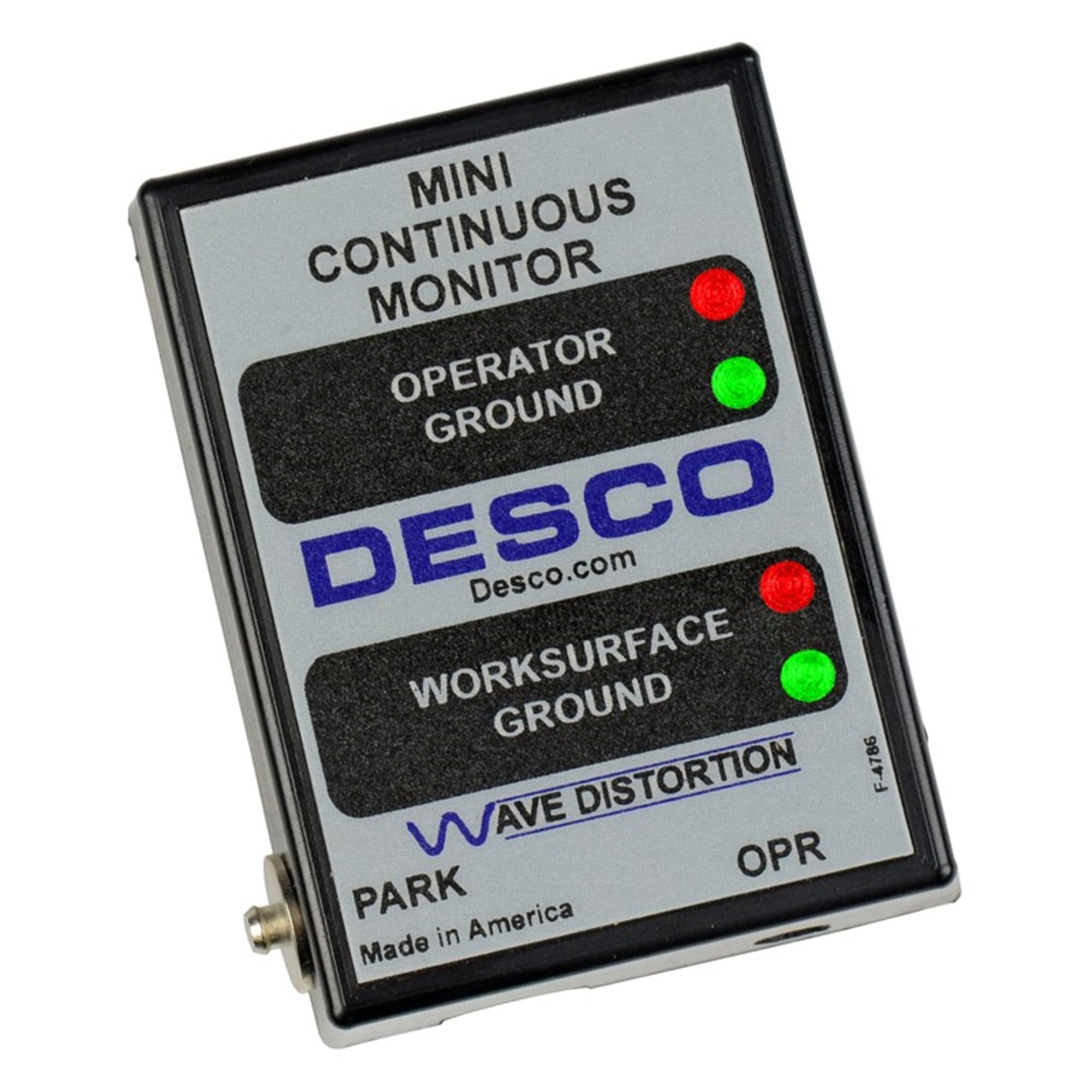
Figure 1: DESCO 19239 Mini Continuous Monitor with typical connections. The image shows the compact monitor unit with various ports for power, operator wrist strap, and worksurface ground.
5. Operating Instructions
Once the monitor is properly set up and powered on, it will begin continuous monitoring.
- Power On: The monitor will automatically power on when connected to a power source.
- Indicator Lights:
- Green Light: A steady green light indicates a proper path-to-ground for the monitored item (operator or worksurface).
- Red Light and Audible Alarm: A red light accompanied by an audible alarm indicates a fault in the path-to-ground. This means the operator's wrist strap or the worksurface connection has failed or is compromised.
- Responding to Alarms: If an alarm sounds, immediately check the operator's wrist strap connection and fit, and the worksurface ground cord connection. Rectify the issue before continuing work with ESD sensitive devices.
6. Maintenance
Regular maintenance ensures the longevity and accuracy of your DESCO 19239 Mini Continuous Monitor.
- Cleaning: Clean the exterior of the monitor with a soft, damp cloth. Do not use abrasive cleaners or solvents. Ensure the unit is unplugged before cleaning.
- Connection Checks: Periodically inspect all cables and connections for wear, damage, or loose fittings. Replace any damaged components immediately.
- Calibration: While continuous monitors are generally designed for long-term stability, periodic verification of its functionality with a known good wrist strap and worksurface connection is recommended as part of your ESD control program. Refer to industry standards like ANSI/ESD S20.20 for guidance on verification intervals.
7. Troubleshooting
If you encounter issues with your DESCO 19239 Mini Continuous Monitor, refer to the following troubleshooting guide:
| Problem | Possible Cause | Solution |
|---|---|---|
| Monitor does not power on. | No power to the unit. | Check power adapter connection to the monitor and the wall outlet. Ensure the outlet is functional. |
| Red light and alarm for operator. | Operator wrist strap failure or poor contact. | Check wrist strap connection to the monitor. Ensure wrist strap is worn correctly with good skin contact. Test wrist strap for continuity. |
| Red light and alarm for worksurface. | Worksurface ground cord failure or poor connection. | Check worksurface ground cord connection to the monitor and the ESD mat. Ensure the mat is properly grounded. |
| Intermittent alarms. | Loose connections or faulty components. | Inspect all connections for looseness. Test wrist strap and ground cords for intermittent faults. |
If the problem persists after following these steps, contact DESCO customer support for further assistance.
8. Specifications
The following specifications apply to the DESCO 19239 Mini Continuous Monitor:
- Model Number: 19239
- Brand: DESCO
- Monitoring Capacity: One operator, one ESD worksurface
- Power Input: North American Plug (specific voltage/current typically found on adapter, but not provided in data)
- Mounting Type: Desk Mount
- Item Weight: Approximately 1.3 Pounds (0.59 kg)
- Indicators: Green (Pass), Red (Fail) with audible alarm
- Compliance: Designed to meet relevant ESD standards (e.g., ANSI/ESD S20.20, IEC 61340-5-1)
Note: Specifications are subject to change without notice.
9. Warranty and Support
DESCO products are manufactured under stringent quality control standards. For warranty information, please refer to the warranty statement included with your product or visit the official DESCO website. Technical support is available to assist with any questions regarding the installation, operation, or troubleshooting of your DESCO 19239 Mini Continuous Monitor.
For assistance, please contact DESCO customer service through their official channels.


