
1. Introduction
This manual provides essential information for setting up, operating, and maintaining your OnePlus 10T 5G smartphone. Please read through this guide to ensure optimal performance and longevity of your device.

Image: OnePlus 10T 5G Smartphone in Jade Green. This image displays the front and back of the device, highlighting its sleek design and camera module.
2. Setup
2.1 Unboxing Contents
Upon opening your OnePlus 10T 5G package, you should find the following items:
- OnePlus 10T 5G Smartphone
- USB Cable
- Power Adapter (for 150W SUPERVOOC Endurance Edition charging)
- SIM Ejector Tool
- Quick Start Guide and Safety Information
2.2 SIM Card Installation
- Locate the SIM card tray on the side of your device.
- Insert the SIM ejector tool into the small hole next to the tray and press gently until the tray pops out.
- Place your Nano-SIM card(s) into the tray with the gold contacts facing down. The OnePlus 10T 5G supports Dual-SIM functionality.
- Carefully reinsert the SIM card tray into the device.
Note: This smartphone is designed for GSM networks and is not compatible with CDMA networks (e.g., Verizon, Sprint, US Cellular). Please verify network compatibility with your service provider before use.
2.3 Initial Power-On and Setup
- Press and hold the Power button (located on the right side of the device) until the OnePlus logo appears.
- Follow the on-screen prompts to select your language, connect to a Wi-Fi network, and set up your Google account.
- During setup, you will be guided to configure security features, including the in-display fingerprint sensor.
3. Operating Your Device
3.1 Basic Navigation and OxygenOS
The OnePlus 10T 5G runs on Android 12 with OxygenOS, offering a smooth and intuitive user experience. Navigate using gestures or on-screen buttons. OxygenOS provides a clean interface with minimal bloatware and fast updates.
- Power Button: Press to wake/sleep the screen. Press and hold to power off or restart.
- Volume Rocker: Adjust media volume, ringtone volume, and alarm volume.
- In-Display Fingerprint Sensor: Unlock your device quickly and securely by placing your registered finger on the designated area of the screen.
3.2 Camera Features
The OnePlus 10T 5G is equipped with a versatile camera system to capture high-quality photos and videos.
- Rear Camera System:
- Main Camera: 50 MP, f/1.8, 24mm (wide), 1/1.56", 1.0µm, PDAF, OIS for stable and detailed shots.
- Ultrawide Camera: 8 MP, f/2.2, 120° field of view, 1/4", 1.12µm for expansive landscapes and group photos.
- Macro Camera: 2 MP, f/2.4 for close-up detail.
- Front Camera: 16 MP, f/2.4, 24mm (wide), 1/3", 1.0µm for clear selfies and video calls.
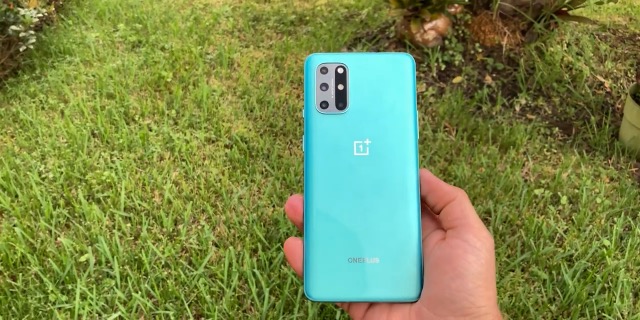
Image: Rear camera module of a OnePlus device. This image illustrates the multi-lens setup, which is functionally similar to the OnePlus 10T 5G's camera array.
4. Maintenance
4.1 Charging Your Device
The OnePlus 10T 5G features a 4800mAh non-removable battery and supports 150W SUPERVOOC Endurance Edition fast charging. Use the provided power adapter and USB cable for optimal charging speeds.
- A full charge can be achieved in approximately 10 minutes using the 150W charger.
- The device offers up to 24 hours of phone talk time on a single charge.
4.2 Software Updates
Regular software updates are released to improve performance, add new features, and enhance security. Ensure your device is connected to Wi-Fi and has sufficient battery life before performing an update.
- Go to Settings > About device > OxygenOS version.
- Tap Check for updates and follow the on-screen instructions.
4.3 Cleaning and Care
- Use a soft, lint-free cloth to clean the screen and body of the device.
- Avoid using harsh chemicals or abrasive materials.
- While the device may offer some splash protection, it is not fully waterproof. Avoid submerging it in water.
5. Troubleshooting
5.1 Network Connectivity Issues
- Ensure your SIM card is correctly inserted and activated.
- Verify that your device is compatible with your network provider's frequencies (2G GSM, 3G WCDMA, 4G LTE-FDD, 5G SA/NSA bands are listed in specifications).
- Try restarting your device or toggling Airplane Mode on and off.
- If issues persist, contact your network provider for assistance.
5.2 Device Unresponsive
- If your device becomes unresponsive, press and hold the Power button for approximately 10-15 seconds to force a restart.
- Ensure the battery is not completely drained. Connect to the charger and wait a few minutes before attempting to power on.
6. Specifications
| Feature | Detail |
|---|---|
| Model Name | OnePlus 10T 5G |
| Processor | Qualcomm SM8475 Snapdragon 8+ Gen 1 (4 nm), Octa-core (1x3.19 GHz Cortex-X2 & 3x2.75 GHz Cortex-A710 & 4x1.80 GHz Cortex-A510) |
| RAM | 8 GB |
| Internal Storage | 128 GB (non-expandable) |
| Display | 6.7 inches, Fluid AMOLED, 1080 x 2412 pixels, Corning Gorilla Glass 5, 120Hz Refresh Rate |
| Rear Camera | 50 MP (wide, OIS), 8 MP (ultrawide), 2 MP (macro) |
| Front Camera | 16 MP (wide) |
| Battery | 4800 mAh (non-removable), 150W Fast Charging |
| Operating System | Android 12.0 |
| Connectivity | 5G, Dual-SIM, Wi-Fi |
| Dimensions | 3.94 x 18.9 x 19.69 inches |
| Weight | 1.43 pounds |
| Color | Jade Green |


