
Introduction
Thank you for purchasing the DOSHISHA Circulight Ceiling Fan. This product combines an LED ceiling light with a circulator fan, designed to provide both illumination and air circulation for enhanced comfort in your living space. This manual provides detailed instructions for safe installation, operation, and maintenance of your new ceiling fan.
The DCC-SW12CM model features 16-level fan speed adjustment, forward/reverse rotation, an off timer, and a 2-level swing function. It is suitable for rooms up to 12 tatami mat size, offering dimmable and color-adjustable lighting with a light diffusing lens for optimal light distribution.
Safety Information
- Always disconnect power before installation, cleaning, or maintenance.
- Installation should be performed by a qualified electrician or in accordance with local electrical codes.
- Ensure the ceiling structure can support the weight of the unit (approx. 6.5 kg).
- Do not insert fingers or objects into the fan blades while the unit is operating.
- Keep the remote control away from water and extreme temperatures.
- Use only the specified battery type for the remote control.
Package Contents
Verify that all items are included in the package:
- Main Unit (Circulight Ceiling Fan)
- Remote Control x1
- AAA Batteries for Remote Control (for trial) x2
- Remote Control Mounting Screw x1
- Vibration Damping Pads x8
- Wiring Fixture Fixing Screws x2
- Mounting Bracket Fixing Wood Screws (long) x4
Setup and Installation
Follow these steps for proper installation. It is recommended to have two people for installation due to the unit's weight and ceiling work.
- Attach the Adapter: Securely attach the adapter to your ceiling wiring fixture.
- Install Vibration Damping Pads: Attach the two-layer vibration damping pads to the ceiling cover. If the ceiling protrusion is 11mm, cut the pads to fit.
- Mount the Ceiling Cover: Secure the ceiling cover to the adapter on the ceiling.
- Connect the Connector: Connect the main unit's electrical connector to the ceiling wiring.
- Attach the Main Unit: Carefully lift and attach the main unit to the ceiling cover, ensuring it is securely fastened.
- Pair the Remote Control: Long-press the color temperature change button on the remote control to pair it with the unit.
- Confirm Pairing: Pairing is complete when the LED light on the unit blinks.
Video: Installation instructions for the Coizabera Ceiling Fan Light. This video demonstrates the step-by-step process of mounting the adapter, attaching the ceiling cover, connecting wires, and securing the main unit to the ceiling, followed by remote control pairing.
Operating Instructions
Your Circulight Ceiling Fan offers various functions for lighting and air circulation, controlled via the included remote.
Lighting Functions
- On/Off: Use the dedicated light power button on the remote.
- Brightness Adjustment (Dimmable): Adjust light intensity from 5% to 100% using the brightness control buttons.
- Color Temperature Adjustment: Change the light color from warm white (3000K) to cool white (6000K) using the color temperature buttons.
- Night Light Mode: Activate the night light function for a softer, low-level illumination.
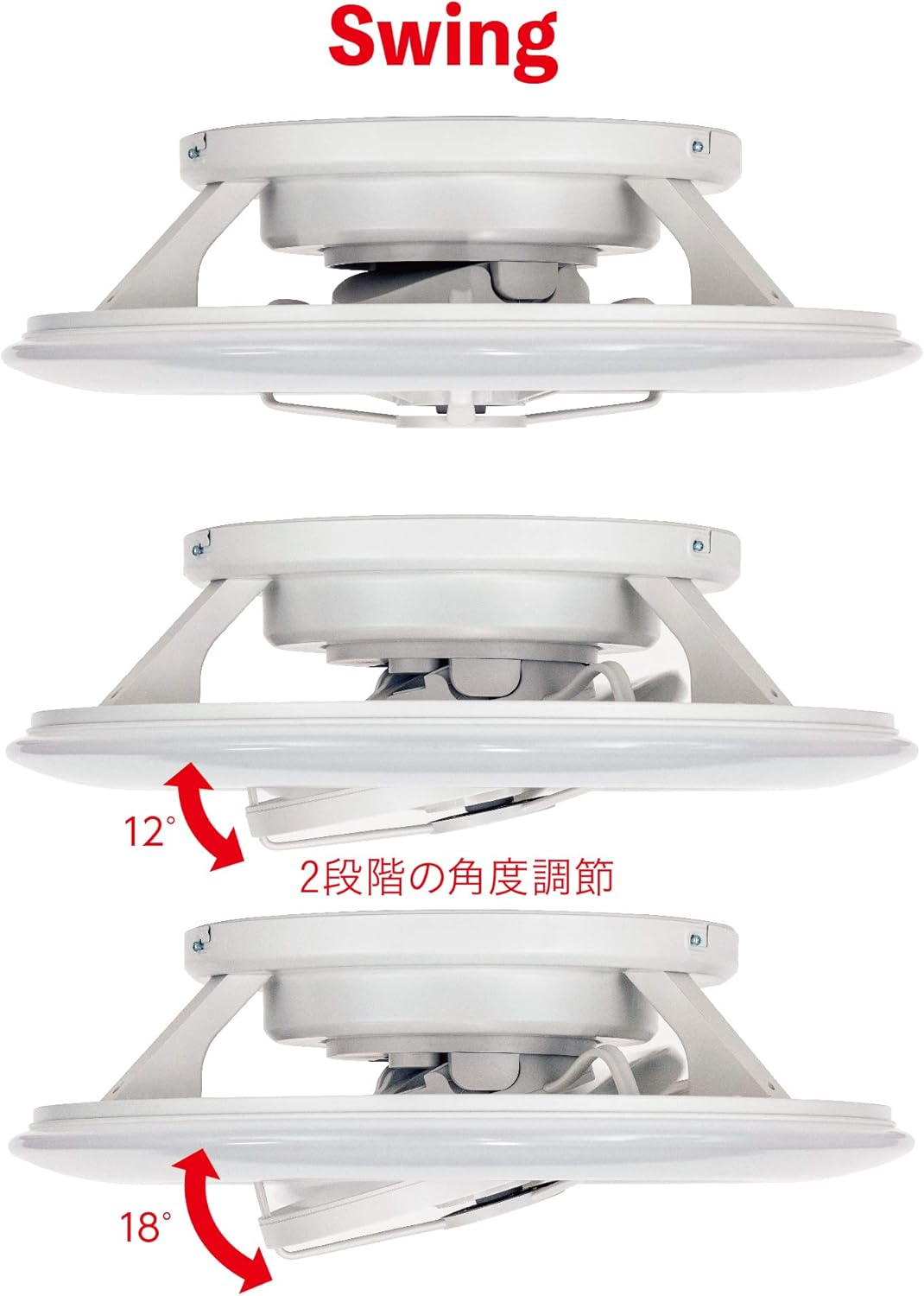
Image: The remote control for the Circulight ceiling fan, showing buttons for light operation (on/off, brightness, color temperature, night light) and fan operation (on/off, speed, rotation direction, swing, timer).
Fan Functions
- Fan Speed: Select from 16 fan speed levels for optimal airflow. One-touch buttons provide 4 common speed settings.
- Forward/Reverse Rotation: Switch between forward rotation (downward airflow for cooling in summer) and reverse rotation (upward airflow for circulating warm air in winter).
- Automatic Swing: Activate the 2-level swing function to distribute air more widely.
- Off Timer: Set the fan to automatically turn off after 1, 2, 4, or 8 hours.

Image: A diagram illustrating the airflow patterns for summer (downward flow for cooling) and winter (upward flow to circulate warm air from the ceiling).
Video: This video demonstrates the various operational features of a ceiling fan light, including 6-stage fan speed adjustment, forward/reverse rotation, stepless brightness adjustment (5%-100%), and 3-stage color temperature adjustment (3000K-6000K). It also shows the application in rooms up to 10 tatami mats.
Video: This video illustrates the airflow direction for summer (downward flow to efficiently lower room temperature) and winter (upward flow to circulate warm air from the ceiling). It also highlights the dimming and color adjustment features, along with indirect lighting.
Maintenance
Regular maintenance ensures optimal performance and longevity of your Circulight Ceiling Fan.
- Cleaning: Before cleaning, ensure the power is off. Wipe the exterior of the unit with a soft, dry cloth. For stubborn dirt, use a slightly damp cloth and then dry thoroughly. Do not use abrasive cleaners or solvents.
- Fan Blades: Periodically clean dust from the fan blades to maintain efficient airflow.
- Light Diffuser: Gently wipe the light diffuser to remove dust and ensure consistent light output.
- Remote Control: Keep the remote control clean and dry. Replace batteries when the indicator light dims or the remote becomes unresponsive.
Troubleshooting
| Problem | Possible Cause | Solution |
|---|---|---|
| Light or fan does not turn on. | No power, remote control batteries are dead, or unit is not paired. | Check power supply. Replace remote control batteries. Re-pair the remote control (refer to Setup section). |
| Fan makes unusual noise or wobbles. | Loose mounting screws, unbalanced blades, or obstruction. | Ensure all mounting screws are tightened. Check for any obstructions around the blades. If wobbling persists, consult a professional. |
| Remote control is unresponsive. | Batteries are low or depleted, or remote is out of range. | Replace batteries. Ensure you are within the effective range of the remote control. |
Specifications
| Feature | Detail |
|---|---|
| Brand | DOSHISHA |
| Model Number | DCC-SW12CM |
| Size | 12 Tatami Mat (approx. φ630mm × 200mm thickness) |
| Color | White |
| Power Source | AC100V 50/60Hz (Power Cord Type) |
| Rated Power Consumption (LED) | Approx. 60W (100% illumination), Approx. 1W (night light) |
| Rated Power Consumption (Circulator) | Approx. 12W (maximum airflow) |
| Luminous Flux | Approx. 5000lm (100% illumination) |
| Bulb Type | LED |
| Fan Speed Adjustment | 16 levels (4-level one-touch) |
| Rotation Direction | Forward/Reverse |
| Swing Function | 2 levels |
| Off Timer | 1, 2, 4, 8 hours |
| Product Weight | 6.5 kg |
| Recommended Room Type | Study room, Living room, Bedroom |
| Mounting Type | Ceiling Mount |
Warranty and Support
This product comes with a 1-year warranty from the date of purchase for the main unit. Please retain your proof of purchase for warranty claims.
For technical support, troubleshooting assistance, or warranty inquiries, please contact DOSHISHA customer service. Contact information can typically be found on the product packaging or the official DOSHISHA website.