
Introduction
Thank you for choosing the Steinel L 800 SC Smart LED Outdoor Wall Light. This intelligent downlight combines modern design with advanced technology, featuring an invisible high-frequency motion detector and Bluetooth connectivity for app control. This manual provides essential information for the safe installation, operation, and maintenance of your new outdoor light.

Figure 1: Steinel L 800 SC Smart LED Outdoor Wall Light, anthracite color, mounted on a wall.
Safety Instructions
- Electrical Installation: Installation must be performed by a qualified electrician in accordance with national wiring regulations and local safety standards. Ensure the power supply is disconnected before installation or maintenance.
- Voltage: This product operates on 220-240 V / 50-60 Hz. Verify your power supply matches these requirements.
- LED Light Source: The LED light source is integrated and not user-replaceable. Do not attempt to open or modify the light source.
- Outdoor Use: The light is designed for outdoor use with an IP44 rating, protecting against solid objects larger than 1mm and water splashes from any direction.
- Cleaning: Disconnect power before cleaning. Use a soft, damp cloth. Do not use abrasive cleaners or solvents.
Package Contents
Carefully unpack the box and ensure all components are present and undamaged. If any parts are missing or damaged, contact your retailer.
- Steinel L 800 SC LED Outdoor Wall Light
- Mounting hardware (screws, wall plugs)
- Instruction manual
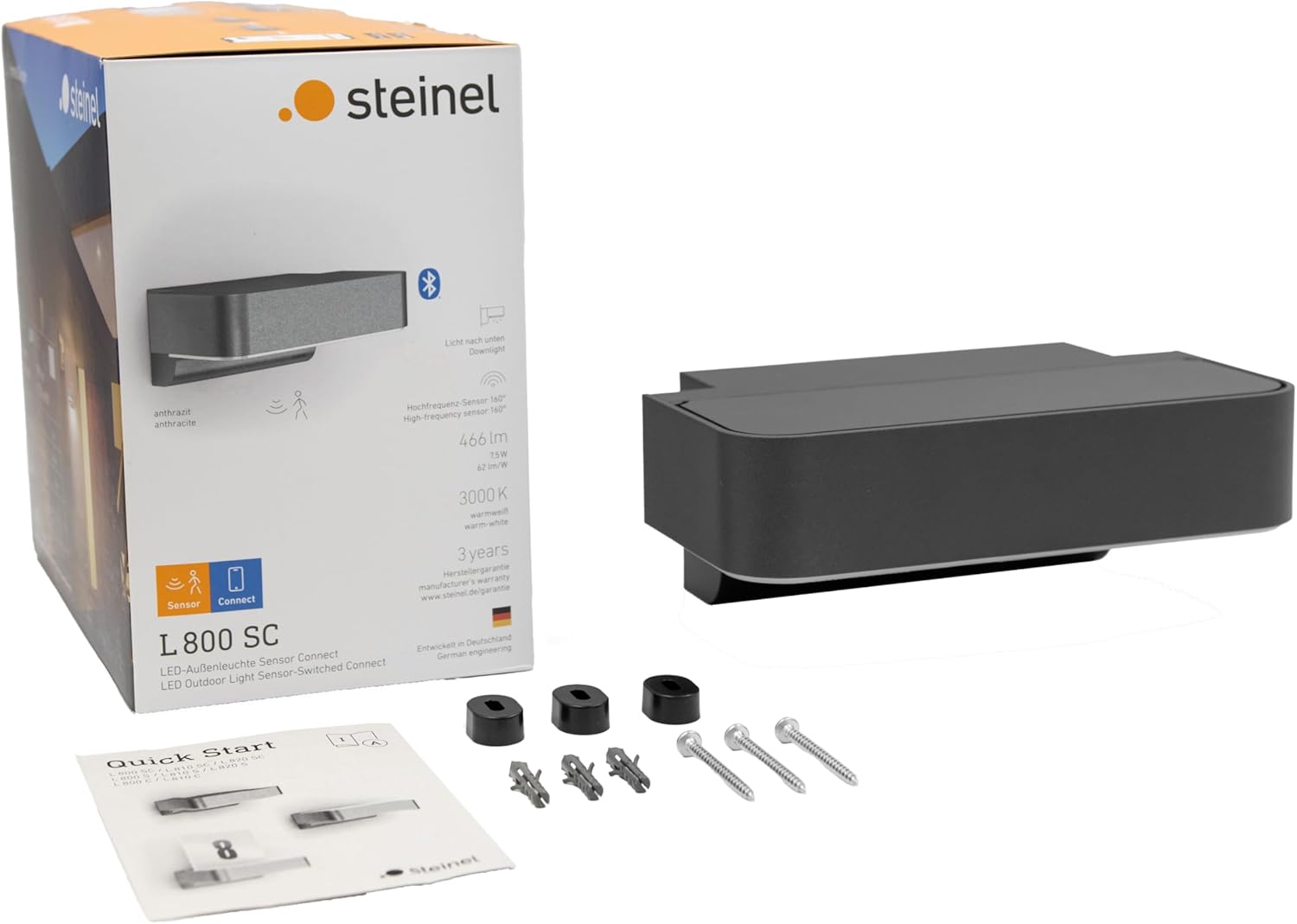
Figure 2: Package contents including the light, mounting hardware, and manual.
Setup
1. Mounting the Light
- Choose a suitable mounting location on an exterior wall, ensuring it is within reach of the electrical supply and provides the desired illumination area.
- Use the provided mounting template (if included) or the light fixture itself to mark the drilling points on the wall.
- Drill holes and insert the wall plugs.
- Secure the mounting bracket (if separate) or the light fixture directly to the wall using the supplied screws.

Figure 3: Technical drawing with dimensions for mounting.
2. Electrical Connection
- Ensure the main power supply is switched off at the circuit breaker.
- Connect the electrical wires from your mains supply to the terminals on the light fixture. Follow the wiring diagram provided in the quick start guide for correct live, neutral, and earth connections.
- Carefully secure the wiring and close the terminal box, ensuring a watertight seal.
- Attach the light fixture to the mounting bracket or directly to the wall, ensuring it is firmly in place.
- Restore power to the circuit.
3. App Installation and Initial Pairing
- Download the free STEINEL Connect app from your smartphone's app store (available for iOS and Android).
- Enable Bluetooth on your smartphone.
- Open the STEINEL Connect app and follow the on-screen instructions to discover and pair with your L 800 SC light. The app will guide you through the initial setup process.
Operating the Light
The Steinel L 800 SC offers versatile control options through its integrated motion sensor and the STEINEL Connect app.
Basic Light Functions
- Soft Light Start: The light features a soft light start, gradually increasing brightness to prevent sudden glare.
- Warm White Illumination: The 7.5 W LED system provides 466 lm of 3000K warm white light, creating an inviting ambiance.

Figure 4: Key features of the L 800 SC light.
Motion Sensor Settings
The precise 160° invisible high-frequency detector is flexibly adjustable on two axes via the app and detects movement within a perimeter of up to 5 meters.
- Detection Range: Adjustable from 1 to 5 meters.
- Detection Angle: 160 degrees.
- Twilight Setting: The light can be configured to activate based on ambient light levels (2-2000 lux).
- Lighting Duration: Adjustable from 5 seconds to 60 minutes after motion detection.

Figure 5: Illustration of high-frequency motion detection.

Figure 6: Motion sensor coverage around a house.
App Features (STEINEL Connect)
The STEINEL Connect app unlocks the full potential of your lighting, with regular updates and an evolving product range. Key features include:
- Dimmable Lighting: Adjust night light and main light intensity from 0-100%.
- Timer Function: Set daily and weekly schedules for light activation.
- Permanent Light: Option to switch on permanent light for extended periods.
- Twilight Setting: Fine-tune the ambient light level at which the sensor activates.
- Wireless Networking: Connect multiple lights without an additional bridge for synchronized control.
- Learning Twilight Settings: The app can learn optimal lux and time settings for twilight.

Figure 7: STEINEL Connect app interface for light settings.

Figure 8: Digital adjustment of sensor settings via the app.
Maintenance
The Steinel L 800 SC is designed for durability and minimal maintenance. Regular cleaning will help maintain its appearance and performance.
- Cleaning: To clean the light, ensure the power is disconnected. Use a soft, damp cloth with mild soap and water. Avoid harsh chemicals or abrasive materials that could damage the finish or sensor.
- LED Longevity: The integrated LED has an average lifespan of 50,000 hours, equivalent to approximately 30 years with 4.5 hours of daily use. No routine LED replacement is required.
- Inspection: Periodically check the mounting and electrical connections for any signs of wear or damage. If any issues are found, consult a qualified electrician.
Troubleshooting
If you encounter issues with your Steinel L 800 SC, refer to the following common troubleshooting steps:
| Problem | Possible Cause | Solution |
|---|---|---|
| Light does not turn on. | No power supply, incorrect wiring, faulty LED. | Check circuit breaker. Verify wiring connections. If LED is faulty, contact support. |
| Motion sensor not detecting. | Incorrect sensitivity setting, obstructed sensor, ambient light too high. | Adjust sensor sensitivity via the app. Clear any obstructions. Adjust twilight setting in the app. |
| Light stays on constantly. | Permanent light function activated, continuous motion detected. | Deactivate permanent light in the app. Check for constant motion in the detection zone. |
| Cannot connect to app via Bluetooth. | Bluetooth off, light too far, app issue. | Ensure Bluetooth is enabled on your device. Move closer to the light. Restart the app or your device. |
Specifications
| Feature | Specification |
|---|---|
| Brand | Steinel |
| Model Number | 065690 |
| Dimensions (L x W x H) | 14.5 x 23 x 8.8 cm |
| Weight | 910 g |
| Material | Aluminium |
| Color | Anthracite |
| Power Supply | 220-240 V / 50-60 Hz |
| Power Consumption | 7.5 Watts |
| Luminous Flux | 466 lm |
| Color Temperature | 3000 Kelvin (Warm White) |
| Color Rendering Index (CRI) | 80 |
| Average Lifespan | 50,000 Hours |
| Ingress Protection (IP) Rating | IP44 |
| Motion Sensor Type | High-frequency (invisible) |
| Motion Sensor Detection Angle | 160° |
| Motion Sensor Detection Range | Up to 5 meters |
| Connectivity | Bluetooth |
| Installation Type | Wall Mount |
Warranty and Support
Steinel products are manufactured to the highest quality standards. For warranty information, please refer to the documentation included with your purchase or visit the official Steinel website. For technical support or further assistance, please contact Steinel customer service.
Manufacturer: Steinel GmbH


