
Trane MOD00943 / MOD-0943
Trane MOD00943 / MOD-0943 Human Interface Module User Manual
Model: MOD00943 / MOD-0943 | Brand: Trane
1. Introduction
This manual provides essential information for the proper installation, operation, and maintenance of the Trane MOD00943 / MOD-0943 Human Interface Module. This OEM component is designed for use with various Trane chiller models, including RTAA, RTUA, RTWA, and RTXA series, serving as a critical interface for system monitoring and control.
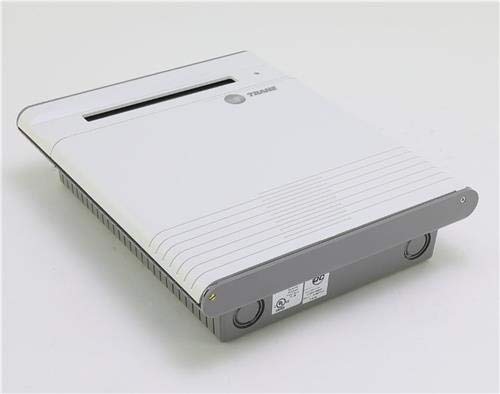
Figure 1.1: Front view of the Trane MOD00943 / MOD-0943 Human Interface Module. This module provides a user interface for Trane chiller systems.
2. Safety Information
Always observe safety precautions when working with electrical components and industrial machinery. Improper installation or handling can result in serious injury or equipment damage. This module should only be installed and serviced by qualified personnel.
- Ensure all power to the chiller system is disconnected and locked out before attempting any installation, maintenance, or troubleshooting.
- Wear appropriate personal protective equipment (PPE), including safety glasses and gloves.
- Verify correct wiring and connections according to the chiller's specific wiring diagrams.
- Do not attempt to modify the module. Use only genuine Trane replacement parts.
- Refer to the chiller's main service manual for detailed safety procedures.
3. Product Overview
The Trane MOD00943 / MOD-0943 is an OEM Remote Human Interface Module designed to provide a user-friendly interface for monitoring and controlling Trane chiller units. It replaces and supersedes older models such as MOD875, MOD0875, MOD00875, MOD-0875, MOD-0943, MOD0943, and MOD943. This module is specifically compatible with RTAA, RTUA, RTWA, and RTXA series chillers, among others.
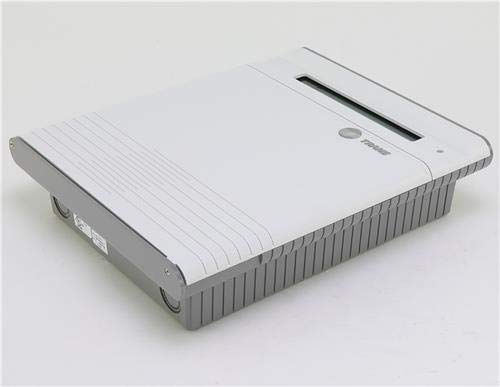
Figure 3.1: Angled view of the Trane MOD00943 / MOD-0943 module, showing its compact design and connection points.

Figure 3.2: This module is an Original Equipment Manufacturer (OEM) component from Trane, ensuring compatibility and quality.
4. Setup and Installation
Installation of the Human Interface Module requires specific knowledge of Trane chiller systems and electrical wiring. It is strongly recommended that installation be performed by a certified HVAC technician or qualified electrician.
General Installation Steps:
- Power Disconnection: Ensure the chiller unit's main power supply is completely disconnected and secured to prevent accidental startup.
- Locate Mounting Position: Identify the designated mounting location for the remote human interface module, typically near the chiller or in a control room.
- Mount the Module: Securely mount the MOD00943 / MOD-0943 module using appropriate fasteners.
- Wiring Connections: Carefully connect the module to the chiller's control system wiring harness. Refer to the specific chiller's wiring diagram for accurate terminal connections. Pay close attention to communication lines and power supply connections.
- Verify Connections: Double-check all wiring for correct polarity, secure connections, and absence of shorts.
- Power Restoration: Once all connections are verified and the module is securely mounted, restore power to the chiller system.
- Initial Power-Up: Observe the module's display for proper initialization and system status.
5. Operating Instructions
The Trane Human Interface Module provides real-time data and control capabilities for your chiller system. Specific operational procedures will vary based on the chiller model and its configured parameters. Generally, the module allows for:
- System Status Monitoring: View current operating conditions, temperatures, pressures, and alarm statuses.
- Parameter Adjustment: Modify setpoints, operating modes, and other configurable parameters within safe limits.
- Alarm and Event Logging: Access historical data for alarms, warnings, and operational events to aid in diagnostics.
- Diagnostic Information: Retrieve detailed diagnostic codes and messages to assist in troubleshooting.
For detailed navigation and specific function access, consult the chiller's dedicated operation manual.
6. Maintenance
The Trane MOD00943 / MOD-0943 Human Interface Module is designed for reliability and requires minimal routine maintenance. However, periodic inspection and cleaning can help ensure its longevity and proper function.
- Cleaning: Gently wipe the module's display and casing with a soft, dry, or slightly damp cloth. Avoid abrasive cleaners or solvents.
- Inspection: Periodically inspect the module for any signs of physical damage, loose connections, or unusual operating behavior.
- Environmental Conditions: Ensure the module is operating within its specified environmental conditions (temperature, humidity) to prevent premature failure.
Any internal maintenance or repair should only be performed by authorized Trane service personnel.
7. Troubleshooting
This section provides general guidance for common issues. For complex problems, refer to the chiller's service manual or contact Trane technical support.
| Problem | Possible Cause | Solution |
|---|---|---|
| Module display is blank | No power, loose connection, internal fault | Check power supply to the module. Verify all wiring connections. If problem persists, contact service. |
| Incorrect readings or data | Sensor issue, communication error, configuration mismatch | Verify sensor connections. Check communication wiring. Consult chiller manual for configuration settings. |
| Module unresponsive to input | Frozen software, button malfunction, communication loss | Cycle power to the module (if safe to do so). Inspect buttons for physical damage. Check communication lines. |
| Error codes displayed | System fault, communication issue | Note the specific error code and consult the chiller's service manual for detailed interpretation and resolution steps. |
8. Specifications
Key specifications for the Trane MOD00943 / MOD-0943 Human Interface Module:
| Specification | Value |
|---|---|
| Model Number | MOD00943 / MOD-0943 |
| Item Weight | 15 Pounds |
| Manufacturer | Trane |
| Compatibility | RTAA, RTUA, RTWA, RTXA Chillers and similar |
| Type | OEM Remote Human Interface Module |
9. Warranty and Support
As an OEM (Original Equipment Manufacturer) component, the Trane MOD00943 / MOD-0943 Human Interface Module comes with a manufacturer's warranty. Please refer to the warranty documentation provided with your purchase or contact Trane directly for specific warranty terms and conditions.
Important Note: This is a specialty component and is typically NON-RETURNABLE. Ensure compatibility with your unit model and serial number before purchase.
For technical support, service, or to inquire about additional American Standard & Trane products, please contact your authorized Trane distributor or service provider. Provide your module's model number and the chiller's serial number when seeking support to expedite assistance.
Ask a question about this manual
Ask about setup, troubleshooting, compatibility, parts, safety, or missing instructions. Manuals+ will review the question and use this page’s manual context to help answer it.