
TRIXIE 39319
TRIXIE Crate Insert for Padlocks Instruction Manual
Model: 39319 | Brand: TRIXIE
Product Overview
The TRIXIE Crate Insert for Padlocks is an accessory designed to enhance the security of TRIXIE aluminum transport boxes, specifically models 39340-39346. Made from durable aluminum, this insert provides a secure point for attaching a padlock, preventing unwanted access to the crate's contents or its occupant. It is particularly useful for securing the crate when the boot lid of a vehicle is open, ensuring the safety of your pet.

This image displays the TRIXIE Crate Insert for Padlocks, a silver-colored aluminum component designed to secure pet transport boxes. The insert features a U-shaped loop for a padlock and a flat base with screw holes for attachment.
Package Contents
- 1 x TRIXIE Crate Insert for Padlocks (Model 39319)
- Mounting Screws (typically included with the insert)
- 1 x Hex Key (Allen wrench) for installation

This image shows a standard L-shaped hex key (Allen wrench), which is typically used for tightening the screws that secure the TRIXIE Crate Insert to the transport box.
Setup and Installation
This section provides step-by-step instructions for installing the TRIXIE Crate Insert for Padlocks onto your compatible aluminum transport box (models 39340-39346).
- Identify Mounting Location: Locate the designated mounting area on your TRIXIE aluminum transport box. This is typically a vertical section near the door latch mechanism, designed to accommodate this specific insert.
- Position the Insert: Place the flat base of the TRIXIE Crate Insert against the identified mounting surface on the crate. Ensure the U-shaped loop is oriented correctly to allow a padlock to pass through easily.
- Align Screw Holes: Align the pre-drilled holes on the insert's base with the corresponding holes or pilot points on the crate's frame.
- Secure with Screws: Insert the provided mounting screws into the holes. Use the hex key (Allen wrench) to tighten the screws firmly. Do not overtighten, but ensure the insert is securely fastened and does not wobble.

A hand is shown inserting a combination padlock through the TRIXIE Crate Insert, which is already mounted on the vertical frame of an aluminum pet transport box. This demonstrates the primary function of the insert in securing the crate door.
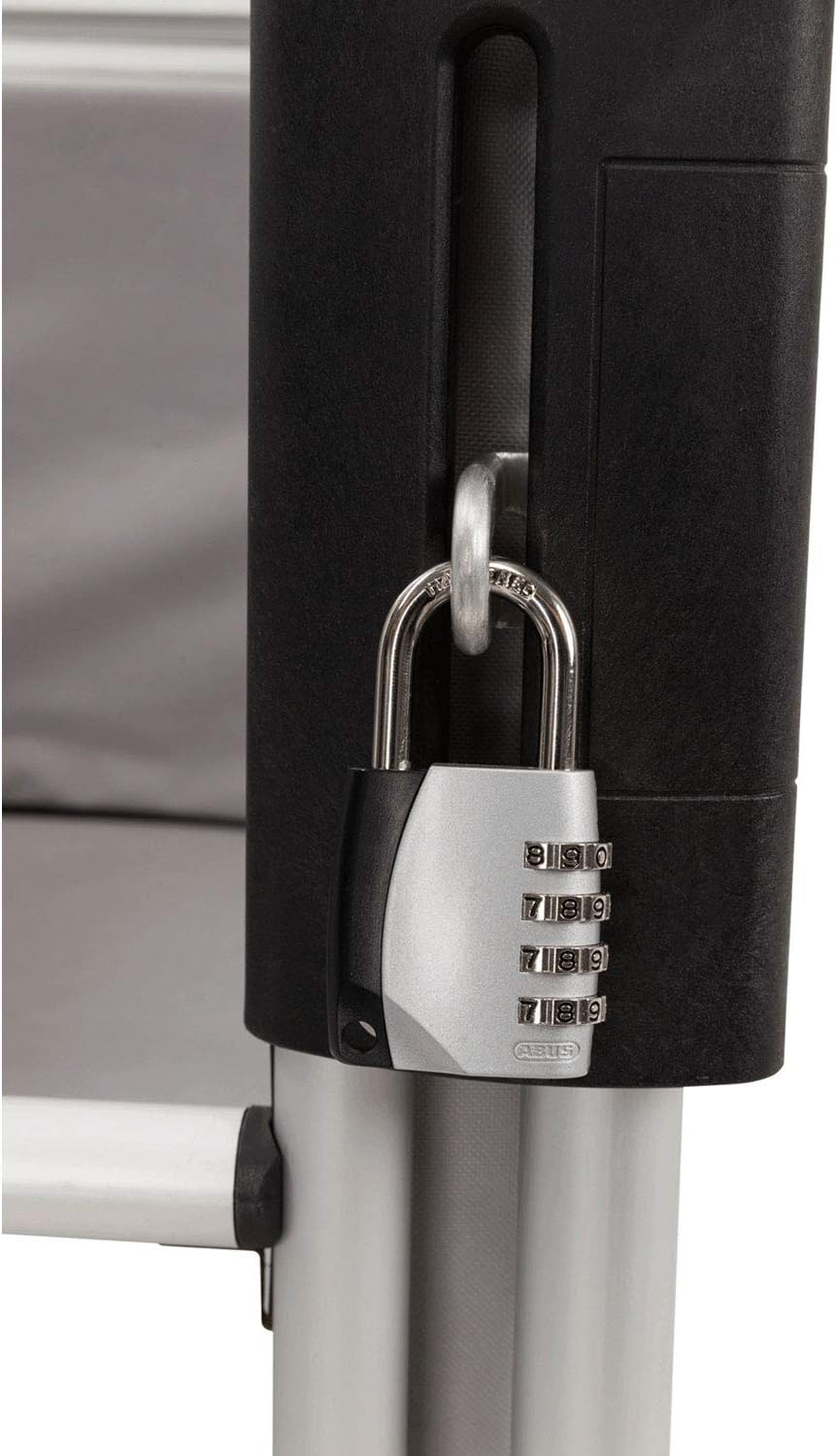
A close-up view of a combination padlock fully secured through the TRIXIE Crate Insert, which is attached to an aluminum pet transport box. This illustrates the final, secured state of the crate door.
Operating Instructions
Once the TRIXIE Crate Insert is securely installed, its operation is straightforward:
- Open Crate Door: Ensure the crate door is closed and latched as usual.
- Insert Padlock: Take a compatible padlock (not included) and thread its shackle through the U-shaped loop of the TRIXIE Crate Insert.
- Secure Padlock: Close and lock the padlock according to its own instructions. This will prevent the crate door from being opened without unlocking the padlock.
- To Unlock: Unlock the padlock, remove it from the insert, and then open the crate door as normal.
The insert provides an additional layer of security, particularly useful in situations where the crate might be accessible to unauthorized individuals or when you need to ensure the dog remains securely inside, such as during transport with an open vehicle boot.
Maintenance
The TRIXIE Crate Insert for Padlocks requires minimal maintenance due to its durable aluminum construction.
- Cleaning: Wipe the insert periodically with a damp cloth to remove dust or dirt. Avoid abrasive cleaners that could damage the aluminum finish.
- Inspection: Regularly inspect the insert and its mounting screws for any signs of loosening, wear, or damage. Ensure the screws remain tight to maintain security.
- Corrosion: While aluminum is resistant to corrosion, prolonged exposure to harsh elements may affect its appearance. Store the crate and insert in a dry environment when not in use.
Troubleshooting
If you encounter issues with your TRIXIE Crate Insert, consider the following:
- Insert is Loose: If the insert feels loose after installation, re-tighten the mounting screws using the hex key. Ensure the screws are properly seated in the crate's frame.
- Padlock Does Not Fit: Verify that your padlock's shackle size is compatible with the opening of the insert's U-shaped loop. The insert is designed for standard padlock sizes.
- Difficulty Aligning: Ensure you are installing the insert on a compatible TRIXIE aluminum transport box (models 39340-39346). The design is specific to these models for proper alignment.
Specifications
| Model Number | 39319 |
| Compatible Crate Models | TRIXIE Aluminum Transport Boxes #39340-39346 |
| Material | Aluminum |
| Color | Silver |
| Dimensions (L x W x H) | Approx. 0.79 x 4.72 x 5.31 inches (2 x 12 x 13.5 cm) |
| Item Weight | Approx. 0.04 kg (1.06 ounces) |
| Special Feature | Upgradeable (allows existing crates to be secured) |
Warranty and Support
For information regarding product warranty, returns, or technical support, please refer to the official TRIXIE website or contact TRIXIE customer service directly. Specific warranty terms may vary by region and retailer.
You can visit the TRIXIE Store for more information: TRIXIE Official Store
Ask a question about this manual
Ask about setup, troubleshooting, compatibility, parts, safety, or missing instructions. Manuals+ will review the question and use this page’s manual context to help answer it.