
1. Introduction
This manual provides detailed instructions for the safe and effective use of the Wendry HW-391 2S Lithium Battery Protection Board. This board is designed to protect 2-series (2S) lithium-ion battery packs from overcharge, over-discharge, and overcurrent conditions. It is intended for use with two 4.2V cells connected in series.
2. Product Overview
The HW-391 protection board is built with high-quality materials to ensure durability and reliable performance. It features a professional chipset for stable operation.
- Charging Voltage: DC 8.4-9V
- Continuous Discharge Current: 20A (Note: Reduce load current if heat dissipation is poor.)
- Continuous Charging Current: 10A
- Protection Features: Overvoltage, undervoltage, and overcurrent protection.
- Design: Precise cuts and interfaces for easy installation and secure fit.

Figure 2.1: Top view of the HW-391 board, highlighting its robust construction.

Figure 2.2: Detailed view of the board's electronic components and voltage markings.
3. Specifications
| Parameter | Value |
|---|---|
| Product Model | HW-391 |
| Charging Voltage | DC 8.4-9V |
| Continuous Discharge Current | 20A |
| Continuous Charging Current | 10A |
| Item Type | Battery Protection Board |
| Product Size (L x W x H) | Approx. 5 x 2 x 0.2 cm (2.0 x 0.8 x 0.1 inches) |
| Input Voltage | 9 Volts |
| Output Voltage | 9 Volts |
4. Setup and Installation
The HW-391 board is designed for 2-series (2S) lithium-ion battery configurations. Proper wiring is crucial for safe operation. This board provides basic protection and does not include charging management, cell balancing, or temperature monitoring.
4.1 Wiring Diagram and Connections
Follow these steps for connecting the battery cells and output:
- Battery Series Connection: Connect two 4.2V lithium-ion cells in series. Ensure the positive terminal of Cell 1 is connected to the negative terminal of Cell 2. The configuration should be: +[Cell 1]- +[Cell 2]-.
- 0V Pad Connection: Connect the 0V pad on the protection board to the NEGATIVE (-) terminal of Cell 2.
- 4.2V Pad Connection: Connect the 4.2V pad on the protection board to the JUNCTION point between Cell 1's negative terminal and Cell 2's positive terminal.
- 8.4V Pad Connection: Connect the 8.4V pad on the protection board to the POSITIVE (+) terminal of Cell 1.
- Output Connection: Connect your load or charger to the + and - output pads on the board.
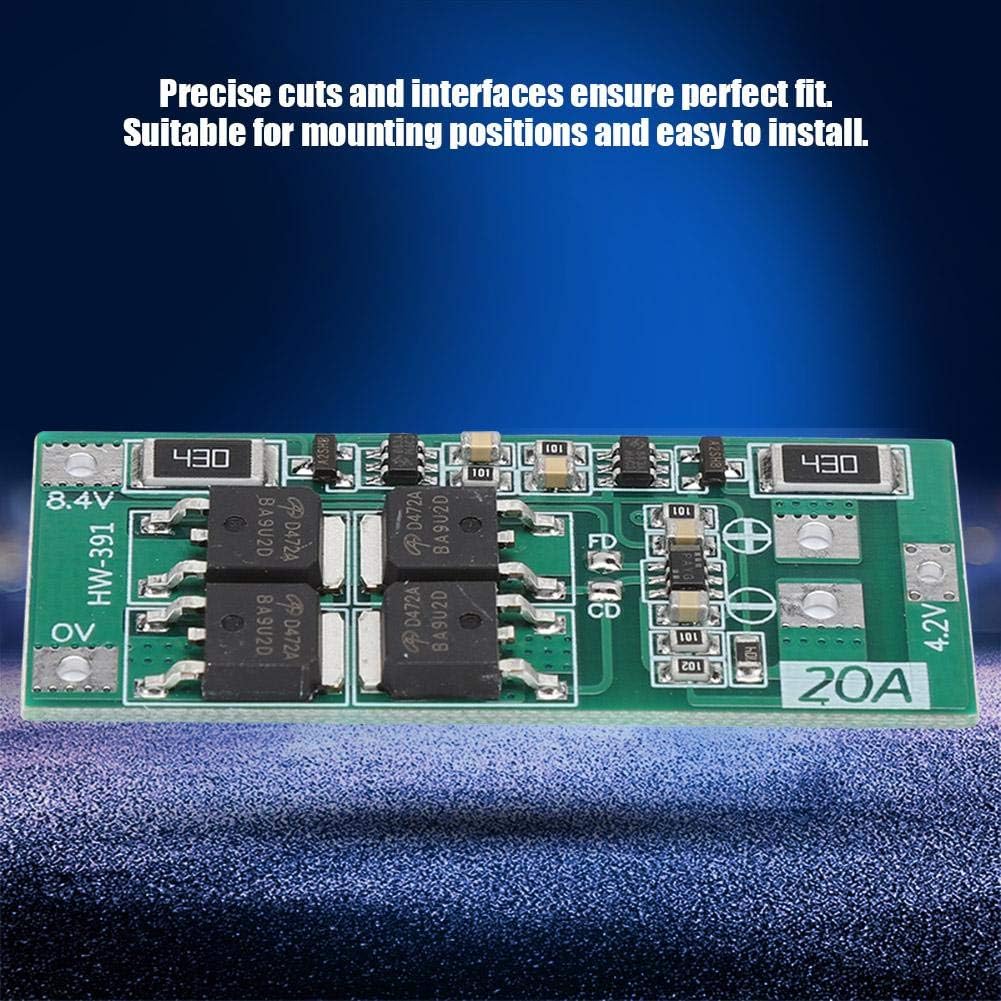
Figure 4.1: Connection points on the HW-391 board.
Important: Always double-check your wiring before applying power to prevent damage to the board or batteries. Incorrect wiring can lead to short circuits, overheating, or fire.
5. Operating Instructions
Once properly installed, the HW-391 board operates automatically to provide protection for your 2S lithium battery pack.
- Charging: Connect a DC 8.4-9V charger to the output terminals. The board will allow charging up to 10A. It will cut off charging if the voltage exceeds the overcharge protection threshold.
- Discharging: Connect your load to the output terminals. The board will allow discharge up to 20A. It will cut off discharge if the voltage drops below the over-discharge protection threshold.
- Overcurrent Protection: The board will interrupt the circuit if the discharge current exceeds 20A to protect the batteries and the board itself.
The board's protection functions are designed to prolong the lifespan of your lithium batteries by preventing them from operating outside their safe voltage and current limits.
6. Maintenance
The HW-391 battery protection board requires minimal maintenance. Adhere to the following guidelines:
- Keep Clean: Ensure the board is free from dust, dirt, and moisture. Use a soft, dry brush or cloth for cleaning if necessary.
- Environmental Conditions: Operate the board within its specified temperature and humidity ranges. Avoid extreme heat, cold, or damp environments.
- Physical Inspection: Periodically inspect the board for any signs of physical damage, loose connections, or discoloration.
- Heat Dissipation: If operating at high continuous discharge currents (close to 20A), ensure adequate airflow around the board to prevent overheating. Consider reducing the load current if the board becomes excessively hot.
7. Troubleshooting
If you encounter issues with the HW-391 board, consider the following common problems and solutions:
| Problem | Possible Cause / Solution |
|---|---|
| No output power. |
|
| Batteries not charging. |
|
| Board becomes excessively hot. |
|
| Unexpected power cut-off. |
|
Note: This board provides basic protection. It does not perform cell balancing. Ensure your 2S battery pack is balanced externally if required for your application.
8. Safety Information
Read and understand all safety precautions before installing or operating the HW-391 protection board.
- Electrical Hazard: This product involves electrical components. Improper handling can result in electric shock.
- Battery Safety: Always use appropriate lithium-ion batteries and handle them with care. Do not short-circuit batteries.
- Correct Voltage: Ensure the input and output voltages are within the specified range (DC 8.4-9V).
- Polarity: Observe correct polarity for all connections. Incorrect polarity can damage the board and batteries.
- Ventilation: Ensure adequate ventilation, especially when operating at high currents, to prevent overheating.
- Professional Installation: If you are unsure about any aspect of installation, seek assistance from a qualified professional.
- Children and Pets: Keep the product out of reach of children and pets.
9. Warranty and Support
For warranty information or technical support regarding your Wendry HW-391 2S Lithium Battery Protection Board, please refer to the retailer's return policy or contact Wendry customer service through their official channels. Please have your product model number (HW-391) and purchase details ready when contacting support.