
1. Introduction
This manual provides comprehensive instructions for the safe and effective use of your INNOREL H90 Video Fluid Head Tripod. Please read this manual thoroughly before operation to ensure proper setup, usage, and maintenance. Retain this manual for future reference.
2. Product Overview and Features
The INNOREL H90 is a robust video fluid head designed for DSLR cameras, camcorders, and other compatible devices. It features a durable construction and smooth operation for precise camera movements.
- Construction: Manufactured using Aircraft Aluminum Alloy with CNC technology and Hard Anodic Oxidation for enhanced durability.
- Load Capacity: Supports a maximum load of 33.1 lbs (15 kg).
- Smooth Damping: Provides fluid pan and tilt movements for stable video recording.
- Wide Range of Motion: Offers 360° panoramic rotation and a tilt range of +78° to -70°.
- Wear-resistant Gear: Utilizes Powder Metallurgy technology for gears, ensuring long-term resistance to wear and corrosion.
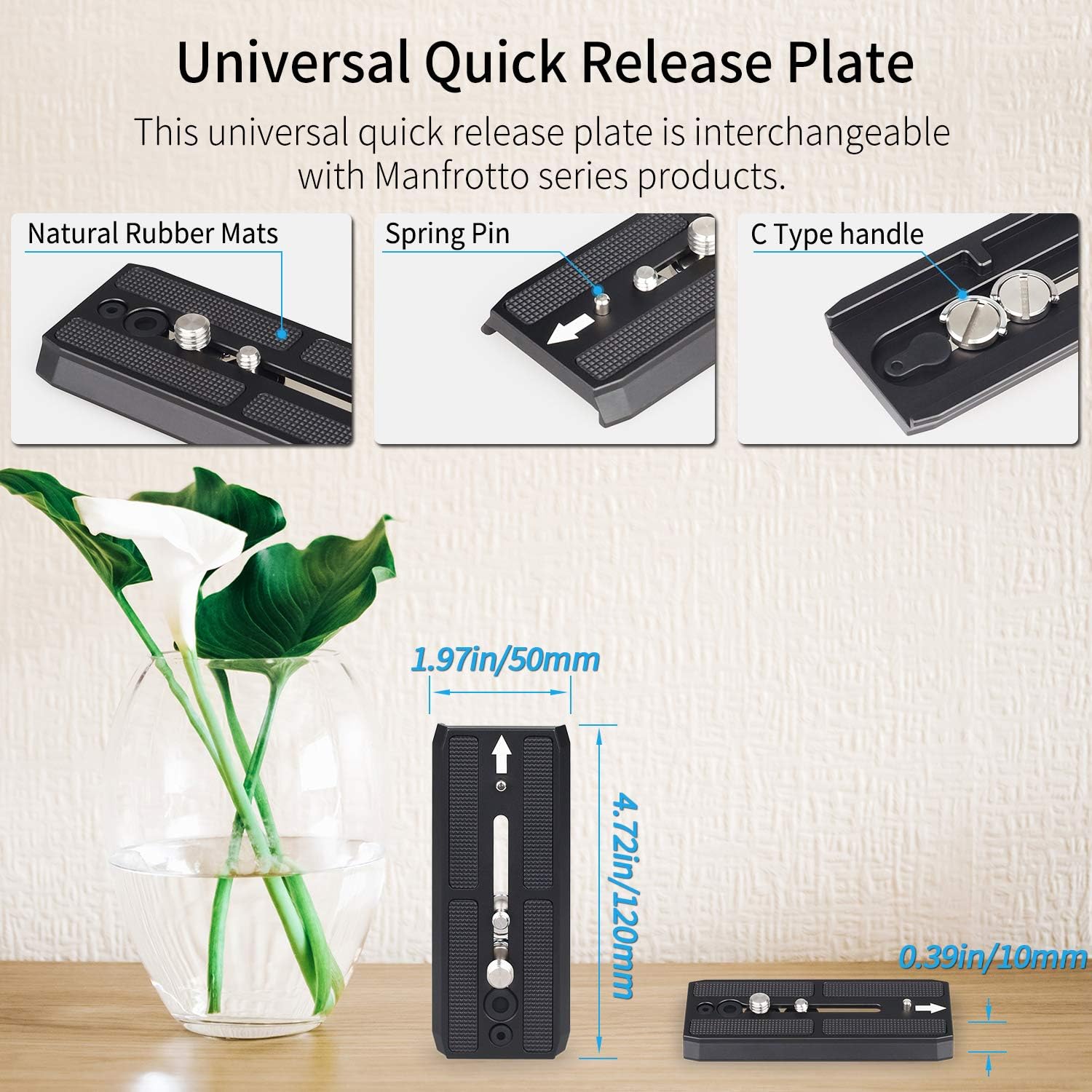
- Universal Quick Release Plate: Compatible with Manfrotto series products, featuring 1/4" and 3/8" mounting screws and natural rubber mats for secure camera attachment.
- Safety Features: Includes a safe button mechanism for secure quick release plate operation.


3. Package Contents
Verify that all items listed below are included in your package. If any items are missing or damaged, please contact customer support.
- Main Body (Fluid Head) x 1
- Quick Release Plate x 1
- Handle x 1

4. Setup Instructions
4.1 Attaching the Fluid Head to a Tripod/Monopod
- Ensure your tripod or monopod has a 3/8" mounting screw.
- Align the bottom screw hole of the H90 fluid head with the mounting screw on your tripod/monopod.
- Rotate the fluid head clockwise until it is securely fastened. Do not overtighten.
4.2 Attaching the Handle
- Locate the handle attachment point on the side of the fluid head.
- Insert the handle into the socket and tighten the locking knob until it is firm.
- The handle can be adjusted for length and angle for comfortable operation.

4.3 Mounting Your Camera
- Attach Quick Release Plate to Camera: Screw the quick release plate onto the bottom of your camera using the appropriate 1/4" or 3/8" screw. Ensure it is tightly secured.
- Insert Quick Release Plate into Fluid Head:
- Loosen the Quick Release Plate Lock knob on the fluid head.
- Press the Safe Button (usually a small silver button) to allow the plate to slide in.
- Slide the quick release plate with your camera into the receiver on the fluid head.
- Once positioned, release the Safe Button and tighten the Quick Release Plate Lock knob to secure the camera.
- Balance the Camera: Adjust the position of the quick release plate forward or backward within the receiver until the camera is balanced. This reduces strain on the fluid head and allows for smoother movements.

5. Operating Instructions
5.1 Pan Movement (Horizontal Rotation)
The H90 fluid head allows for a full 360° panoramic rotation.
- To enable horizontal rotation, loosen the "Lock of Horizontal Rotation" knob located at the base of the fluid head.
- Gently move the handle to pan the camera horizontally.
- To lock the horizontal position, tighten the "Lock of Horizontal Rotation" knob.


5.2 Tilt Movement (Vertical Rotation)
The fluid head supports a tilt range from +78° to -70°.
- To enable vertical tilt, loosen the "Tilt Lock" knob.
- Gently move the handle up or down to tilt the camera vertically.
- To lock the vertical position, tighten the "Tilt Lock" knob.

5.3 Adjusting Drag (Fluidity)
The fluid head is designed for smooth damping. While specific drag adjustment knobs are not detailed, the tightness of the pan and tilt lock knobs can influence the resistance. For optimal fluidity, ensure the camera is well-balanced on the quick release plate.
6. Maintenance
- Cleaning: Use a soft, dry cloth to wipe down the fluid head after each use. Avoid abrasive cleaners or solvents.
- Storage: Store the fluid head in a dry, dust-free environment.
- Inspection: Periodically check all screws and knobs to ensure they are secure. Do not attempt to disassemble the fluid head, as this may void any warranty and could damage the internal fluid mechanism.
7. Troubleshooting
| Problem | Possible Cause | Solution |
|---|---|---|
| Camera not securely mounted. | Quick release plate not fully engaged or lock knob loose. | Ensure the quick release plate is fully inserted and the lock knob is tightened. Confirm the safe button has engaged. |
| Pan/Tilt movement is stiff or not smooth. | Lock knobs are too tight, or camera is not properly balanced. | Loosen the respective pan or tilt lock knob. Re-balance the camera on the quick release plate by adjusting its position. |
| Fluid head feels unstable on tripod. | Fluid head not securely attached to tripod/monopod. | Ensure the fluid head is tightly screwed onto the tripod/monopod's mounting screw. |
8. Specifications
| Feature | Detail |
|---|---|
| Model Number | H90 |
| Material | Aircraft Aluminum Alloy |
| Max Load Capacity | 33.1 lbs (15 kg) |
| Item Weight | 2.86 pounds (1.3 kg) |
| Product Dimensions (L x W x H) | 4.33 x 4.57 x 5.91 inches (110mm x 85mm x 116mm) |
| Pan Range | 360° |
| Tilt Range | +78° / -70° |
| Mounting Screw (Quick Release Plate) | 1/4", 3/8" |
| Bottom Screw Hole | 3/8" |
| UPC | 722704757706 |


9. Warranty and Support
Specific warranty details are not provided in the product information. For warranty claims, technical support, or any inquiries regarding your INNOREL H90 fluid head, please contact the seller or manufacturer directly through their official channels. Refer to your purchase documentation for contact information.