
1. Product Overview
The AFMAT Cordless Air Duster is a versatile and eco-friendly device designed for efficient cleaning of electronics, computers, and various household items. It offers a powerful air thrust as an alternative to traditional compressed air cans, featuring a rechargeable battery and multiple speed settings for diverse cleaning needs.
- Powerful Airflow: Generates a strong thrust of air (up to 28m/s) with a motor speed of up to 33000 RPM for deep cleaning.
- Rechargeable Battery: Equipped with a 6000mAh battery, providing approximately 30 minutes of continuous operation. Supports 10W fast charging via USB-C.
- Eco-Friendly: A reusable alternative to disposable compressed air cans, designed for over 5000 uses.
- User-Friendly Design: Features an extended full-palm gripping design and a withdrawable nozzle for comfortable and precise use. Offers two operation modes: long-press for continuous blow or double-press for sustained airflow.

Image: The AFMAT Cordless Air Duster in use, demonstrating its strong blowing force to clean a laptop keyboard.
2. Package Contents
Please check the package contents upon unboxing to ensure all items are present.
- AFMAT Cordless Air Duster Unit
- Nozzle (various types for different applications, as seen in product images)
- USB-C Charging Cable
- Instruction Manual
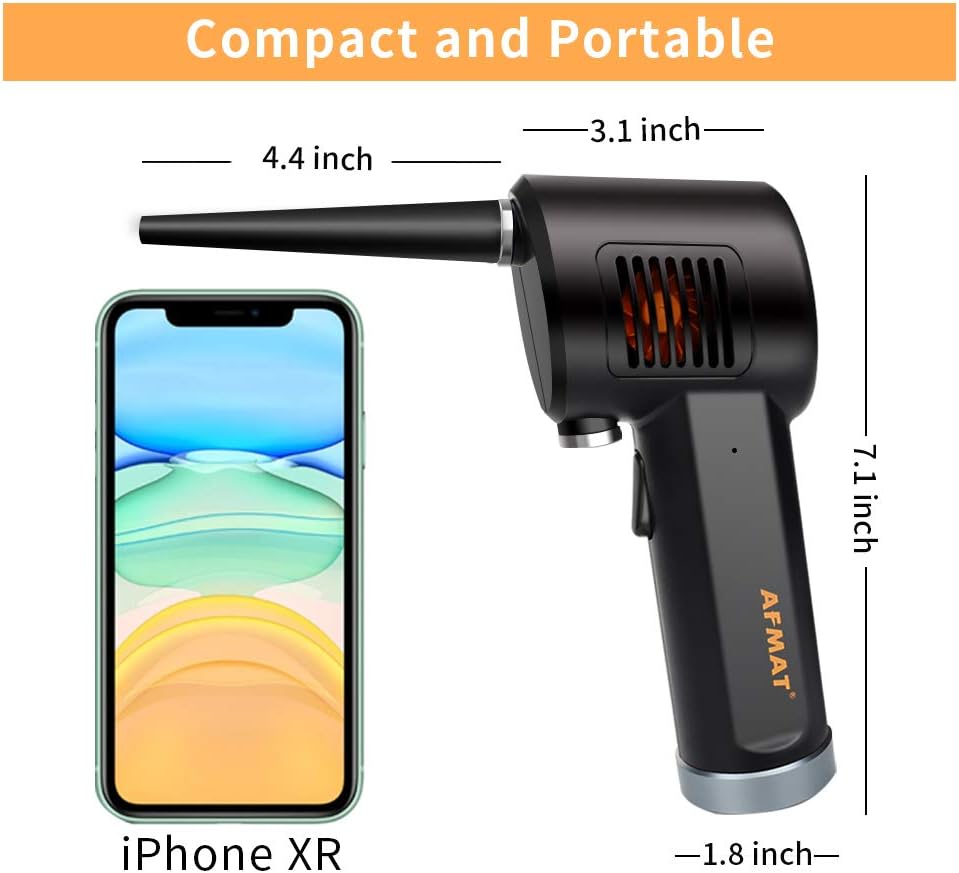
Image: The compact size of the AFMAT Cordless Air Duster shown next to an iPhone XR, highlighting its portability.
3. Setup and Assembly
- Charging the Device:
Before first use, fully charge the air duster. Connect the provided USB-C charging cable to the device's USB-C port and plug the other end into a compatible USB power adapter (not included), power bank, or car charger. The LED indicator lights will show charging status. A full charge takes approximately 3 hours.

Image: The AFMAT Cordless Air Duster connected to a USB-C charging cable, illustrating the charging process.
- Attaching the Nozzle:
Select the appropriate nozzle for your cleaning task. Align the nozzle with the air outlet on the duster unit and gently push until it clicks into place. Ensure it is securely attached before operation.
4. Operating Instructions
- Power On/Off:
To power on the device, press and hold the power button for 2 seconds. The LED indicator lights will illuminate. To power off, press and hold the power button again for 2 seconds.
- Adjusting Airflow Speed:
The air duster features multiple speed settings. While the device is on, short-press the power button to cycle through the available speeds. The LED indicators will change to reflect the selected speed.
- Using the Duster:
Point the nozzle towards the area you wish to clean. You can operate the duster in two ways:
- Continuous Blow: Press and hold the trigger button for continuous airflow.
- Sustained Airflow: Double-press the trigger button to activate sustained airflow without needing to hold the button. Press again to stop.

Image: The AFMAT Cordless Air Duster being used in different settings, including cleaning a window, a pencil sharpener, a car interior, and a sofa.
Video: Official AFMAT video demonstrating the features and usage of the Cordless Air Duster.
5. Maintenance and Cleaning
To ensure optimal performance and longevity of your AFMAT Cordless Air Duster, regular maintenance is recommended.
- Cleaning the Nozzle: Detach the nozzle and clean any accumulated dust or debris using a soft brush or cloth.
- Cleaning the Unit: Wipe the main unit with a dry, soft cloth. Do not use liquid cleaners or immerse the device in water.
- Storage: Store the air duster in a cool, dry place away from direct sunlight and extreme temperatures.
6. Troubleshooting
- Device not turning on: Ensure the battery is fully charged. If the issue persists, contact customer support.
- Weak airflow: Check if the nozzle is securely attached and free from obstructions. Ensure the battery is adequately charged.
- Device overheating: Discontinue use immediately and allow the device to cool down. Avoid blocking the air intake during operation.
7. Specifications
| Brand | AFMAT |
| Model Number | B07XJMR71R |
| Product Dimensions | 6.26 x 3.11 x 0.39 inches |
| Item Weight | 0.64 ounces |
| Battery Capacity | 6000mAh |
| Max RPM | 33000 RPM |
| Charging Time | Approx. 3 hours |
| Charging Port | USB-C |
8. Warranty and Support
For warranty information, technical support, or any inquiries regarding your AFMAT Cordless Air Duster, please refer to the contact details provided in the product packaging or visit the official AFMAT website.


