
FORGING MOUNT FM9388-B
FORGING MOUNT TV Mount User Manual
Model: FM9388-B
1. Product Overview
The FORGING MOUNT FM9388-B is a robust full motion TV wall mount designed to securely hold flat or curved televisions ranging from 37 to 80 inches. It supports VESA patterns up to 600x400mm and can bear a maximum weight of 110 lbs. Its articulating arm allows for extensive movement, providing optimal viewing angles from various positions within a room.

Image: All components of the FORGING MOUNT TV Wall Mount.

Image: The FORGING MOUNT TV Wall Mount installed in a living room, demonstrating its full motion capability for 37" to 80" screens.
2. Safety Information
Please read all instructions carefully before installation. If you have any questions, contact customer support. Improper installation may result in serious injury or damage.
- Do not exceed the maximum weight capacity of 110 lbs (50 kg).
- Ensure the wall structure can safely support the combined weight of the mount and the television.
- This mount is designed for installation on 16-inch wood stud walls and solid concrete walls. Do not install on drywall alone.
- Use appropriate safety gear during installation, including eye protection.
- Keep children and pets away from the work area during installation.
3. Package Contents
Verify that all components are present and undamaged before beginning installation.
- Arm Assembly (Wall Plate and Articulating Arm)
- TV Plate/Brackets
- Drill-hole Template
- TV Standard Mounting Hardware (various screws, washers, spacers)
- 3-Axis Bubble Level
- Cable Ties (5 pieces)

Image: Unique spacer design for simplified TV attachment.

Image: Included mounting hardware: screws, washers, and spacers.
4. Specifications
| Feature | Specification |
|---|---|
| Model Number | FM9388-B |
| Compatible TV Sizes | 37 - 80 inches |
| Weight Capacity | Up to 110 lbs (50 kg) |
| VESA Compatibility | 100x100mm to 600x400mm |
| Extension from Wall | 3 to 43 inches |
| Tilt Angle | +5° / -10° |
| Swivel Angle | Up to 180° (depending on TV size) |
| Level Adjustment | ±3° |
| Material | Heavy-duty Carbon Steel, Aluminum |
| Product Dimensions | 42 x 24 x 16 inches (fully extended) |
| Item Weight | 20 pounds |

Image: The mount's robust construction supports up to 110 lbs.

Image: Visual representation of the 110 lbs load capacity.
5. Setup and Installation
5.1. Pre-Installation Checklist
Before starting, ensure your TV and wall are compatible with the mount.
- Check TV Specifications: Verify your TV screen size is between 37 and 80 inches and its weight does not exceed 110 lbs.
- Check TV VESA Pattern: Locate the four mounting holes on the back of your TV and measure the horizontal and vertical distances. Ensure it falls within the 100x100mm to 600x400mm VESA range.
- Check Wall Type: This mount is suitable for 16-inch wood stud walls and solid concrete/brick walls. Do not install on drywall alone.
- Check for Potential Blockage: Ensure the mounting location on the wall and the back of your TV do not have any outlets or ports that would be blocked by the mount.

Image: Compatibility with various wall types and VESA patterns.

Image: Comprehensive compatibility checklist for the TV mount.
5.2. Installation Steps
Follow these steps for a secure installation:
- Locate Studs and Mark Drilling Holes: Use a stud finder to locate the center of your wood studs. Use the provided drill-hole template to mark the precise drilling locations on the wall. For concrete walls, use a masonry drill bit.
- Mount Wall Plate: Securely attach the wall plate to the marked locations using the appropriate lag bolts and washers. Ensure the wall plate is level using the included bubble level.
- Attach Brackets to TV: Attach the TV brackets to the back of your television using the correct screws, washers, and spacers from the hardware kit. Ensure the brackets are centered and securely fastened.
- Hang TV: Carefully lift the television and hook the TV brackets onto the wall plate. Ensure the TV is securely seated on the mount.
- Secure TV to Mount: Use the security screws or locking mechanisms on the TV brackets to firmly secure the TV to the wall plate, preventing accidental dislodgement.

Image: Simplified installation process with a handy template.
Video: This video demonstrates the articulation and extension capabilities of the TV mount, showing how it moves away from and back to the wall.
Video: A detailed demonstration of the 42-inch long arm TV wall mount's full range of motion, including extension, swivel, and tilt.
6. Operating Instructions
The FORGING MOUNT TV mount offers full adjustment capabilities for optimal viewing.
- Extension and Retraction: Gently pull or push the TV to extend it up to 43 inches from the wall or retract it to a minimum of 3 inches.
- Swivel: Pivot the TV left or right up to 180 degrees to achieve the desired viewing angle from different locations in the room.
- Tilt: Adjust the vertical tilt from +5 degrees (upward) to -10 degrees (downward) to reduce glare or optimize viewing height.
- Leveling: After installation, fine-tune the horizontal level of the TV by rotating it up to ±3 degrees to ensure a perfectly straight display.
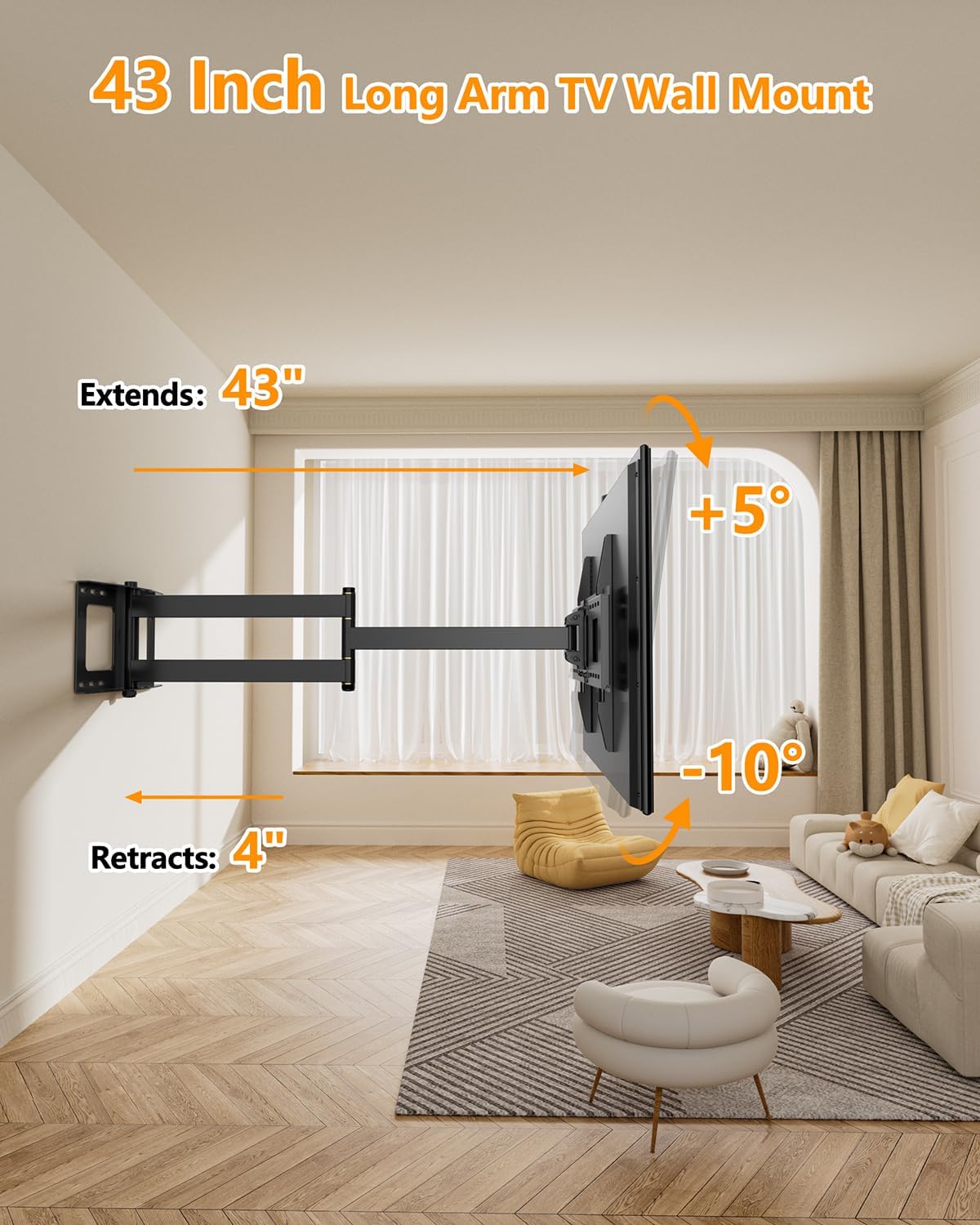
Image: Demonstrates the extension, retraction, and tilt capabilities.

Image: The mount allows bringing the TV closer for an enhanced viewing experience.
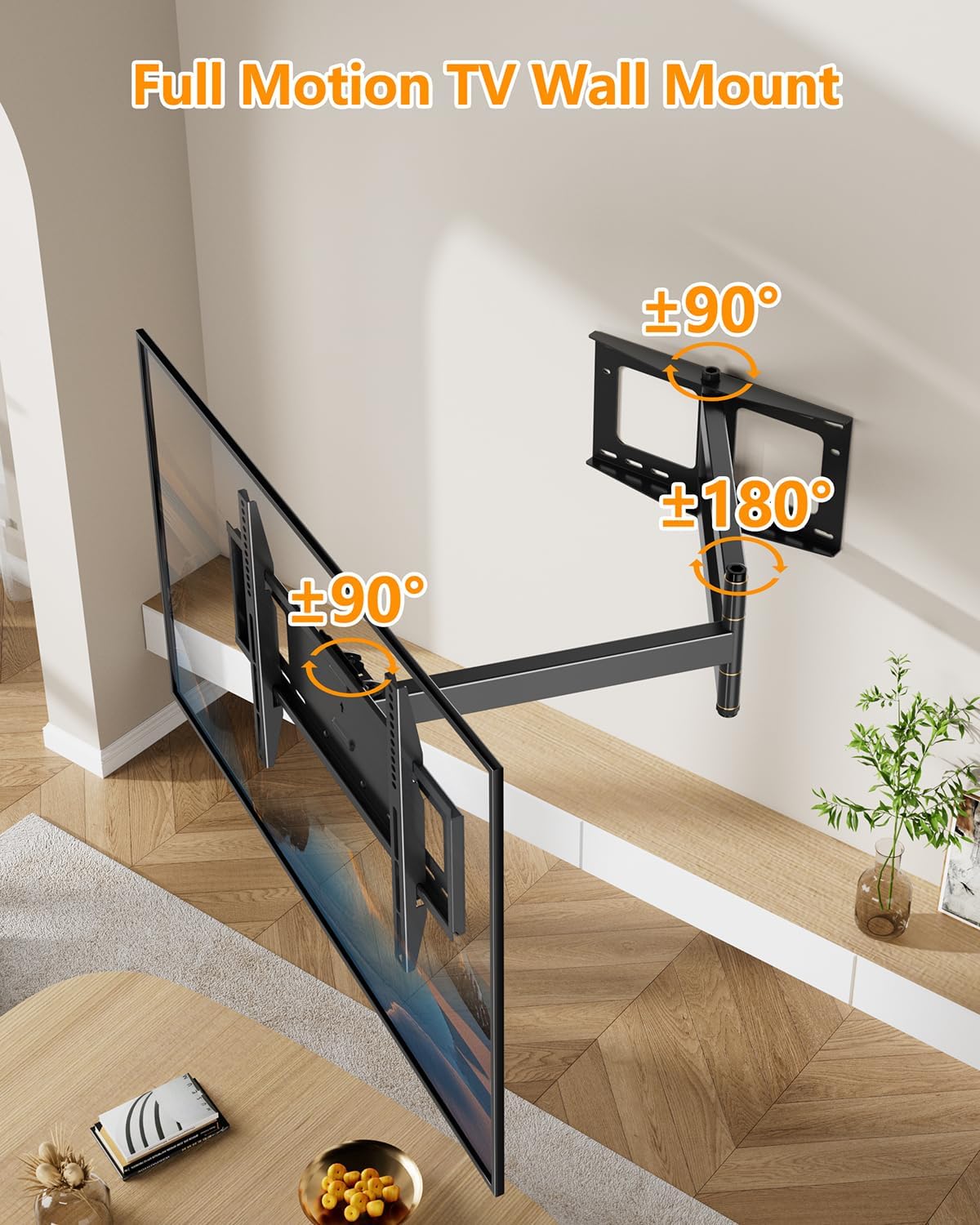
Image: Full motion swivel capabilities of the TV mount.

Image: Adjusting the TV to the best viewing angle with 180-degree swivel.
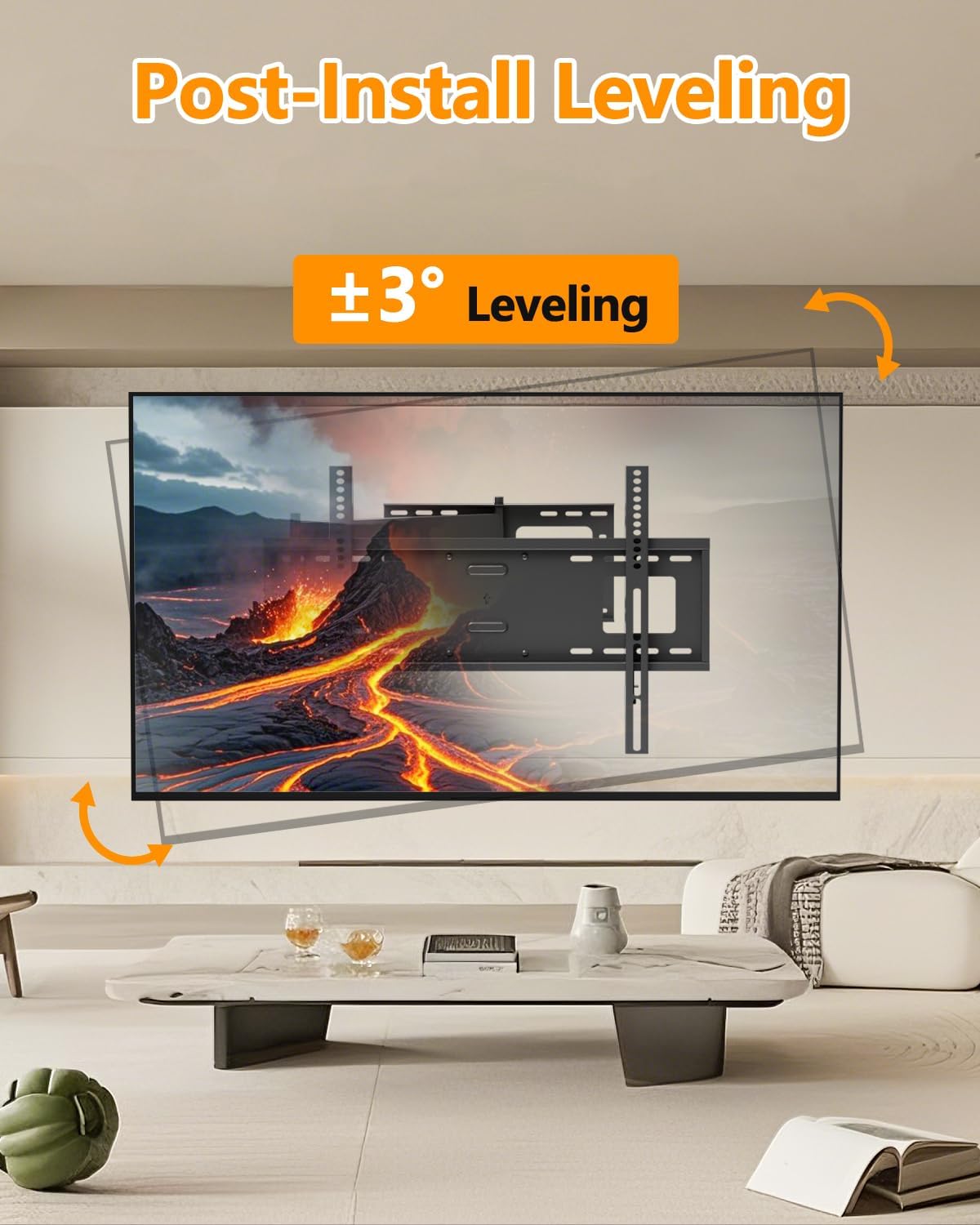
Image: Post-installation leveling adjustment of ±3 degrees.

Image: Achieving perfect TV leveling with ±3 degrees adjustment.
Video: This video showcases the full motion capabilities of the TV wall mount, including its ability to extend, swivel, and tilt for various viewing angles.
Video: A demonstration of the FORGING MOUNT long extension TV mount's full motion features, highlighting its smooth movement and adjustability.
7. Maintenance
Regular maintenance ensures the longevity and smooth operation of your TV mount.
- Cleaning: Wipe the mount with a soft, dry cloth to remove dust. For stubborn marks, use a slightly damp cloth and mild detergent, then dry thoroughly. Avoid abrasive cleaners.
- Joint Lubrication: Periodically check the articulating joints. If movement becomes stiff, apply a small amount of silicone-based lubricant to the moving parts.
- Fastener Check: Every 6-12 months, re-tighten all mounting screws and bolts to ensure they remain secure. Do not overtighten.
- Cable Management: Ensure cables are neatly managed and not pinched or strained by the mount's movement. Use the provided cable ties.
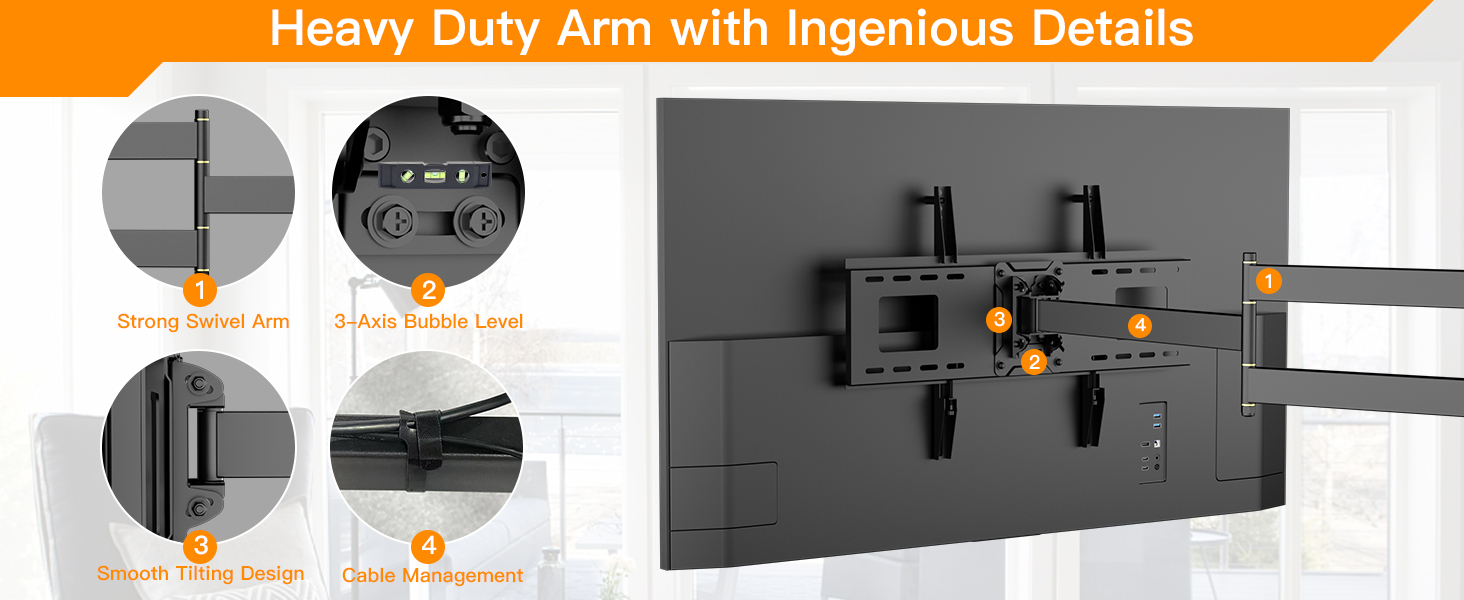
Image: Key features for durability and ease of use, including cable management.
8. Troubleshooting
If you encounter issues with your FORGING MOUNT TV mount, refer to the following common problems and solutions:
- TV is not level: Use the ±3° level adjustment feature on the mount to fine-tune the horizontal position of the TV. Ensure the wall plate was installed level initially.
- Mount feels stiff or difficult to move: Apply a small amount of silicone-based lubricant to the articulating joints. Ensure no cables are obstructing movement.
- TV wobbles or feels unstable: Re-check all mounting screws and bolts on both the wall plate and the TV brackets to ensure they are securely tightened. Verify that the wall structure is sound and capable of supporting the weight. Ensure the TV's weight does not exceed 110 lbs.
- Mount does not extend/retract fully: Check for any obstructions behind the TV or along the arm's path. Ensure cables are not tangled or restricting movement.
- TV does not fit the mount: Double-check your TV's VESA pattern and weight against the specifications in Section 4. If they do not match, the mount is not compatible with your TV.
9. Warranty and Support
FORGING MOUNT products are manufactured with quality and durability in mind. For specific warranty details, please refer to the documentation included with your purchase or visit the official FORGING MOUNT website.
If you require technical assistance, have questions about installation, or need to report a missing/damaged part, please contact FORGING MOUNT customer support. Contact information can typically be found on the product packaging or the brand's official website.
You can also find additional resources and support by visiting the FORGING MOUNT Store on Amazon.
Related documentsFM9388-B


Ask a question about this manual
Ask about setup, troubleshooting, compatibility, parts, safety, or missing instructions. Manuals+ will review the question and use this page’s manual context to help answer it.