
1. Introduction
The SOMMER Pearl Twin S10019-00001 is a high-quality 2-command remote control transmitter designed for use with SOMMER garage door operators. It features an interference-resistant radio signal and robust 128-bit encryption for secure and reliable operation. This manual provides essential information for the proper setup, operation, and maintenance of your remote control.
2. Product Overview
The Pearl Twin remote control features two buttons for operating your garage door or other compatible SOMMER devices. Its compact design ensures ease of use and portability.

Image 1: SOMMER Pearl Twin S10019-00001 remote control in its retail packaging, showing the front of the device with two grey buttons and the SOMMER logo.
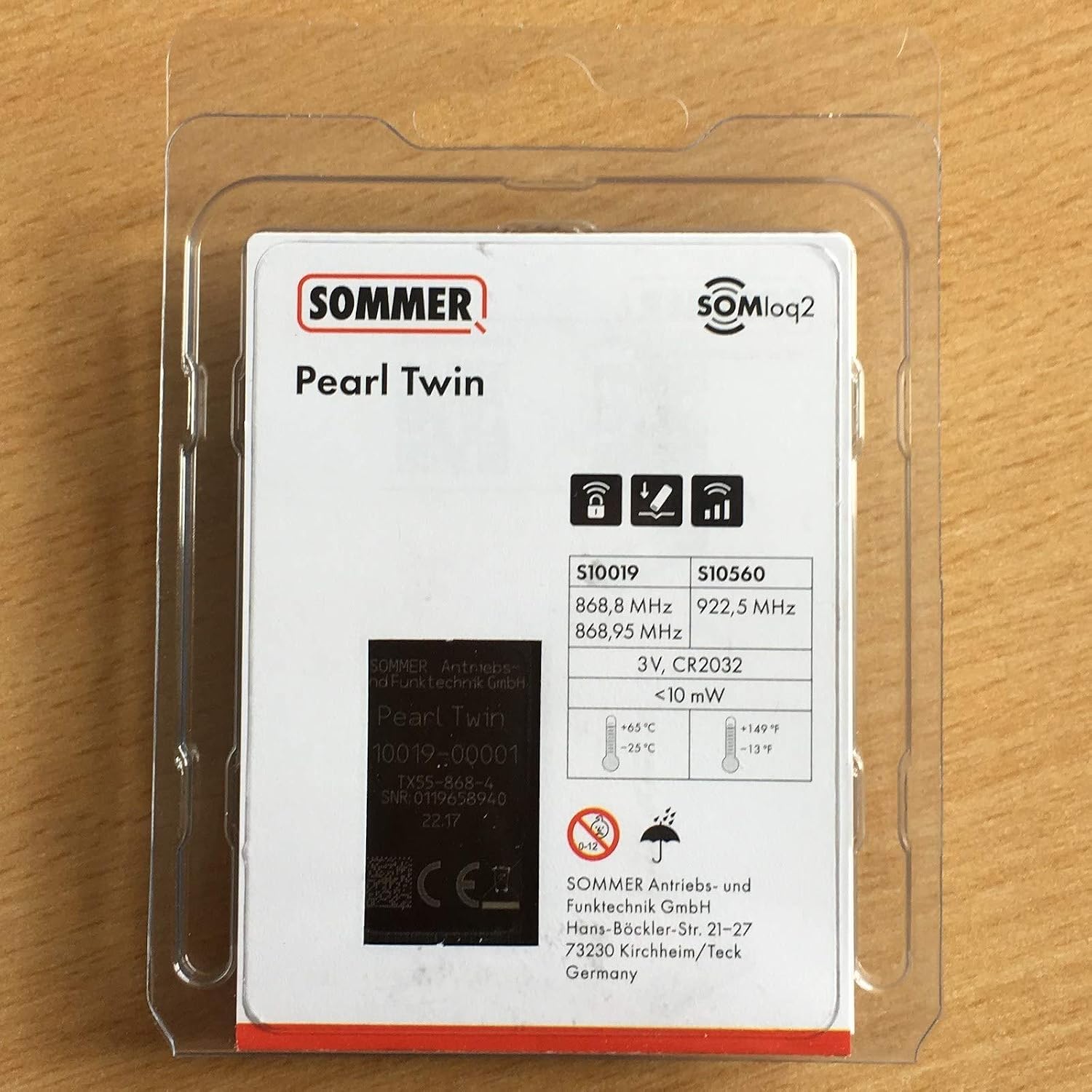
Image 2: Back of the SOMMER Pearl Twin S10019-00001 packaging, displaying technical details such as model number (S10019), frequencies (868.8 MHz, 868.95 MHz), battery type (3V, CR2032), and manufacturer information.
3. Setup and Programming
To use your SOMMER Pearl Twin remote control, it must first be programmed to your SOMMER garage door operator. The programming process is straightforward:
- Locate the Programming Button: On your SOMMER garage door operator's control unit, find the programming button. This button is often labeled "Radio" or may be a distinct color, such as blue. Refer to your garage door operator's manual for its exact location.
- Activate Programming Mode: Press and release the programming button on the operator. The indicator light on the operator will typically illuminate or flash, indicating it is in programming mode.
- Program the Remote: Within a few seconds of activating programming mode on the operator, press and hold the desired button on your Pearl Twin remote control that you wish to program.
- Confirm Pairing: Release the button on the remote control once the operator's indicator light confirms successful pairing. This confirmation may be indicated by the light flashing rapidly, changing color, or turning off.
- Test Operation: Test the remote control to ensure it operates the garage door correctly. If not, repeat the programming steps.
4. Operating Instructions
Once programmed, operating your SOMMER Pearl Twin remote control is simple:
- Open/Close Door: Press the programmed button on the remote control to open or close your garage door.
- Stop Operation: Pressing the button again during the door's movement will stop the door at its current position.
5. Maintenance
The SOMMER Pearl Twin remote control requires minimal maintenance, primarily battery replacement.
Battery Replacement
The remote control is powered by a CR2032 3V lithium coin cell battery. When the remote's range decreases or it stops responding, it is likely time to replace the battery.
- Open Battery Compartment: Locate the battery compartment on the back of the remote control. Use a small screwdriver or a coin to carefully open the compartment cover.
- Remove Old Battery: Remove the old CR2032 battery from its holder.
- Insert New Battery: Insert a new CR2032 3V lithium coin cell battery, ensuring that the positive (+) side faces upwards, as indicated in the compartment.
- Close Compartment: Securely close the battery compartment cover.
Disposal: Dispose of old batteries according to local regulations. Do not dispose of batteries in household waste.
6. Troubleshooting
If you encounter issues with your SOMMER Pearl Twin remote control, refer to the following troubleshooting tips:
- Remote Not Responding:
- Check the battery. Replace it if it is low or depleted (refer to Section 5).
- Ensure the remote is within range of the garage door operator.
- Re-program the remote control to the garage door operator (refer to Section 3).
- Limited Range:
- Replace the battery.
- Ensure there are no significant obstructions (e.g., metal objects, thick walls) between the remote and the operator.
- Check for sources of radio interference in the vicinity (e.g., other wireless devices).
- Door Opens/Closes Unintentionally:
- Ensure the remote control buttons are not being accidentally pressed (e.g., in a pocket or bag).
- If the issue persists, re-program the remote control.
If these steps do not resolve the issue, contact customer support or a qualified technician.
7. Specifications
| Feature | Specification |
|---|---|
| Model Number | S10019-00001 (RPT404) |
| Manufacturer | SOMMER |
| Frequency | 868.8 MHz, 868.95 MHz |
| Encoding | 128-bit |
| Range | Approx. 50 - 140 m (depending on external conditions) |
| Battery Type | 1 x CR2032 3V Lithium Coin Cell (included) |
| Dimensions (L x W x H) | 79 x 26 x 13 mm |
| Weight | 30 g |
8. Warranty Information
Specific warranty terms for the SOMMER Pearl Twin S10019-00001 remote control may vary. Please retain your proof of purchase and refer to the warranty documentation provided by your retailer or contact SOMMER directly for detailed warranty information.
9. Support
For further assistance, technical support, or inquiries regarding your SOMMER Pearl Twin S10019-00001 remote control, please contact:
- Your authorized SOMMER retailer.
- The official SOMMER customer service (contact details typically available on the manufacturer's website).


