
Introduction
This user manual provides comprehensive instructions for the 3Plus Hybrid Cruz and Callie Charging Stand Dock Charger. It covers product components, setup, operation, maintenance, and troubleshooting to ensure optimal performance and longevity of your charging stand. This charger is specifically designed for 3Plus Cruz and 3Plus Callie smartwatches.
What's in the Box
Upon opening the package, verify that all the following components are present:
- 3Plus Hybrid Cruz and Callie Charging Stand
- USB Charging Cable

Image: The 3Plus Hybrid Cruz and Callie Charging Stand, a compact black dock with a circular magnetic charging surface and a small indicator light.
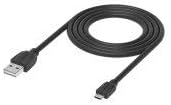
Image: A black USB charging cable, typically used to connect the charging stand to a power source.
Product Overview
The charging stand features a sleek, compact design with a dedicated magnetic charging area for your 3Plus smartwatch. It includes a small LED indicator light to show charging status.

Image: Technical drawing showing the dimensions of the charging stand: approximately 55mm in width and 41mm in height.
Setup
- Connect the USB Cable: Insert the smaller end of the USB charging cable into the port on the back of the charging stand.

Image: Illustration demonstrating how to insert the USB cable into the charging port located at the rear of the charging stand, with a 3Plus Cruz smartwatch already placed on the stand.
- Connect to Power: Plug the larger USB end of the cable into a compatible USB power adapter (not included) or a USB port on a computer. Ensure the power source provides a stable 240 Volts input.
Operating Instructions
- Place Your Smartwatch: Gently place your 3Plus Cruz or 3Plus Callie smartwatch onto the magnetic charging surface of the stand. The smartwatch will align itself correctly due to the magnetic connection.

Image: A black 3Plus Cruz smartwatch resting on the charging stand, indicating a successful connection for charging. A small red light is visible on the stand.

Image: A rose gold 3Plus Callie smartwatch resting on the charging stand, indicating a successful connection for charging. A small red light is visible on the stand.
- Charging Indicator: A small LED light on the front of the charging stand will illuminate to indicate that the smartwatch is charging. The color of the light may change (e.g., from red to blue/green) to signify charging status or completion, depending on the smartwatch's model.
- Charging Time: Charging time may vary depending on the smartwatch's battery level and the power source.
Maintenance
- Cleaning: Use a soft, dry cloth to wipe the charging stand. Do not use abrasive cleaners or solvents.
- Storage: Store the charging stand in a cool, dry place away from direct sunlight and extreme temperatures when not in use.
- Handling: Avoid dropping the charging stand or subjecting it to strong impacts, as this may damage internal components.
Troubleshooting
| Problem | Possible Cause | Solution |
|---|---|---|
| Smartwatch not charging. |
|
|
| Charging stand indicator light not on. |
|
|
Specifications
| Product Dimensions | 5.08 x 5.08 x 5.08 cm |
| Item Weight | 68 g |
| Connectivity Technology | USB |
| Connector Type | Proprietary |
| Compatible Devices | 3Plus Cruz, 3Plus Callie |
| Form Factor | Stand |
| Color | Black |
| Input Voltage | 240 Volts |
| Mounting Type | Tabletop Mount |
Warranty and Support
For information regarding warranty coverage and customer support, please refer to the official 3Plus website or contact their customer service directly. Keep your purchase receipt as proof of purchase for any warranty claims.
For further assistance, visit the 3Plus Official Website.